
Device profile · Specifications & compatibility
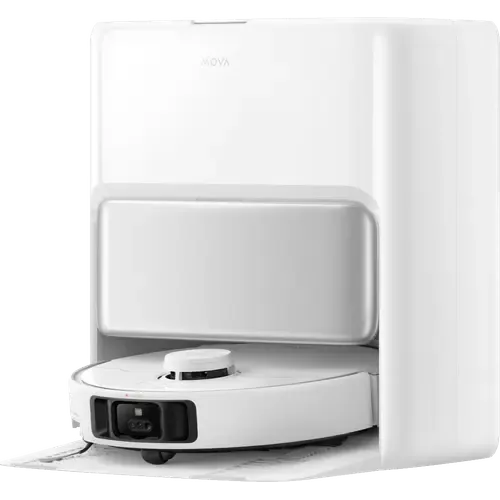
MOVA P50 Pro Ultra
MOVA · Robot Vacuums · Model RLP53HE
We may earn a commission from qualifying purchases through these links.
Prices and stock change often on Amazon, so we do not show them here. The button opens the current listing.
- MOVA P50 Pro Ultra lists Navigation Type: Laser (LiDAR); Self Emptying; Auto Mop Lifting.
- Match the navigation requirements to the layout, obstacles and setup conditions; the label alone does not measure navigation reliability.
Browse more from MOVA or explore all robot vacuums in our catalog.
- Recorded year
- 2025
- Recorded warranty
- 3 years
The details that shape your choice
MOVA P50 Pro Ultra Quick Features
Start with these specifications, then check the full details and conditions below.
Make the differences clear
Which device fits your setup?
Choose another model to compare features, connections and requirements side by side.
From specification to decision
MOVA P50 Pro Ultra: Capabilities And Limitations
Based on listed specifications, not hands-on testing. Manufacturer sources are linked where checked.
What it offers
Self-emptying is listed, offering a way to transfer collected dust into a dock between cleanups. Check whether the emptying dock is included and which bags or filters it needs. Dock collects dust for up to 75 days
View Self Emptying details →Automatic mop lifting is listed, a useful feature to investigate for mixed hard-floor and rug layouts. Check the lift height and rug restrictions; a lift mechanism alone does not confirm suitability for every carpet. Mop pads are removed automatically before entering carpet
View Auto Mop Lifting details →Obstacle detection is listed, providing an avoidance feature to check against the objects in your rooms. Check the minimum detectable object size and the manufacturer’s exclusions.
View Obstacle Detection details →
What to consider
Matter is listed as unsupported; check another documented integration if Matter is essential to your setup.
View Matter details →Apple Home support is listed as unavailable; do not assume the device appears directly in Apple Home. Siri voice control only, no HomeKit accessory support
View Apple Home details →
Still needs verification
Confirm these details if they matter to your setup.
Questions About MOVA P50 Pro Ultra
Does MOVA P50 Pro Ultra empty its own dustbin?
Yes, according to the listed specifications. Check whether the emptying dock is included and which bags or filters it needs. Dock collects dust for up to 75 days
View Self Emptying specifications →Does MOVA P50 Pro Ultra lift its mop?
Yes, according to the listed specifications. Check the lift height and rug restrictions; a lift mechanism alone does not confirm suitability for every carpet. Mop pads are removed automatically before entering carpet
View Auto Mop Lifting specifications →What is the battery runtime of MOVA P50 Pro Ultra?
Battery Life: 210 minutes. Check the stated workload and conditions. A catalog runtime is not a prediction of runtime in your installation.
View Battery Life specifications →Explore the full picture
MOVA P50 Pro Ultra Specifications
Recorded catalog values. Expand notes for qualifications; unknown values are not treated as missing features.
0 of 37 fields matched to manufacturer documentation. Source checks apply only to the named model and stated scope. Other fields remain catalog data. How we verify specifications →
Features7 fields
| Onboard Dustbin Capacity | 300ml |
|---|---|
| Self Emptying | YesDetails & conditionsDock collects dust for up to 75 days |
| Dock Dustbin Capacity | 3.2L |
| Noise Level | Not recorded |
| Real Time Tracking | YesDetails & conditionsSynced video and two-way voice interaction through the app |
| Scheduling | Yes |
| Child Lock | YesDetails & conditionsToggled on the robot or in the MOVAhome app |
Mopping7 fields
| Mopping | YesDetails & conditionsDual rotary mops with 32 adjustable water levels and an extendable pad |
|---|---|
| Water Tank Capacity | 4LDetails & conditions4 L clean and 3.5 L waste tanks in the base station |
| Detergent Compatibility | Yes |
| Auto Detergent Dispenser | Yes |
| Auto Mop Washing | YesDetails & conditions75 °C (167 °F) hot water washing of mop pads and washboard |
| Auto Mop Drying | YesDetails & conditions45 °C (113 °F) hot air drying |
| Auto Mop Lifting | YesDetails & conditionsMop pads are removed automatically before entering carpet |
Connectivity6 fields
| 2.4 GHz Wi-Fi | Yes |
|---|---|
| 5 GHz Wi-Fi | No |
| Bluetooth | No |
| Z Wave | No |
| Zigbee | No |
| Thread | No |
Integrations6 fields
| Google Home | Yes |
|---|---|
| Alexa | Yes |
| Apple Home | NoDetails & conditionsSiri voice control only, no HomeKit accessory support |
| SmartThings | No |
| Home Assistant | YesDetails & conditionsSupported by the community Dreame integration as mova.vacuum.r2475a |
| Matter | No |
Power3 fields
| Battery Life | 210 minutes |
|---|---|
| Charging Time | 3.5 hours |
| Auto Recharge | Yes |
Suction Performance3 fields
| Suction Power | 19000Pa |
|---|---|
| Carpet Cleaning | YesDetails & conditionsMop is removed automatically and the brush lifts 10 mm to keep carpets dry |
| Side Brushes | YesDetails & conditionsExtendable side brush for corners and edges |
How this device compares
MOVA P50 Pro Ultra vs Other Similar Models
Statistical context from 159 robot vacuums in this catalog. These figures describe our recorded data, not independent measurements.
Recorded feature coverage
Auto Mop Drying: 116 of 156 known answers are Yes
Mopping: 74% among explicit Yes/No answers; 3 of 159 devices have no resolved answer. Check the specifications for this model’s conditions.
Recorded feature coverage
Auto Mop Washing: 116 of 156 known answers are Yes
Mopping: 74% among explicit Yes/No answers; 3 of 159 devices have no resolved answer. Check the specifications for this model’s conditions.
Recorded feature coverage
Auto Mop Lifting: 118 of 155 known answers are Yes
Mopping: 76% among explicit Yes/No answers; 4 of 159 devices have no resolved answer. Check the specifications for this model’s conditions.
Brand representation in this directory
7 of 159 models are from MOVA
Counts robot vacuums listed here, not sales or market share. Catalog inclusion does not imply a recommendation.
Side-by-side specification comparison
Compare MOVA P50 Pro Ultra vs Similar Robot Vacuums
See how MOVA P50 Pro Ultra stacks up against other robot vacuums in this catalog. Compare specifications, compatibility and pricing.
Catalog specifications have not all been independently checked against manufacturer sources. Read our data and evidence methodology.