
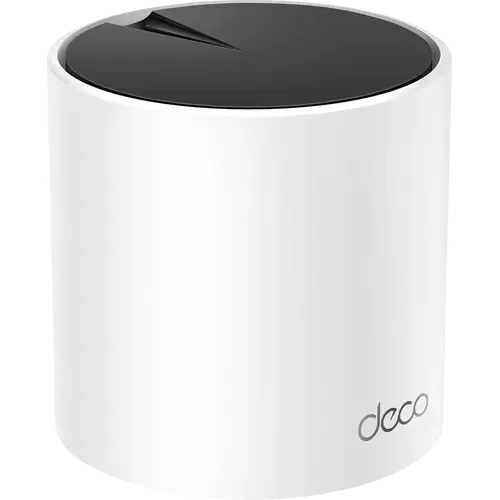
Device profile · Specifications & compatibility
TP-Link Deco X55
TP-Link · Routers · Model Deco X55
Other Amazon stores
We may earn a commission from qualifying purchases through these links.
Prices and stock change often on Amazon, so we do not show them here. The button opens the current listing.
- TP-Link Deco X55 lists 10 Gbps WAN-capable ports: 0; 2.5 Gbps WAN-capable ports: 0.
- Verify whether a port changes between WAN and LAN roles; do not add overlapping role counts as separate physical sockets.
Browse more from TP-Link or explore all routers in our catalog.
- Recorded year
- 2022
- Recorded warranty
- 2 years
- Dimensions
- 110 x 110 x 114 mm
- Weight
- ?
The details that shape your choice
TP-Link Deco X55 Quick Features
Start with these specifications, then check the full details and conditions below.
Make the differences clear
Which device fits your setup?
Choose another model to compare features, connections and requirements side by side.
From specification to decision
TP-Link Deco X55: Capabilities And Limitations
Based on listed specifications, not hands-on testing. Manufacturer sources are linked where checked.
What it offers
Check the full specifications against the features you need. There is not enough confirmed information here to highlight a capability.
What to consider
Wi-Fi 7 is listed as unsupported; compare the Wi-Fi standards the device does support.
View Wi-Fi 7 details →Thread border-router functionality is listed as unavailable; a Thread setup may need a separate border router.
View Thread border router details →
Questions About TP-Link Deco X55
Does TP-Link Deco X55 support Wi-Fi 7?
No, according to the listed specifications. Check supported bands and client capabilities. Wi-Fi 7 alone does not imply a 6 GHz radio.
View Wi-Fi 7 specifications →How many 10 Gbps WAN-capable ports does TP-Link Deco X55 have?
10 Gbps WAN-capable ports: 0. Verify whether a port changes between WAN and LAN roles; do not add overlapping role counts as separate physical sockets.
View 10 Gbps WAN-capable ports specifications →How many 2.5 Gbps WAN-capable ports does TP-Link Deco X55 have?
2.5 Gbps WAN-capable ports: 0. Check the assigned port role, service speed and shared-port restrictions.
View 2.5 Gbps WAN-capable ports specifications →Does TP-Link Deco X55 act as a Thread border router?
No, according to the listed specifications. A border router connects Thread to other IP networks. Check Matter-controller functions separately.
View Thread border router specifications →Explore the full picture
TP-Link Deco X55 Specifications
Recorded catalog values. Expand notes for qualifications; unknown values are not treated as missing features.
0 of 75 fields matched to manufacturer documentation. Source checks apply only to the named model and stated scope. Other fields remain catalog data. How we verify specifications →
Wifi Generation4 fields
| Wi-Fi 5 | Yes |
|---|---|
| Wi-Fi 6 | Yes |
| Wi-Fi 6E | No |
| Wi-Fi 7 | No |
Network Ports14 fields
| Total Ports | 3 |
|---|---|
| Wan Port Count | 3 |
| Wan 1 Gbps Ports | 3 |
| 2.5 Gbps WAN-capable ports | 0 |
| 10 Gbps WAN-capable ports | 0 |
| Wan Sfp Ports | 0 |
| Wan Sfp Plus Ports | 0 |
| Lan Port Count | 3 |
| Lan 1 Gbps Ports | 3 |
| 2.5 Gbps LAN ports | 0 |
| 10 Gbps LAN-capable ports | 0 |
| Lan Sfp Ports | 0 |
| Lan Sfp Plus Ports | 0 |
| Lan Link Aggregation | No |
Features7 fields
| Max Connected Devices | 150 |
|---|---|
| Speed Tests | YesDetails & conditionsTP-Link documents the Deco app's built-in internet speed test, powered by Speedtest by Ookla. |
| Mlo | No |
| Qos | Yes |
| Firewall | Yes |
| New Connection Notifications | Not recorded |
| Configuration Backup Restore | YesDetails & conditionsThe Deco X55 firmware 1.8.0 release notes introduce configuration backup and one-click device migration. |
Cellular Connectivity7 fields
| Cellular Technology | Not applicable / unspecified |
|---|---|
| Max Download Speed | Not applicable / unspecified |
| Max Upload Speed | Not applicable / unspecified |
| Sim Card Support | Not applicable / unspecified |
| External Lte Antennas | Not applicable / unspecified |
| Antennas Gain | Not applicable / unspecified |
| Sms Send Receive | No |
Management5 fields
| Web Interface | Yes |
|---|---|
| Android App | Yes |
| Ios App | Yes |
| Cli | No |
| Snmp | No |
Parental Controls3 fields
| Wifi Pause Schedules | Yes |
|---|---|
| Instant Wifi Pause | Yes |
| Block Content | Yes |
Power1 fields
| Consumption | Not recorded |
|---|
Smart Home Protocols2 fields
| Thread border router | No |
|---|---|
| Matter Controller | No |
Usb Ports2 fields
| Usb 2 | 0 |
|---|---|
| Usb 3 | 0 |
Usb Storage4 fields
| Ftp | No |
|---|---|
| Samba | No |
| Time Machine | No |
| Media Sharing | No |
Vpn7 fields
| Vpn Client | Yes |
|---|---|
| Vpn Server | Yes |
| Open Vpn | Yes |
| Pptp Vpn | Yes |
| L2tp Ipsec Vpn | Yes |
| Wireguard Vpn | No |
| Ddns | Yes |
Wan Redundancy3 fields
| Multi Wan | No |
|---|---|
| Wan Failover | No |
| Cellular Backup | No |
Wifi Antennas3 fields
| Internal Antennas | 2 |
|---|---|
| External Antennas | 0 |
| Antennas Gain | Not recorded |
Wifi Bands6 fields
| 2.4 GHz bands | 1 |
|---|---|
| 2 4 Ghz Speed | 574 Mbps |
| 5 GHz bands | 1 |
| 5 Ghz Speed | 2402 Mbps |
| 6 GHz bands | 0 |
| 6 Ghz Speed | Not applicable / unspecified |
Wifi Features7 fields
| Max Wifi Speed | 3 Gbps |
|---|---|
| Guest Network | Yes |
| Iot Network | Yes |
| Mesh Wifi | Yes |
| Mesh Standard | Proprietary |
| Wpa3 Encryption | Yes |
| Access Point Mode | Yes |
How this device compares
TP-Link Deco X55 vs Other Similar Models
Statistical context from 43 routers in this catalog. These figures describe our recorded data, not independent measurements.
Recorded feature coverage
Speed Tests: 17 of 41 known answers are Yes
Features: 41% among explicit Yes/No answers; 2 of 43 devices have no resolved answer. Check the specifications for this model’s conditions.
Recorded feature coverage
Pptp Vpn: 33 of 42 known answers are Yes
Vpn: 79% among explicit Yes/No answers; 1 of 43 devices have no resolved answer. Check the specifications for this model’s conditions.
Recorded feature coverage
L2tp Ipsec Vpn: 36 of 42 known answers are Yes
Vpn: 86% among explicit Yes/No answers; 1 of 43 devices have no resolved answer. Check the specifications for this model’s conditions.
Brand representation in this directory
16 of 43 models are from TP-Link
Counts routers listed here, not sales or market share. Catalog inclusion does not imply a recommendation.
Side-by-side specification comparison
Compare TP-Link Deco X55 vs Similar Routers
See how TP-Link Deco X55 stacks up against other routers in this catalog. Compare specifications, compatibility and pricing.
Catalog specifications have not all been independently checked against manufacturer sources. Read our data and evidence methodology.