
Device profile · Specifications & compatibility
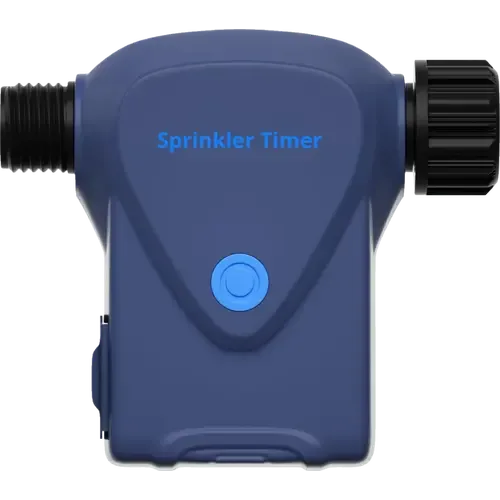
YoLink Smart Sprinkler Timer
YoLink · Water Timers · Model YS4103-UC
Other Amazon stores
We may earn a commission from qualifying purchases through these links.
Prices and stock change often on Amazon, so we do not show them here. The button opens the current listing.
- YoLink Smart Sprinkler Timer lists Outlets: 1; Schedule Mode; Water Consumption Monitoring.
- Check whether each outlet has independent scheduling and the required pressure range.
Browse more from YoLink or explore all water timers in our catalog.
- Recorded year
- 2025
- Recorded warranty
- 2 years
- Dimensions
- 136 x 52.5 x 127 mm
- Weight
- ?
The details that shape your choice
YoLink Smart Sprinkler Timer Quick Features
Start with these specifications, then check the full details and conditions below.
Make the differences clear
Which device fits your setup?
Choose another model to compare features, connections and requirements side by side.
From specification to decision
YoLink Smart Sprinkler Timer: Capabilities And Limitations
Based on listed specifications, not hands-on testing. Manufacturer sources are linked where checked.
What it offers
Water-consumption monitoring is listed as an additional usage feature. Check the measurement method, units and history available. The integrated flow meter measures real-time water flow and total usage, which is what makes gallon-based watering and the usage logs possible.
View Water Consumption Monitoring details →A Home Assistant integration is listed, providing an integration path to verify for the exact model. Check the exact integration and firmware. A catalog integration label does not establish local control, official support or available entities. The official Home Assistant YoLink integration lists this exact model in its supported devices: YS4103-UC (Sprinkler Timer).
View Home Assistant details →
What to consider
No specific limitation is established here. Check installation requirements and compatibility before choosing.
Still needs verification
Confirm these details if they matter to your setup.
Questions About YoLink Smart Sprinkler Timer
How many water outlets does YoLink Smart Sprinkler Timer have?
Outlets: 1. Check whether each outlet has independent scheduling and the required pressure range.
View Outlets specifications →What is the scheduling mode of YoLink Smart Sprinkler Timer?
Schedule Mode: Yes. Verify available intervals, zone control and behavior when connectivity is unavailable. Up to 12 schedules at a time, with start and end dates, repeat days (daily, weekly, odd/even or custom cycles) and start times. Schedules run on the device itself, so no internet connection is required.
View Schedule Mode specifications →Does YoLink Smart Sprinkler Timer monitor water consumption?
Yes, according to the listed specifications. Check the measurement method, units and history available. The integrated flow meter measures real-time water flow and total usage, which is what makes gallon-based watering and the usage logs possible.
View Water Consumption Monitoring specifications →Does YoLink Smart Sprinkler Timer work with Home Assistant?
Yes, according to the listed specifications. Check the exact integration and firmware. A catalog integration label does not establish local control, official support or available entities. The official Home Assistant YoLink integration lists this exact model in its supported devices: YS4103-UC (Sprinkler Timer).
View Home Assistant specifications →Does YoLink Smart Sprinkler Timer connect to 2.4 GHz Wi-Fi?
No, according to the listed specifications. Check the network security mode and setup requirements before connecting the device. The user guide states the timer connects to the internet through a YoLink hub and does not connect directly to WiFi or the local network. The radio is LoRa, rated up to 1/4 mile in open air.
View 2.4 GHz Wi-Fi specifications →Explore the full picture
YoLink Smart Sprinkler Timer Specifications
Recorded catalog values. Expand notes for qualifications; unknown values are not treated as missing features.
0 of 23 fields matched to manufacturer documentation. Source checks apply only to the named model and stated scope. Other fields remain catalog data. How we verify specifications →
Features5 fields
| Outlets | 1 |
|---|---|
| Child Lock | No |
| Water Consumption Monitoring | YesDetails & conditionsThe integrated flow meter measures real-time water flow and total usage, which is what makes gallon-based watering and the usage logs possible. |
| Automations | YesDetails & conditionsThe timer can be used as an action in a YoLink automation (for example, start watering when a soil moisture sensor reads low), and Control-D2D pairs it directly to another YoLink device so it keeps working without internet or cloud. |
| History Records | YesDetails & conditionsThe app keeps 180 days of watering logs, showing when watering started, how long it ran and how much water was used, plus a watering calendar view. |
Irrigation Plans3 fields
| Schedule Mode | YesDetails & conditionsUp to 12 schedules at a time, with start and end dates, repeat days (daily, weekly, odd/even or custom cycles) and start times. Schedules run on the device itself, so no internet connection is required. |
|---|---|
| Capacity Mode | YesDetails & conditionsVolume Mode delivers a set amount of water instead of running for a set time, selectable per schedule alongside Duration Mode. |
| Irrigation Volume | YesDetails & conditionsEach schedule lets you pick the watering duration or the watering volume, and the built-in flow meter measures the water actually delivered. |
Alerts1 fields
| Abnormality Alerts | YesDetails & conditionsAlarm Strategy settings send app push, email and SMS notifications, and can trigger YoLink sirens, SpeakerHubs or a scene. The timer also reports low battery in the app and blinks its LED red when the batteries need replacing. |
|---|
Connectivity6 fields
| 2.4 GHz Wi-Fi | NoDetails & conditionsThe user guide states the timer connects to the internet through a YoLink hub and does not connect directly to WiFi or the local network. The radio is LoRa, rated up to 1/4 mile in open air. |
|---|---|
| 5 GHz Wi-Fi | No |
| Bluetooth | No |
| Z Wave | No |
| Zigbee | No |
| Thread | No |
Integrations6 fields
| Google Home | Not recorded |
|---|---|
| Alexa | NoDetails & conditionsAlexa supports neither the Matter Water Valve device type nor any irrigation category, so the valve has nothing to map to |
| Apple Home | Not recorded |
| SmartThings | Not recorded |
| Home Assistant | YesDetails & conditionsThe official Home Assistant YoLink integration lists this exact model in its supported devices: YS4103-UC (Sprinkler Timer). |
| Matter | Not recorded |
Power2 fields
| Battery Type | 4x AA |
|---|---|
| Battery Life | Not recorded |
How this device compares
YoLink Smart Sprinkler Timer vs Other Similar Models
Statistical context from 11 water timers in this catalog. These figures describe our recorded data, not independent measurements.
Recorded feature coverage
Capacity Mode: 4 of 11 known answers are Yes
Irrigation Plans: 36% among explicit Yes/No answers; 0 of 11 devices have no resolved answer. Check the specifications for this model’s conditions.
Recorded feature coverage
Irrigation Volume: 4 of 11 known answers are Yes
Irrigation Plans: 36% among explicit Yes/No answers; 0 of 11 devices have no resolved answer. Check the specifications for this model’s conditions.
Recorded feature coverage
Abnormality Alerts: 7 of 10 known answers are Yes
Alerts: 70% among explicit Yes/No answers; 1 of 11 devices have no resolved answer. Check the specifications for this model’s conditions.
Brand representation in this directory
1 of 11 models are from YoLink
Counts water timers listed here, not sales or market share. Catalog inclusion does not imply a recommendation.
Side-by-side specification comparison
Compare YoLink Smart Sprinkler Timer vs Similar Water Timers
See how YoLink Smart Sprinkler Timer stacks up against other water timers in this catalog. Compare specifications, compatibility and pricing.
Catalog specifications have not all been independently checked against manufacturer sources. Read our data and evidence methodology.