Option 1 · Kwikset
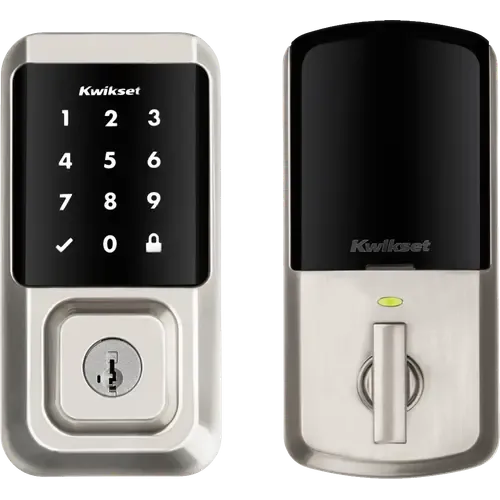
Kwikset Halo Touchscreen Wi-Fi Enabled Smart Lock
Last updated October 2026
View full device profile
The Smart Device Compare comparison
Understand the differences. Decide what matters to your home.
Build another comparison →Before you compare every specification
A summary of selected recorded differences between these door locks. Check the full specification table below for details and conditions.
These observations are derived from recorded catalog data and have not all been independently verified. Confirm details with the manufacturer before purchasing.
Compare capabilities, compatibility and setup requirements.
Option 1 · Kwikset
Last updated October 2026
View full device profile
What the catalog tells us
These counts describe the available data, not a quality score. More features do not automatically make a better device.
Your priorities, side by side
Mark the specifications you care about. Open manufacturer sources for verification scope; fields without citations remain catalog data. Expand notes for other qualifications.
Showing 45 of 45 rows. “Not recorded” does not mean “No”.
Push notifications for every lock and unlock event, with the full history in the app
Audible beeps and a flashing indicator at the lock, plus an app alert, at three battery levels
Code Alarm sounds after three consecutive incorrect codes are entered
Kwikset app notifications for unusual lock activity, including tampering
Auto-Lock relocks the deadbolt after a delay you set, following entry or exit
Built-in gyroscope detects the door closing and locks automatically
Geofencing unlocks the door automatically as you approach home
Kwikset requires a 2.4 GHz network with WPA2 encryption
Bluetooth pairing with a range of about 30 ft, used for setup and for syncing access codes
SecureScreen asks for two random digits before revealing the keypad, so fingerprints on the glass do not give the code away
One-time codes that can be used once within the next 24 hours
One-time guest codes
Codes limited by date range, or by weekday and time, with recurring schedules
Kwikset account linking in the Alexa app, no hub required
Absent from Apple's Works with Apple Home accessory finder, which lists the Kwikset Premis; Apple home keys arrived with the Halo Select Plus
Kwikset account linking in the Google Home app, no hub required
The Kwikset Smart Locks custom integration, installed through HACS, lists Halo (Wi-Fi) as a verified working model and talks to the Kwikset cloud API
Not in the CSA certified product database, which lists only Halo Select and Halo Select Plus for Kwikset
Kwikset's Smart Home Integration Guide documents adding Kwikset Halo Wi-Fi from Partner devices in the SmartThings app
Lock and unlock from the app with the phone within about 30 ft of the lock
Fingerprint reading is the Halo Touch model
Up to 250 access codes on a backlit touchscreen
Illuminated anti-peep keypad, up to 50 codes
Two SmartKey keys included, and the cylinder can be re-keyed in seconds
Mechanical key backup
Lock, unlock and manage access codes from anywhere with the Kwikset app
Built-in Wi-Fi, manage via the Wyze app
No emergency power terminal, the physical key is the backup when the batteries die
No door position sensor, the app reports the deadbolt state and not whether the door is open
Millimeter wave radar presence detection for battery saving
| Specification | Kwikset Halo Touchscreen Wi-Fi Enabled Smart Lock | Wyze Palm Lock |
|---|---|---|
| Alerts | ||
YesCatalog notePush notifications for every lock and unlock event, with the full history in the app | Yes | |
YesCatalog noteAudible beeps and a flashing indicator at the lock, plus an app alert, at three battery levels | Yes | |
YesCatalog noteCode Alarm sounds after three consecutive incorrect codes are entered | Not recorded | |
YesCatalog noteKwikset app notifications for unusual lock activity, including tampering | Not recorded | |
| Automatic Lock | ||
YesCatalog noteAuto-Lock relocks the deadbolt after a delay you set, following entry or exit | YesCatalog noteBuilt-in gyroscope detects the door closing and locks automatically | |
| No | No | |
YesCatalog noteGeofencing unlocks the door automatically as you approach home | Not recorded | |
| Connectivity | ||
| Yes | Yes | |
NoCatalog noteKwikset requires a 2.4 GHz network with WPA2 encryption | No | |
YesCatalog noteBluetooth pairing with a range of about 30 ft, used for setup and for syncing access codes | Not recorded | |
| No | No | |
| No | No | |
| No | No | |
| No | No | |
| Features | ||
YesCatalog noteSecureScreen asks for two random digits before revealing the keypad, so fingerprints on the glass do not give the code away | Yes | |
| No | No | |
| No | No | |
YesCatalog noteOne-time codes that can be used once within the next 24 hours | YesCatalog noteOne-time guest codes | |
YesCatalog noteCodes limited by date range, or by weekday and time, with recurring schedules | Not recorded | |
| Integrations | ||
YesCatalog noteKwikset account linking in the Alexa app, no hub required | Yes | |
NoCatalog noteAbsent from Apple's Works with Apple Home accessory finder, which lists the Kwikset Premis; Apple home keys arrived with the Halo Select Plus | No | |
YesCatalog noteKwikset account linking in the Google Home app, no hub required | Yes | |
YesCatalog noteThe Kwikset Smart Locks custom integration, installed through HACS, lists Halo (Wi-Fi) as a verified working model and talks to the Kwikset cloud API | Not recorded | |
NoCatalog noteNot in the CSA certified product database, which lists only Halo Select and Halo Select Plus for Kwikset | No | |
YesCatalog noteKwikset's Smart Home Integration Guide documents adding Kwikset Halo Wi-Fi from Partner devices in the SmartThings app | No | |
| Lock System | ||
| No | No | |
YesCatalog noteLock and unlock from the app with the phone within about 30 ft of the lock | Not recorded | |
| No | No | |
NoCatalog noteFingerprint reading is the Halo Touch model | No | |
| No | No | |
YesCatalog noteUp to 250 access codes on a backlit touchscreen | YesCatalog noteIlluminated anti-peep keypad, up to 50 codes | |
YesCatalog noteTwo SmartKey keys included, and the cylinder can be re-keyed in seconds | YesCatalog noteMechanical key backup | |
YesCatalog noteLock, unlock and manage access codes from anywhere with the Kwikset app | YesCatalog noteBuilt-in Wi-Fi, manage via the Wyze app | |
| Power | ||
NoCatalog noteNo emergency power terminal, the physical key is the backup when the batteries die | Secondary battery + USB-C emergency port | |
| 6 months | 6 months | |
| 4x AA | Built-in | |
| Sensors | ||
NoCatalog noteNo door position sensor, the app reports the deadbolt state and not whether the door is open | Not recorded | |
| Video | ||
| No | No | |
| No | No | |
| No | No | |
| No | No | |
| No | No | |
| No | YesCatalog noteMillimeter wave radar presence detection for battery saving | |
| No | No | |
| Not applicable / unspecified | Not recorded | |
The table matches specifications by section and field. It preserves notes, separates missing data from explicit “No” values, and keeps qualifications attached to their values. No overall winner is assigned from feature counts.
Read our comparison methodology