
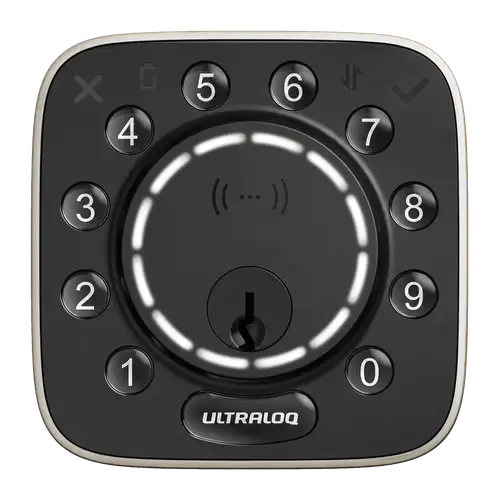
The Smart Device Compare comparison
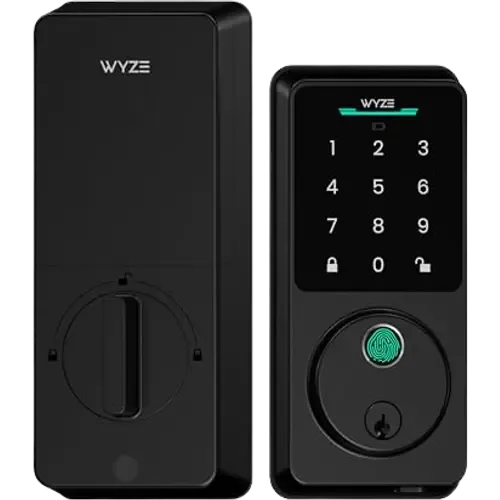
ULTRALOQ Bolt Mission vs Wyze Auto-Lock Bolt v2
Understand the differences. Decide what matters to your home.
Build another comparison →Before you compare every specification
Key differences between ULTRALOQ Bolt Mission and Wyze Auto-Lock Bolt v2
A summary of selected recorded differences between these door locks. Check the full specification table below for details and conditions.
Feature differences among your selected devices
- 2.4 GHz Wi-Fi (connectivity): ULTRALOQ Bolt Mission — No (No Wi-Fi built in; the ULTRALOQ Wi-Fi Bridge is required for remote control through the Xthings Home app); Wyze Auto-Lock Bolt v2 — Yes.
- Other (connectivity): ULTRALOQ Bolt Mission — Yes (UWB (Ultra-Wideband), NFC); Wyze Auto-Lock Bolt v2 — No.
- Apple Home (integrations): ULTRALOQ Bolt Mission — Yes (Via Matter over Thread, so a Thread border router is required); Wyze Auto-Lock Bolt v2 — No.
- Matter (integrations): ULTRALOQ Bolt Mission — Yes (Matter over Thread); Wyze Auto-Lock Bolt v2 — No.
Specifications to check side by side
- Thread (connectivity): ULTRALOQ Bolt Mission — Thread Border Router required; Wyze Auto-Lock Bolt v2 — No.
Information still to confirm
- 13 of 45 comparison fields lack a resolved value for at least one selected device. Missing information is not evidence that a feature is absent.
- Check the full table and manufacturer documentation before ruling out a device.
These observations are derived from recorded catalog data and have not all been independently verified. Confirm details with the manufacturer before purchasing.
Compare capabilities, compatibility and setup requirements.
What the catalog tells us
Understand the tradeoffs.
These counts describe the available data, not a quality score. More features do not automatically make a better device.
8differences with recorded values for every device
13rows with missing or unspecified information
Consider your setup
Apple Home
- ULTRALOQ Bolt MissionYes
- Wyze Auto-Lock Bolt v2No
Confirm which features appear in Apple Home and whether extra hardware or a subscription is needed for your intended use.
Inspect the specificationsConsider your setup
Matter
- ULTRALOQ Bolt MissionYes
- Wyze Auto-Lock Bolt v2No
Confirm the exact device type and the features exposed in your chosen platform. Protocol support does not establish feature parity across apps.
Inspect the specificationsYour priorities, side by side
Focus on what changes.
Mark the specifications you care about. Open manufacturer sources for verification scope; fields without citations remain catalog data. Expand notes for other qualifications.
Showing 45 of 45 rows. “Not recorded” does not mean “No”.
Alerts
- ULTRALOQ Bolt Mission
- Yes
- Wyze Auto-Lock Bolt v2
- Yes
- ULTRALOQ Bolt Mission
- Yes
Catalog note
Battery icon on the faceplate and a low-battery notification
- Wyze Auto-Lock Bolt v2
- Yes
- ULTRALOQ Bolt Mission
- Not recorded
- Wyze Auto-Lock Bolt v2
- Not recorded
- ULTRALOQ Bolt Mission
- Not recorded
- Wyze Auto-Lock Bolt v2
- Not recorded
Automatic Lock
- ULTRALOQ Bolt Mission
- Yes
Catalog note
Locks automatically when the door closes, on a custom timer, or instantly with a tap
- Wyze Auto-Lock Bolt v2
- Yes
Catalog note
Auto-lock
- ULTRALOQ Bolt Mission
- No
- Wyze Auto-Lock Bolt v2
- No
- ULTRALOQ Bolt Mission
- Not recorded
- Wyze Auto-Lock Bolt v2
- Not recorded
Connectivity
- ULTRALOQ Bolt Mission
- No
Catalog note
No Wi-Fi built in; the ULTRALOQ Wi-Fi Bridge is required for remote control through the Xthings Home app
- Wyze Auto-Lock Bolt v2
- Yes
- ULTRALOQ Bolt Mission
- No
- Wyze Auto-Lock Bolt v2
- No
- ULTRALOQ Bolt Mission
- Yes
- Wyze Auto-Lock Bolt v2
- Not recorded
- ULTRALOQ Bolt Mission
- Yes
Catalog note
UWB (Ultra-Wideband), NFC
- Wyze Auto-Lock Bolt v2
- No
- ULTRALOQ Bolt Mission
- Thread Border Router required
- Wyze Auto-Lock Bolt v2
- No
- ULTRALOQ Bolt Mission
- No
- Wyze Auto-Lock Bolt v2
- No
- ULTRALOQ Bolt Mission
- No
- Wyze Auto-Lock Bolt v2
- No
Features
- ULTRALOQ Bolt Mission
- Not recorded
- Wyze Auto-Lock Bolt v2
- Yes
- ULTRALOQ Bolt Mission
- No
- Wyze Auto-Lock Bolt v2
- No
- ULTRALOQ Bolt Mission
- No
- Wyze Auto-Lock Bolt v2
- No
- ULTRALOQ Bolt Mission
- Yes
Catalog note
Permanent, scheduled or temporary virtual keys and codes
- Wyze Auto-Lock Bolt v2
- Not recorded
- ULTRALOQ Bolt Mission
- Yes
- Wyze Auto-Lock Bolt v2
- Not recorded
Integrations
- ULTRALOQ Bolt Mission
- Yes
- Wyze Auto-Lock Bolt v2
- Yes
Catalog note
Wyze lists Alexa among the ways to operate the Bolt v2; locking by voice is allowed and unlocking is not, which is Alexa's own restriction on locks
- ULTRALOQ Bolt Mission
- Yes
Catalog note
Via Matter over Thread, so a Thread border router is required
- Wyze Auto-Lock Bolt v2
- No
- ULTRALOQ Bolt Mission
- Yes
- Wyze Auto-Lock Bolt v2
- Not recorded
- ULTRALOQ Bolt Mission
- Yes
Catalog note
Via Matter
- Wyze Auto-Lock Bolt v2
- Not recorded
- ULTRALOQ Bolt Mission
- Yes
Catalog note
Matter over Thread
- Wyze Auto-Lock Bolt v2
- No
- ULTRALOQ Bolt Mission
- Yes
Catalog note
Via Matter
- Wyze Auto-Lock Bolt v2
- No
Lock System
- ULTRALOQ Bolt Mission
- No
Catalog note
ULTRALOQ states Apple Home Key is not supported
- Wyze Auto-Lock Bolt v2
- No
- ULTRALOQ Bolt Mission
- Yes
- Wyze Auto-Lock Bolt v2
- Not recorded
- ULTRALOQ Bolt Mission
- No
- Wyze Auto-Lock Bolt v2
- No
- ULTRALOQ Bolt Mission
- No
- Wyze Auto-Lock Bolt v2
- Yes
Catalog note
AI learning fingerprint scanner, unlocks in 0.5 seconds
- ULTRALOQ Bolt Mission
- Yes
Catalog note
Android NFC tap to unlock, or a key fob
- Wyze Auto-Lock Bolt v2
- No
- ULTRALOQ Bolt Mission
- Yes
Catalog note
PIN codes for family, guests and service providers
- Wyze Auto-Lock Bolt v2
- Yes
Catalog note
Anti-peep keypad
- ULTRALOQ Bolt Mission
- Yes
Catalog note
2 emergency keys included
- Wyze Auto-Lock Bolt v2
- Yes
Catalog note
Backup keys included
- ULTRALOQ Bolt Mission
- Yes
Catalog note
Remote control through the Xthings Home app with a Wi-Fi Bridge, or through a Matter platform hub
- Wyze Auto-Lock Bolt v2
- Yes
Catalog note
Built-in Wi-Fi, manage via the Wyze app
Power
- ULTRALOQ Bolt Mission
- Not recorded
- Wyze Auto-Lock Bolt v2
- USB-C Emergency Port
- ULTRALOQ Bolt Mission
- 8 months
- Wyze Auto-Lock Bolt v2
- 8 months
- ULTRALOQ Bolt Mission
- 8x AA
- Wyze Auto-Lock Bolt v2
- 8x AA
Sensors
- ULTRALOQ Bolt Mission
- Not recorded
- Wyze Auto-Lock Bolt v2
- Not recorded
Video
- ULTRALOQ Bolt Mission
- No
- Wyze Auto-Lock Bolt v2
- No
- ULTRALOQ Bolt Mission
- No
- Wyze Auto-Lock Bolt v2
- No
- ULTRALOQ Bolt Mission
- No
- Wyze Auto-Lock Bolt v2
- No
- ULTRALOQ Bolt Mission
- No
- Wyze Auto-Lock Bolt v2
- No
- ULTRALOQ Bolt Mission
- No
- Wyze Auto-Lock Bolt v2
- No
- ULTRALOQ Bolt Mission
- No
- Wyze Auto-Lock Bolt v2
- No
- ULTRALOQ Bolt Mission
- No
- Wyze Auto-Lock Bolt v2
- No
- ULTRALOQ Bolt Mission
- Not applicable / unspecified
- Wyze Auto-Lock Bolt v2
- Not applicable / unspecified
| Specification | ULTRALOQ Bolt Mission | Wyze Auto-Lock Bolt v2 |
|---|---|---|
| Alerts | ||
| Yes | Yes | |
YesCatalog noteBattery icon on the faceplate and a low-battery notification | Yes | |
| Not recorded | Not recorded | |
| Not recorded | Not recorded | |
| Automatic Lock | ||
YesCatalog noteLocks automatically when the door closes, on a custom timer, or instantly with a tap | YesCatalog noteAuto-lock | |
| No | No | |
| Not recorded | Not recorded | |
| Connectivity | ||
NoCatalog noteNo Wi-Fi built in; the ULTRALOQ Wi-Fi Bridge is required for remote control through the Xthings Home app | Yes | |
| No | No | |
| Yes | Not recorded | |
YesCatalog noteUWB (Ultra-Wideband), NFC | No | |
| Thread Border Router required | No | |
| No | No | |
| No | No | |
| Features | ||
| Not recorded | Yes | |
| No | No | |
| No | No | |
YesCatalog notePermanent, scheduled or temporary virtual keys and codes | Not recorded | |
| Yes | Not recorded | |
| Integrations | ||
| Yes | YesCatalog noteWyze lists Alexa among the ways to operate the Bolt v2; locking by voice is allowed and unlocking is not, which is Alexa's own restriction on locks | |
YesCatalog noteVia Matter over Thread, so a Thread border router is required | No | |
| Yes | Not recorded | |
YesCatalog noteVia Matter | Not recorded | |
YesCatalog noteMatter over Thread | No | |
YesCatalog noteVia Matter | No | |
| Lock System | ||
NoCatalog noteULTRALOQ states Apple Home Key is not supported | No | |
| Yes | Not recorded | |
| No | No | |
| No | YesCatalog noteAI learning fingerprint scanner, unlocks in 0.5 seconds | |
YesCatalog noteAndroid NFC tap to unlock, or a key fob | No | |
YesCatalog notePIN codes for family, guests and service providers | YesCatalog noteAnti-peep keypad | |
YesCatalog note2 emergency keys included | YesCatalog noteBackup keys included | |
YesCatalog noteRemote control through the Xthings Home app with a Wi-Fi Bridge, or through a Matter platform hub | YesCatalog noteBuilt-in Wi-Fi, manage via the Wyze app | |
| Power | ||
| Not recorded | USB-C Emergency Port | |
| 8 months | 8 months | |
| 8x AA | 8x AA | |
| Sensors | ||
| Not recorded | Not recorded | |
| Video | ||
| No | No | |
| No | No | |
| No | No | |
| No | No | |
| No | No | |
| No | No | |
| No | No | |
| Not applicable / unspecified | Not applicable / unspecified | |
Know what’s behind the comparison.
The table matches specifications by section and field. It preserves notes, separates missing data from explicit “No” values, and keeps qualifications attached to their values. No overall winner is assigned from feature counts.
Read our comparison methodology