Option 1 · Philips
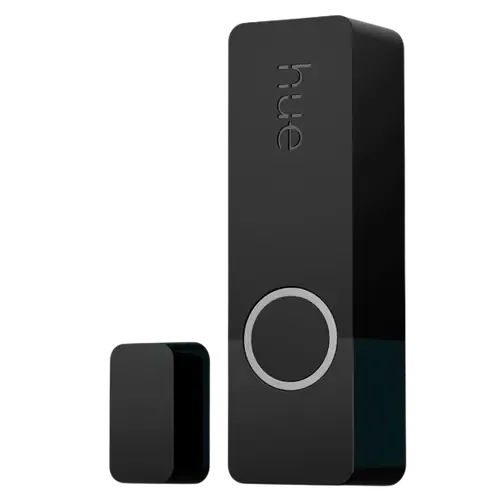
Philips Hue Secure Contact Sensor
Last updated September 2026
View full device profile
The Smart Device Compare comparison
Understand the differences. Decide what matters to your home.
Build another comparison →Before you compare every specification
A summary of selected recorded differences between these door & window sensors. Check the full specification table below for details and conditions.
These observations are derived from recorded catalog data and have not all been independently verified. Confirm details with the manufacturer before purchasing.
Compare capabilities, compatibility and setup requirements.
Option 1 · Philips
Last updated September 2026
View full device profile
What the catalog tells us
These counts describe the available data, not a quality score. More features do not automatically make a better device.
Consider your setup
Confirm which features appear in Apple Home and whether extra hardware or a subscription is needed for your intended use.
Inspect the specificationsConsider your setup
Confirm the exact device type and the features exposed in your chosen platform. Protocol support does not establish feature parity across apps.
Inspect the specificationsConsider your setup
Compare the stated test conditions. Catalog battery figures alone do not predict runtime in your home.
Inspect the specificationsYour priorities, side by side
Mark the specifications you care about. Open manufacturer sources for verification scope; fields without citations remain catalog data. Expand notes for other qualifications.
Showing 30 of 30 rows. “Not recorded” does not mean “No”.
IAS Zone status bit 3 flags a battery at or below 15 percent, and the battery percentage is also broadcast over BTHome.
The documented IAS Zone status flags are Alarm1, Alarm2 and Battery only, with no tamper bit.
Bluetooth 5 (LE), broadcasting in the BTHome format, with simultaneous Zigbee + Bluetooth operation.
Zigbee 3.0 end device (IAS Zone, profile 0x104), so it joins an existing Zigbee coordinator.
Open and close events trigger scenes and automations, either directly with other Shelly devices or through the Shelly Smart Control app.
Firmware is updated over the air from the Shelly Smart Control app once the device is registered in the account, or from the Shelly BLE Debug app.
Report angle threshold is configurable from 0 to 90 degrees (1 degree by default) and sets the minimum tilt needed to trigger a report; the light sensor adds configurable dark and bright thresholds.
Reaches Amazon Alexa through the Shelly Smart Control account, and the product page states a gateway is necessary to use this device with that app (Shelly BLU Gateway, or any Shelly Plus, Pro, Gen3 or Gen4 device other than a sensor).
The device documentation lists only Bluetooth (BTHome) and Zigbee, with no Matter or HomeKit profile, and Shelly does not offer an Apple Home path for its BLU sensors.
Reaches Google Home through the Shelly Smart Control account, and the product page states a gateway is necessary to use this device with that app (Shelly BLU Gateway, or any Shelly Plus, Pro, Gen3 or Gen4 device other than a sensor).
Zigbee2MQTT supports this exact model (SBDW-103C), exposing contact, handle position, battery, battery low and light level.
Not in the CSA certified-product database, and the device documentation lists only Bluetooth 5 LE and Zigbee 3.0.
Reaches SmartThings through the Shelly Smart Control account, and the product page states a gateway is necessary to use this device with that app (Shelly BLU Gateway, or any Shelly Plus, Pro, Gen3 or Gen4 device other than a sensor).
Reed switch, reported over Zigbee as IAS Zone type 0x0016 (Door/Window Handle), which also distinguishes tilted from fully open.
Built-in light sensor reporting illumination, with configurable dark and bright thresholds.
The MSA311 accelerometer measures the tilt angle of the door or window, not movement in the room.
| Specification | Philips Hue Secure Contact Sensor | Shelly BLU Door/Window ZB |
|---|---|---|
| Alerts | ||
| Yes | Yes | |
| Not recorded | YesCatalog noteIAS Zone status bit 3 flags a battery at or below 15 percent, and the battery percentage is also broadcast over BTHome. | |
| No | No | |
| No | NoCatalog noteThe documented IAS Zone status flags are Alarm1, Alarm2 and Battery only, with no tamper bit. | |
| No | No | |
| Connectivity | ||
| No | No | |
| No | No | |
| No | YesCatalog noteBluetooth 5 (LE), broadcasting in the BTHome format, with simultaneous Zigbee + Bluetooth operation. | |
| No | No | |
| No | No | |
| No | No | |
| Zigbee Hub required | Zigbee Hub requiredCatalog noteZigbee 3.0 end device (IAS Zone, profile 0x104), so it joins an existing Zigbee coordinator. | |
| Features | ||
| Yes | YesCatalog noteOpen and close events trigger scenes and automations, either directly with other Shelly devices or through the Shelly Smart Control app. | |
| Not recorded | Not recorded | |
| Not recorded | 10mm | |
| Not recorded | YesCatalog noteFirmware is updated over the air from the Shelly Smart Control app once the device is registered in the account, or from the Shelly BLE Debug app. | |
| Not recorded | YesCatalog noteReport angle threshold is configurable from 0 to 90 degrees (1 degree by default) and sets the minimum tilt needed to trigger a report; the light sensor adds configurable dark and bright thresholds. | |
| Integrations | ||
| Yes | Shelly gateway requiredCatalog noteReaches Amazon Alexa through the Shelly Smart Control account, and the product page states a gateway is necessary to use this device with that app (Shelly BLU Gateway, or any Shelly Plus, Pro, Gen3 or Gen4 device other than a sensor). | |
| Yes | NoCatalog noteThe device documentation lists only Bluetooth (BTHome) and Zigbee, with no Matter or HomeKit profile, and Shelly does not offer an Apple Home path for its BLU sensors. | |
| Yes | Shelly gateway requiredCatalog noteReaches Google Home through the Shelly Smart Control account, and the product page states a gateway is necessary to use this device with that app (Shelly BLU Gateway, or any Shelly Plus, Pro, Gen3 or Gen4 device other than a sensor). | |
| Yes | YesCatalog noteZigbee2MQTT supports this exact model (SBDW-103C), exposing contact, handle position, battery, battery low and light level. | |
| Support on Hue Bridge | NoCatalog noteNot in the CSA certified-product database, and the device documentation lists only Bluetooth 5 LE and Zigbee 3.0. | |
| Yes | Shelly gateway requiredCatalog noteReaches SmartThings through the Shelly Smart Control account, and the product page states a gateway is necessary to use this device with that app (Shelly BLU Gateway, or any Shelly Plus, Pro, Gen3 or Gen4 device other than a sensor). | |
| Power | ||
| 2 years | 5 years | |
| CR2 | 1x CR2032 | |
| Sensors | ||
| Yes | YesCatalog noteReed switch, reported over Zigbee as IAS Zone type 0x0016 (Door/Window Handle), which also distinguishes tilted from fully open. | |
| No | YesCatalog noteBuilt-in light sensor reporting illumination, with configurable dark and bright thresholds. | |
| No | NoCatalog noteThe MSA311 accelerometer measures the tilt angle of the door or window, not movement in the room. | |
| No | No | |
| No | No | |
The table matches specifications by section and field. It preserves notes, separates missing data from explicit “No” values, and keeps qualifications attached to their values. No overall winner is assigned from feature counts.
Read our comparison methodology