
The Smart Device Compare comparison
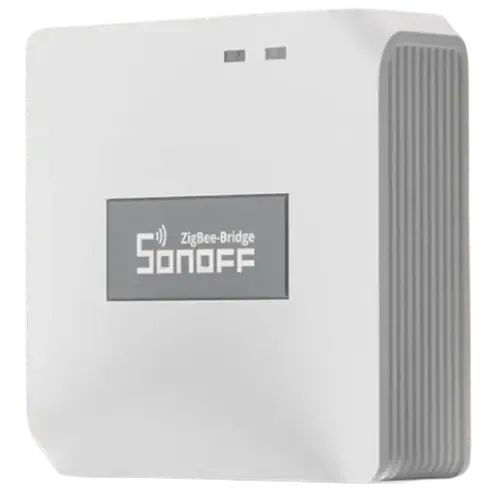
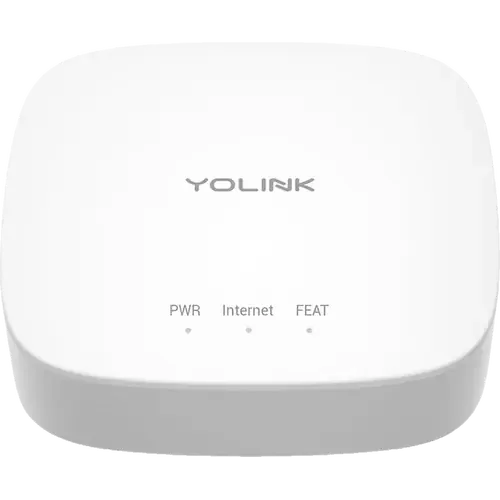
Sonoff Zigbee Bridge Pro vs YoLink Hub
Understand the differences. Decide what matters to your home.
Build another comparison →Before you compare every specification
Key differences between Sonoff Zigbee Bridge Pro and YoLink Hub
A summary of selected recorded differences between these hubs. Check the full specification table below for details and conditions.
Feature differences among your selected devices
- Ethernet (connectivity): Sonoff Zigbee Bridge Pro — No; YoLink Hub — Yes (RJ45 network connector on the rear, with an Ethernet patch cable in the box).
- SmartThings (integrations): Sonoff Zigbee Bridge Pro — Yes; YoLink Hub — No (SmartThings is not on YoLink's compatibility list for this Hub, and the YS1603 is not a Matter device).
- Zigbee coordinator (protocols): Sonoff Zigbee Bridge Pro — Yes; YoLink Hub — No (The Hub hosts YoLink's own LoRa network at 923.3 MHz, not a Zigbee mesh).
Specifications to check side by side
- Subdevices (features): Sonoff Zigbee Bridge Pro — 128; YoLink Hub — 180 (YoLink support states there is no hard limit and that a single Hub carried 180 devices without issues in testing, recommending a second Hub between 100 and 200 devices).
- Bluetooth (protocols): Sonoff Zigbee Bridge Pro — For Setup Only (Official specs list Wi-Fi and Zigbee 3.0 only; Bluetooth is used just to add the bridge in the eWeLink app.); YoLink Hub — No (The technical specs list only two radios, LoRa at 923.3 MHz and Wi-Fi at 2412 to 2462 MHz).
- Third Party Devices (protocols): Sonoff Zigbee Bridge Pro — Partially (Pairs SONOFF Zigbee devices and other brands' products labeled "eWeLink support"; SONOFF says other third-party Zigbee devices cannot be guaranteed on its limited hardware.); YoLink Hub — No (Hosts only YoLink LoRa devices; other brands reach YoLink only through cloud integrations (Alexa, Google, IFTTT, Home Assistant), never by pairing to the hub.).
Information still to confirm
- 3 of 31 comparison fields lack a resolved value for at least one selected device. Missing information is not evidence that a feature is absent.
- Check the full table and manufacturer documentation before ruling out a device.
These observations are derived from recorded catalog data and have not all been independently verified. Confirm details with the manufacturer before purchasing.
Compare capabilities, compatibility and setup requirements.
What the catalog tells us
Understand the tradeoffs.
These counts describe the available data, not a quality score. More features do not automatically make a better device.
6differences with recorded values for every device
3rows with missing or unspecified information
Your priorities, side by side
Focus on what changes.
Mark the specifications you care about. Open manufacturer sources for verification scope; fields without citations remain catalog data. Expand notes for other qualifications.
Showing 31 of 31 rows. “Not recorded” does not mean “No”.
Connectivity
- Sonoff Zigbee Bridge Pro
- Yes
- YoLink Hub
- Yes
Catalog note
Wi-Fi frequency 2412 to 2462 MHz, and the requirements list a router with 2.4 GHz Wi-Fi
- Sonoff Zigbee Bridge Pro
- No
- YoLink Hub
- No
Catalog note
YoLink support states the Hub does not support the 5 GHz Wi-Fi band
- Sonoff Zigbee Bridge Pro
- No
- YoLink Hub
- Yes
Catalog note
RJ45 network connector on the rear, with an Ethernet patch cable in the box
Features
- Sonoff Zigbee Bridge Pro
- No
- YoLink Hub
- No
- Sonoff Zigbee Bridge Pro
- No
- YoLink Hub
- No
- Sonoff Zigbee Bridge Pro
- No
- YoLink Hub
- No
- Sonoff Zigbee Bridge Pro
- 128
Manufacturer source
An expanded network can support up to 128 Zigbee accessories.
Sonoff Zigbee Bridge Pro manufacturer product page →- Source section
- Product description
- Model
- Sonoff Zigbee Bridge Pro
- Region
- Manufacturer product page; no universal regional compatibility implied
- Firmware
- Not specified by this source
- Checked
The bridge directly supports 26 devices. Reaching the advertised network total requires Zigbee routers; it is not a 128-device direct connection limit.
Document check only; not a hands-on test or verification of every regional or firmware variant.
- YoLink Hub
- 180
Catalog note
YoLink support states there is no hard limit and that a single Hub carried 180 devices without issues in testing, recommending a second Hub between 100 and 200 devices
- Sonoff Zigbee Bridge Pro
- No
- YoLink Hub
- No
Hardware
- Sonoff Zigbee Bridge Pro
- Not recorded
- YoLink Hub
- 32-bit RISC (Semtech LoRa YL09 module)
Catalog note
The official technical specs list a Semtech LoRa RF Module YL09 microcontroller with a 32-bit RISC processor
- Sonoff Zigbee Bridge Pro
- Not recorded
- YoLink Hub
- Not recorded
- Sonoff Zigbee Bridge Pro
- No
- YoLink Hub
- No
- Sonoff Zigbee Bridge Pro
- No
- YoLink Hub
- No
Catalog note
The only connectors are the rear RJ45 network port and the Micro-USB B power input
- Sonoff Zigbee Bridge Pro
- No
- YoLink Hub
- No
Catalog note
YoLink support states the current version of the Hub has no built-in PoE functionality, and suggests a PoE splitter with a MicroUSB connector as a workaround
- Sonoff Zigbee Bridge Pro
- No
- YoLink Hub
- No
Catalog note
The datasheet lists only status LEDs; audible alerts are the job of the separate YoLink SpeakerHub
- Sonoff Zigbee Bridge Pro
- Not recorded
- YoLink Hub
- Not recorded
Integrations
- Sonoff Zigbee Bridge Pro
- Yes
- YoLink Hub
- Yes
Catalog note
The official product page lists Alexa among the compatible platforms
- Sonoff Zigbee Bridge Pro
- No
- YoLink Hub
- No
Catalog note
YoLink's compatibility list for this Hub is Alexa, Google, IFTTT, Home Assistant and Raedius, with no Apple Home path; the Matter route belongs to the separate Local Hub (YS1606)
- Sonoff Zigbee Bridge Pro
- Yes
- YoLink Hub
- Yes
Catalog note
YoLink support confirms the Hub can be integrated with Google Home, where the paired YoLink devices show up rather than the Hub itself
- Sonoff Zigbee Bridge Pro
- Yes
- YoLink Hub
- Yes
Catalog note
Home Assistant ships an official YoLink integration that is set up by adding the YoLink hub to the instance, and the product page lists Home Assistant among the compatible platforms
- Sonoff Zigbee Bridge Pro
- Yes
- YoLink Hub
- No
Catalog note
SmartThings is not on YoLink's compatibility list for this Hub, and the YS1603 is not a Matter device
Protocols
- Sonoff Zigbee Bridge Pro
- For Setup Only
Catalog note
Official specs list Wi-Fi and Zigbee 3.0 only; Bluetooth is used just to add the bridge in the eWeLink app.
- YoLink Hub
- No
Catalog note
The technical specs list only two radios, LoRa at 923.3 MHz and Wi-Fi at 2412 to 2462 MHz
- Sonoff Zigbee Bridge Pro
- No
- YoLink Hub
- No
- Sonoff Zigbee Bridge Pro
- No
- YoLink Hub
- No
Catalog note
Matter and a local API arrived with the separate YoLink Local Hub (YS1606); YoLink support states the YS1603 does not support local networks
- Sonoff Zigbee Bridge Pro
- Partially
Catalog note
Pairs SONOFF Zigbee devices and other brands' products labeled "eWeLink support"; SONOFF says other third-party Zigbee devices cannot be guaranteed on its limited hardware.
- YoLink Hub
- No
Catalog note
Hosts only YoLink LoRa devices; other brands reach YoLink only through cloud integrations (Alexa, Google, IFTTT, Home Assistant), never by pairing to the hub.
- Sonoff Zigbee Bridge Pro
- No
- YoLink Hub
- No
- Sonoff Zigbee Bridge Pro
- No
- YoLink Hub
- No
- Sonoff Zigbee Bridge Pro
- Yes
- YoLink Hub
- No
Catalog note
The Hub hosts YoLink's own LoRa network at 923.3 MHz, not a Zigbee mesh
Sensors
- Sonoff Zigbee Bridge Pro
- No
- YoLink Hub
- No
- Sonoff Zigbee Bridge Pro
- No
- YoLink Hub
- No
- Sonoff Zigbee Bridge Pro
- No
- YoLink Hub
- No
- Sonoff Zigbee Bridge Pro
- No
- YoLink Hub
- No
| Specification | Sonoff Zigbee Bridge Pro | YoLink Hub |
|---|---|---|
| Connectivity | ||
| Yes | YesCatalog noteWi-Fi frequency 2412 to 2462 MHz, and the requirements list a router with 2.4 GHz Wi-Fi | |
| No | NoCatalog noteYoLink support states the Hub does not support the 5 GHz Wi-Fi band | |
| No | YesCatalog noteRJ45 network connector on the rear, with an Ethernet patch cable in the box | |
| Features | ||
| No | No | |
| No | No | |
| No | No | |
128Manufacturer sourceAn expanded network can support up to 128 Zigbee accessories. Sonoff Zigbee Bridge Pro manufacturer product page →
The bridge directly supports 26 devices. Reaching the advertised network total requires Zigbee routers; it is not a 128-device direct connection limit. Document check only; not a hands-on test or verification of every regional or firmware variant. | 180Catalog noteYoLink support states there is no hard limit and that a single Hub carried 180 devices without issues in testing, recommending a second Hub between 100 and 200 devices | |
| No | No | |
| Hardware | ||
| Not recorded | 32-bit RISC (Semtech LoRa YL09 module)Catalog noteThe official technical specs list a Semtech LoRa RF Module YL09 microcontroller with a 32-bit RISC processor | |
| Not recorded | Not recorded | |
| No | No | |
| No | NoCatalog noteThe only connectors are the rear RJ45 network port and the Micro-USB B power input | |
| No | NoCatalog noteYoLink support states the current version of the Hub has no built-in PoE functionality, and suggests a PoE splitter with a MicroUSB connector as a workaround | |
| No | NoCatalog noteThe datasheet lists only status LEDs; audible alerts are the job of the separate YoLink SpeakerHub | |
| Not recorded | Not recorded | |
| Integrations | ||
| Yes | YesCatalog noteThe official product page lists Alexa among the compatible platforms | |
| No | NoCatalog noteYoLink's compatibility list for this Hub is Alexa, Google, IFTTT, Home Assistant and Raedius, with no Apple Home path; the Matter route belongs to the separate Local Hub (YS1606) | |
| Yes | YesCatalog noteYoLink support confirms the Hub can be integrated with Google Home, where the paired YoLink devices show up rather than the Hub itself | |
| Yes | YesCatalog noteHome Assistant ships an official YoLink integration that is set up by adding the YoLink hub to the instance, and the product page lists Home Assistant among the compatible platforms | |
| Yes | NoCatalog noteSmartThings is not on YoLink's compatibility list for this Hub, and the YS1603 is not a Matter device | |
| Protocols | ||
For Setup OnlyCatalog noteOfficial specs list Wi-Fi and Zigbee 3.0 only; Bluetooth is used just to add the bridge in the eWeLink app. | NoCatalog noteThe technical specs list only two radios, LoRa at 923.3 MHz and Wi-Fi at 2412 to 2462 MHz | |
| No | No | |
| No | NoCatalog noteMatter and a local API arrived with the separate YoLink Local Hub (YS1606); YoLink support states the YS1603 does not support local networks | |
PartiallyCatalog notePairs SONOFF Zigbee devices and other brands' products labeled "eWeLink support"; SONOFF says other third-party Zigbee devices cannot be guaranteed on its limited hardware. | NoCatalog noteHosts only YoLink LoRa devices; other brands reach YoLink only through cloud integrations (Alexa, Google, IFTTT, Home Assistant), never by pairing to the hub. | |
| No | No | |
| No | No | |
| Yes | NoCatalog noteThe Hub hosts YoLink's own LoRa network at 923.3 MHz, not a Zigbee mesh | |
| Sensors | ||
| No | No | |
| No | No | |
| No | No | |
| No | No | |
Know what’s behind the comparison.
The table matches specifications by section and field. It preserves notes, separates missing data from explicit “No” values, and keeps qualifications attached to their values. No overall winner is assigned from feature counts.
Read our comparison methodology