
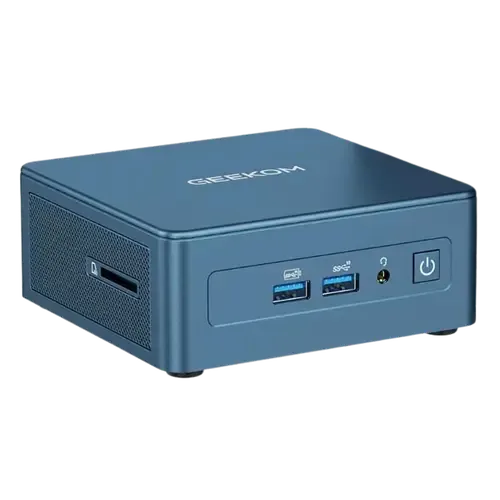
The Smart Device Compare comparison
Geekom IT13 (2TB) vs MINISFORUM MS-S1 Max (64GB + 2TB)
Understand the differences. Decide what matters to your home.
Build another comparison →Before you compare every specification
Key differences between Geekom IT13 (2TB) and MINISFORUM MS-S1 Max (64GB + 2TB)
A summary of selected recorded differences between these mini pcs. Check the full specification table below for details and conditions.
Feature differences among your selected devices
- Microphone (audio): Geekom IT13 (2TB) — No; MINISFORUM MS-S1 Max (64GB + 2TB) — Yes (The official front panel lists two digital microphones (DMIC).).
- VESA mounting (included accessories): Geekom IT13 (2TB) — Yes; MINISFORUM MS-S1 Max (64GB + 2TB) — No (The Japanese distributor lists VESA 100mm support and states the mount is not included.).
- Built In Power Supply (power): Geekom IT13 (2TB) — No; MINISFORUM MS-S1 Max (64GB + 2TB) — Yes (MINISFORUM lists a built-in 320W supply with CCC, FCC, UL, CE and UKCA certification, and an AC input on the rear panel.).
Specifications to check side by side
- Ethernet (connectivity): Geekom IT13 (2TB) — 2.5G Ethernet; MINISFORUM MS-S1 Max (64GB + 2TB) — 2x 10G Ethernet (The official rear-panel diagram lists two 10GbE RJ45 ports on Realtek RTL8127 controllers.).
- Wifi (connectivity): Geekom IT13 (2TB) — Wi-Fi 6E (Wi-Fi 6E AX211); MINISFORUM MS-S1 Max (64GB + 2TB) — Wi-Fi 7.
- Technology (cooling): Geekom IT13 (2TB) — IceBlast; MINISFORUM MS-S1 Max (64GB + 2TB) — Six heat pipes with phase-change material and dual fans (The official page describes a copper base, six heat pipes, phase-change cooling and dual fans, with a 160W peak and 130W sustained.).
- Model (cpu): Geekom IT13 (2TB) — Intel Core i9-13900HK; MINISFORUM MS-S1 Max (64GB + 2TB) — AMD Ryzen AI Max+ 395 (16 cores and 32 threads, max turbo 5.1 GHz. MINISFORUM lists Performance mode at 130W, Balanced at 95W and Quiet at 60W.).
Information still to confirm
- 2 of 33 comparison fields lack a resolved value for at least one selected device. Missing information is not evidence that a feature is absent.
- Check the full table and manufacturer documentation before ruling out a device.
These observations are derived from recorded catalog data and have not all been independently verified. Confirm details with the manufacturer before purchasing.
Compare capabilities, compatibility and setup requirements.
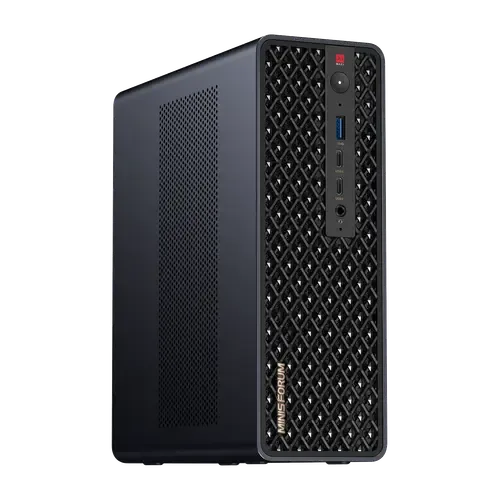
Option 2 · MINISFORUM
MINISFORUM MS-S1 Max (64GB + 2TB)
Last updated October 2026
View full device profileWhat the catalog tells us
Understand the tradeoffs.
These counts describe the available data, not a quality score. More features do not automatically make a better device.
20differences with recorded values for every device
2rows with missing or unspecified information
Your priorities, side by side
Focus on what changes.
Mark the specifications you care about. Open manufacturer sources for verification scope; fields without citations remain catalog data. Expand notes for other qualifications.
Showing 33 of 33 rows. “Not recorded” does not mean “No”.
Audio
- Geekom IT13 (2TB)
- Yes
- MINISFORUM MS-S1 Max (64GB + 2TB)
- Yes
Catalog note
The official front panel lists a 3.5mm combo audio jack.
- Geekom IT13 (2TB)
- No
- MINISFORUM MS-S1 Max (64GB + 2TB)
- Yes
Catalog note
The official front panel lists two digital microphones (DMIC).
- Geekom IT13 (2TB)
- No
- MINISFORUM MS-S1 Max (64GB + 2TB)
- No
Connectivity
- Geekom IT13 (2TB)
- Bluetooth 5.4
Catalog note
GEEKOM lists the IT13 (XB591 card) as supporting Bluetooth 5.4; units from 2025 ship with it enabled
- MINISFORUM MS-S1 Max (64GB + 2TB)
- Bluetooth 5.4
- Geekom IT13 (2TB)
- 2.5G Ethernet
- MINISFORUM MS-S1 Max (64GB + 2TB)
- 2x 10G Ethernet
Catalog note
The official rear-panel diagram lists two 10GbE RJ45 ports on Realtek RTL8127 controllers.
- Geekom IT13 (2TB)
- Wi-Fi 6E
Catalog note
Wi-Fi 6E AX211
- MINISFORUM MS-S1 Max (64GB + 2TB)
- Wi-Fi 7
Cooling
- Geekom IT13 (2TB)
- IceBlast
- MINISFORUM MS-S1 Max (64GB + 2TB)
- Six heat pipes with phase-change material and dual fans
Catalog note
The official page describes a copper base, six heat pipes, phase-change cooling and dual fans, with a 160W peak and 130W sustained.
Cpu
- Geekom IT13 (2TB)
- Intel Core i9-13900HK
- MINISFORUM MS-S1 Max (64GB + 2TB)
- AMD Ryzen AI Max+ 395
Catalog note
16 cores and 32 threads, max turbo 5.1 GHz. MINISFORUM lists Performance mode at 130W, Balanced at 95W and Quiet at 60W.
Gpu
- Geekom IT13 (2TB)
- Intel Iris Xe Graphics
- MINISFORUM MS-S1 Max (64GB + 2TB)
- AMD Radeon 8060S Graphics
Catalog note
MINISFORUM lists 40 GPU cores at up to 2900 MHz. Amazon's table names Radeon 8060S graphics at 2900 MHz.
Included Accessories
- Geekom IT13 (2TB)
- Yes
- MINISFORUM MS-S1 Max (64GB + 2TB)
- Yes
Catalog note
Amazon's box contents for this listing are the mini PC, an HDMI cable, a manual and a US power adapter.
- Geekom IT13 (2TB)
- Yes
- MINISFORUM MS-S1 Max (64GB + 2TB)
- No
Catalog note
The Japanese distributor lists VESA 100mm support and states the mount is not included.
Memory
- Geekom IT13 (2TB)
- 32 GB
- MINISFORUM MS-S1 Max (64GB + 2TB)
- 64 GB
- Geekom IT13 (2TB)
- Dual-channel
- MINISFORUM MS-S1 Max (64GB + 2TB)
- Quad-channel
Catalog note
The official specification lists LPDDR5x on a 256-bit bus, shared by the CPU, GPU and NPU.
- Geekom IT13 (2TB)
- SODIMM
- MINISFORUM MS-S1 Max (64GB + 2TB)
- Soldered
Catalog note
Amazon's product table for this configuration lists 64GB of LPDDR5 at 8000 MHz, and the official sheet describes onboard unified memory rather than SODIMM slots.
- Geekom IT13 (2TB)
- 64 GB
- MINISFORUM MS-S1 Max (64GB + 2TB)
- 64 GB
Catalog note
The platform's official sheet allows up to 128GB, but this configuration is soldered at 64GB, so the capacity shipped is the capacity kept.
- Geekom IT13 (2TB)
- 3200 MT/s
- MINISFORUM MS-S1 Max (64GB + 2TB)
- 8000 MT/s
- Geekom IT13 (2TB)
- DDR4
- MINISFORUM MS-S1 Max (64GB + 2TB)
- LPDDR5X
Npu
- Geekom IT13 (2TB)
- Not applicable / unspecified
- MINISFORUM MS-S1 Max (64GB + 2TB)
- AMD Ryzen AI NPU (50 TOPS)
Catalog note
MINISFORUM states up to 50 TOPS from the NPU and up to 126 TOPS across the whole processor.
Other
- Geekom IT13 (2TB)
- No
- MINISFORUM MS-S1 Max (64GB + 2TB)
- No
- Geekom IT13 (2TB)
- Yes
- MINISFORUM MS-S1 Max (64GB + 2TB)
- Yes
Catalog note
The official rear panel diagram lists an anti-theft lock hole.
- Geekom IT13 (2TB)
- 1x SD Card Reader
- MINISFORUM MS-S1 Max (64GB + 2TB)
- No
Power
- Geekom IT13 (2TB)
- 19V, 6.32A
- MINISFORUM MS-S1 Max (64GB + 2TB)
- Not recorded
- Geekom IT13 (2TB)
- No
- MINISFORUM MS-S1 Max (64GB + 2TB)
- Yes
Catalog note
MINISFORUM lists a built-in 320W supply with CCC, FCC, UL, CE and UKCA certification, and an AC input on the rear panel.
- Geekom IT13 (2TB)
- 120W
- MINISFORUM MS-S1 Max (64GB + 2TB)
- 320W
Software
- Geekom IT13 (2TB)
- Windows 11 Pro
- MINISFORUM MS-S1 Max (64GB + 2TB)
- Windows 11 Pro
Catalog note
B&H, Micro Center and the Japanese distributor all list Windows 11 Pro on the MS-S1 Max.
Storage
- Geekom IT13 (2TB)
- 2 TB
- MINISFORUM MS-S1 Max (64GB + 2TB)
- 2 TB
- Geekom IT13 (2TB)
- M.2 2280 PCIe Gen4x4 SSD + M.2 2242 SATA SSD + 2.5-inch SATA bay
- MINISFORUM MS-S1 Max (64GB + 2TB)
- 1x M.2 2280 NVMe PCIe 4.0 x4 SSD + 1x M.2 2280 NVMe PCIe 4.0 x1 SSD
Catalog note
The official specification lists one M.2 2280 slot at PCIe 4.0 x4 and a second at PCIe 4.0 x1, each up to 8TB.
Usb
- Geekom IT13 (2TB)
- 1x USB 2.0 Type-A
- MINISFORUM MS-S1 Max (64GB + 2TB)
- 2x USB 2.0 Type-A
- Geekom IT13 (2TB)
- 3x USB 3.2 Gen 2 Type-A
- MINISFORUM MS-S1 Max (64GB + 2TB)
- 3x USB 3.2 Gen 2 Type-A
Catalog note
The official port diagram shows USB 3.2 Gen 2 at 10Gbps on the front and the rear.
- Geekom IT13 (2TB)
- 2x USB 4.0 Type-C
- MINISFORUM MS-S1 Max (64GB + 2TB)
- 2x USB4 Type-C (40Gbps) + 2x USB4 V2 Type-C (80Gbps)
Catalog note
The official diagram puts two USB4 ports at 40Gbps with DisplayPort 2.0 Alt Mode and 15W output on the front, and two USB4 V2 ports at 80Gbps with the same Alt Mode and power on the rear.
Video
- Geekom IT13 (2TB)
- DisplayPort (via USB4)
Catalog note
The two USB4 ports (40Gbps) drive displays, up to one 8K screen; with the two HDMI 2.0 ports the i9-13900HK edition supports four displays.
- MINISFORUM MS-S1 Max (64GB + 2TB)
- No
Catalog note
The official port diagram has no dedicated DisplayPort connector. Video on USB4 uses DisplayPort 2.0 Alt Mode.
- Geekom IT13 (2TB)
- 2x HDMI 2.0
- MINISFORUM MS-S1 Max (64GB + 2TB)
- 1x HDMI 2.1 FRL
Catalog note
The official rear panel lists one HDMI 2.1 FRL output, up to 8K at 60Hz or 4K at 120Hz.
- Geekom IT13 (2TB)
- No
- MINISFORUM MS-S1 Max (64GB + 2TB)
- No
| Specification | Geekom IT13 (2TB) | MINISFORUM MS-S1 Max (64GB + 2TB) |
|---|---|---|
| Audio | ||
| Yes | YesCatalog noteThe official front panel lists a 3.5mm combo audio jack. | |
| No | YesCatalog noteThe official front panel lists two digital microphones (DMIC). | |
| No | No | |
| Connectivity | ||
Bluetooth 5.4Catalog noteGEEKOM lists the IT13 (XB591 card) as supporting Bluetooth 5.4; units from 2025 ship with it enabled | Bluetooth 5.4 | |
| 2.5G Ethernet | 2x 10G EthernetCatalog noteThe official rear-panel diagram lists two 10GbE RJ45 ports on Realtek RTL8127 controllers. | |
Wi-Fi 6ECatalog noteWi-Fi 6E AX211 | Wi-Fi 7 | |
| Cooling | ||
| IceBlast | Six heat pipes with phase-change material and dual fansCatalog noteThe official page describes a copper base, six heat pipes, phase-change cooling and dual fans, with a 160W peak and 130W sustained. | |
| Cpu | ||
| Intel Core i9-13900HK | AMD Ryzen AI Max+ 395Catalog note16 cores and 32 threads, max turbo 5.1 GHz. MINISFORUM lists Performance mode at 130W, Balanced at 95W and Quiet at 60W. | |
| Gpu | ||
| Intel Iris Xe Graphics | AMD Radeon 8060S GraphicsCatalog noteMINISFORUM lists 40 GPU cores at up to 2900 MHz. Amazon's table names Radeon 8060S graphics at 2900 MHz. | |
| Included Accessories | ||
| Yes | YesCatalog noteAmazon's box contents for this listing are the mini PC, an HDMI cable, a manual and a US power adapter. | |
| Yes | NoCatalog noteThe Japanese distributor lists VESA 100mm support and states the mount is not included. | |
| Memory | ||
| 32 GB | 64 GB | |
| Dual-channel | Quad-channelCatalog noteThe official specification lists LPDDR5x on a 256-bit bus, shared by the CPU, GPU and NPU. | |
| SODIMM | SolderedCatalog noteAmazon's product table for this configuration lists 64GB of LPDDR5 at 8000 MHz, and the official sheet describes onboard unified memory rather than SODIMM slots. | |
| 64 GB | 64 GBCatalog noteThe platform's official sheet allows up to 128GB, but this configuration is soldered at 64GB, so the capacity shipped is the capacity kept. | |
| 3200 MT/s | 8000 MT/s | |
| DDR4 | LPDDR5X | |
| Npu | ||
| Not applicable / unspecified | AMD Ryzen AI NPU (50 TOPS)Catalog noteMINISFORUM states up to 50 TOPS from the NPU and up to 126 TOPS across the whole processor. | |
| Other | ||
| No | No | |
| Yes | YesCatalog noteThe official rear panel diagram lists an anti-theft lock hole. | |
| 1x SD Card Reader | No | |
| Power | ||
| 19V, 6.32A | Not recorded | |
| No | YesCatalog noteMINISFORUM lists a built-in 320W supply with CCC, FCC, UL, CE and UKCA certification, and an AC input on the rear panel. | |
| 120W | 320W | |
| Software | ||
| Windows 11 Pro | Windows 11 ProCatalog noteB&H, Micro Center and the Japanese distributor all list Windows 11 Pro on the MS-S1 Max. | |
| Storage | ||
| 2 TB | 2 TB | |
| M.2 2280 PCIe Gen4x4 SSD + M.2 2242 SATA SSD + 2.5-inch SATA bay | 1x M.2 2280 NVMe PCIe 4.0 x4 SSD + 1x M.2 2280 NVMe PCIe 4.0 x1 SSDCatalog noteThe official specification lists one M.2 2280 slot at PCIe 4.0 x4 and a second at PCIe 4.0 x1, each up to 8TB. | |
| Usb | ||
| 1x USB 2.0 Type-A | 2x USB 2.0 Type-A | |
| 3x USB 3.2 Gen 2 Type-A | 3x USB 3.2 Gen 2 Type-ACatalog noteThe official port diagram shows USB 3.2 Gen 2 at 10Gbps on the front and the rear. | |
| 2x USB 4.0 Type-C | 2x USB4 Type-C (40Gbps) + 2x USB4 V2 Type-C (80Gbps)Catalog noteThe official diagram puts two USB4 ports at 40Gbps with DisplayPort 2.0 Alt Mode and 15W output on the front, and two USB4 V2 ports at 80Gbps with the same Alt Mode and power on the rear. | |
| Video | ||
DisplayPort (via USB4)Catalog noteThe two USB4 ports (40Gbps) drive displays, up to one 8K screen; with the two HDMI 2.0 ports the i9-13900HK edition supports four displays. | NoCatalog noteThe official port diagram has no dedicated DisplayPort connector. Video on USB4 uses DisplayPort 2.0 Alt Mode. | |
| 2x HDMI 2.0 | 1x HDMI 2.1 FRLCatalog noteThe official rear panel lists one HDMI 2.1 FRL output, up to 8K at 60Hz or 4K at 120Hz. | |
| No | No | |
Know what’s behind the comparison.
The table matches specifications by section and field. It preserves notes, separates missing data from explicit “No” values, and keeps qualifications attached to their values. No overall winner is assigned from feature counts.
Read our comparison methodology