
The Smart Device Compare comparison
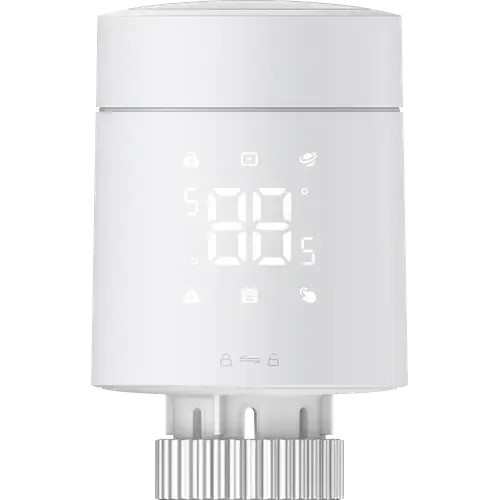
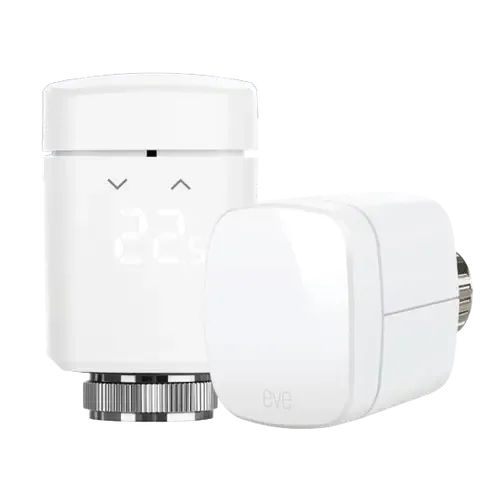
Aqara Radiator Thermostat W600 vs Eve Thermo
Understand the differences. Decide what matters to your home.
Build another comparison →Before you compare every specification
Key differences between Aqara Radiator Thermostat W600 and Eve Thermo
A summary of selected recorded differences between these radiator valves. Check the full specification table below for details and conditions.
Feature differences among your selected devices
- External Temperature Sensors (features): Aqara Radiator Thermostat W600 — Yes (It can take its reading from an Aqara temperature sensor such as the Climate Sensor W100 placed elsewhere in the room, so it regulates the room rather than the air next to the radiator. Requires Zigbee mode through the Aqara Home app.); Eve Thermo — No.
Specifications to check side by side
- Zigbee (connectivity): Aqara Radiator Thermostat W600 — Zigbee Hub required (Zigbee mode is the one that unlocks the Aqara-only features (local schedules, external sensor linking, group control) and needs an Aqara Zigbee 3.0 hub.); Eve Thermo — No.
- Geofencing (features): Aqara Radiator Thermostat W600 — Yes (Heating starts as you approach home, based on the temperature range you preset.); Eve Thermo — Hub required (Don't live life to a fixed schedule? Have Eve Thermo reduce the temperature when everyone’s left for the day. Then as soon as someone returns home, have Eve Thermo raise the temperature automatically | To control your heating based on location, you need a home hub (HomePod mini, HomePod or Apple TV).).
Information still to confirm
- 1 of 27 comparison fields lack a resolved value for at least one selected device. Missing information is not evidence that a feature is absent.
- Check the full table and manufacturer documentation before ruling out a device.
These observations are derived from recorded catalog data and have not all been independently verified. Confirm details with the manufacturer before purchasing.
Compare capabilities, compatibility and setup requirements.
What the catalog tells us
Understand the tradeoffs.
These counts describe the available data, not a quality score. More features do not automatically make a better device.
3differences with recorded values for every device
1rows with missing or unspecified information
Your priorities, side by side
Focus on what changes.
Mark the specifications you care about. Open manufacturer sources for verification scope; fields without citations remain catalog data. Expand notes for other qualifications.
Showing 27 of 27 rows. “Not recorded” does not mean “No”.
Connectivity
- Aqara Radiator Thermostat W600
- No
- Eve Thermo
- No
- Aqara Radiator Thermostat W600
- No
- Eve Thermo
- No
- Aqara Radiator Thermostat W600
- Yes
Catalog note
Aqara lists the wireless protocols as Thread, Zigbee and BLE, and the Matter certificate records Thread and Bluetooth as the transport interfaces.
- Eve Thermo
- Yes
- Aqara Radiator Thermostat W600
- Thread Border Router required
Catalog note
In Thread mode the thermostat joins a Matter fabric directly and needs a Thread border router plus a Matter controller.
- Eve Thermo
- Thread Border Router required
- Aqara Radiator Thermostat W600
- No
- Eve Thermo
- No
- Aqara Radiator Thermostat W600
- Zigbee Hub required
Catalog note
Zigbee mode is the one that unlocks the Aqara-only features (local schedules, external sensor linking, group control) and needs an Aqara Zigbee 3.0 hub.
- Eve Thermo
- No
Display
- Aqara Radiator Thermostat W600
- Yes
Catalog note
The LED display can be rotated 180 degrees so it stays readable whichever way the valve is mounted.
- Eve Thermo
- Yes
- Aqara Radiator Thermostat W600
- LED
- Eve Thermo
- LED
Features
- Aqara Radiator Thermostat W600
- Yes
Catalog note
Open window detection pauses heating for 30 minutes when a bound Aqara door and window sensor reports an opening, and presence or humidity sensors can drive the setpoint through Aqara automations.
- Eve Thermo
- Yes
- Aqara Radiator Thermostat W600
- Yes
Catalog note
The user manual lists a child lock indicator on the display, and Zigbee2MQTT exposes child_lock as a controllable setting.
- Eve Thermo
- Yes
- Aqara Radiator Thermostat W600
- Yes
- Eve Thermo
- Yes
- Aqara Radiator Thermostat W600
- Yes
Catalog note
It can take its reading from an Aqara temperature sensor such as the Climate Sensor W100 placed elsewhere in the room, so it regulates the room rather than the air next to the radiator. Requires Zigbee mode through the Aqara Home app.
- Eve Thermo
- No
- Aqara Radiator Thermostat W600
- Yes
Catalog note
Heating switches on automatically when the ambient temperature falls below 5 degrees Celsius and stops once it climbs back to 8 degrees Celsius.
- Eve Thermo
- Yes
- Aqara Radiator Thermostat W600
- Yes
Catalog note
Heating starts as you approach home, based on the temperature range you preset.
- Eve Thermo
- Hub required
Catalog note
Don't live life to a fixed schedule? Have Eve Thermo reduce the temperature when everyone’s left for the day. Then as soon as someone returns home, have Eve Thermo raise the temperature automatically | To control your heating based on location, you need a home hub (HomePod mini, HomePod or Apple TV).
Integrations
- Aqara Radiator Thermostat W600
- Yes
Catalog note
Via Matter
- Eve Thermo
- Yes
- Aqara Radiator Thermostat W600
- Yes
Catalog note
Via Matter
- Eve Thermo
- Yes
- Aqara Radiator Thermostat W600
- Yes
Catalog note
Via Matter
- Eve Thermo
- Yes
- Aqara Radiator Thermostat W600
- Yes
Catalog note
Home Assistant reaches it two ways: as a Matter thermostat over Thread, and over Zigbee, where Zigbee2MQTT lists the WT-A03E and exposes its schedules, presets, child lock and external temperature input.
- Eve Thermo
- Yes
- Aqara Radiator Thermostat W600
- Yes
Catalog note
Matter certified by the Connectivity Standards Alliance as Smart Thermostat W600 (certificate CSA263YCMAT54532-24), specification 1.3, over Thread.
- Eve Thermo
- Yes
- Aqara Radiator Thermostat W600
- Yes
Catalog note
Via Matter
- Eve Thermo
- Yes
Power
- Aqara Radiator Thermostat W600
- 2 years
- Eve Thermo
- Not recorded
- Aqara Radiator Thermostat W600
- 2x AA
- Eve Thermo
- 2x AA
Scheduling
- Aqara Radiator Thermostat W600
- No
- Eve Thermo
- No
- Aqara Radiator Thermostat W600
- Yes
Catalog note
Up to 7 time periods per day across all 7 days, plus 5 preset modes. In Zigbee mode the schedule is stored on the device and keeps running with the internet down.
- Eve Thermo
- Yes
- Aqara Radiator Thermostat W600
- No
- Eve Thermo
- No
Sensors
- Aqara Radiator Thermostat W600
- No
- Eve Thermo
- No
- Aqara Radiator Thermostat W600
- Yes
Catalog note
A built-in temperature sensor drives the control loop, and it can be calibrated by up to plus or minus 5 degrees Celsius to match how the room actually feels.
- Eve Thermo
- Yes
| Specification | Aqara Radiator Thermostat W600 | Eve Thermo |
|---|---|---|
| Connectivity | ||
| No | No | |
| No | No | |
YesCatalog noteAqara lists the wireless protocols as Thread, Zigbee and BLE, and the Matter certificate records Thread and Bluetooth as the transport interfaces. | Yes | |
Thread Border Router requiredCatalog noteIn Thread mode the thermostat joins a Matter fabric directly and needs a Thread border router plus a Matter controller. | Thread Border Router required | |
| No | No | |
Zigbee Hub requiredCatalog noteZigbee mode is the one that unlocks the Aqara-only features (local schedules, external sensor linking, group control) and needs an Aqara Zigbee 3.0 hub. | No | |
| Display | ||
YesCatalog noteThe LED display can be rotated 180 degrees so it stays readable whichever way the valve is mounted. | Yes | |
| LED | LED | |
| Features | ||
YesCatalog noteOpen window detection pauses heating for 30 minutes when a bound Aqara door and window sensor reports an opening, and presence or humidity sensors can drive the setpoint through Aqara automations. | Yes | |
YesCatalog noteThe user manual lists a child lock indicator on the display, and Zigbee2MQTT exposes child_lock as a controllable setting. | Yes | |
| Yes | Yes | |
YesCatalog noteIt can take its reading from an Aqara temperature sensor such as the Climate Sensor W100 placed elsewhere in the room, so it regulates the room rather than the air next to the radiator. Requires Zigbee mode through the Aqara Home app. | No | |
YesCatalog noteHeating switches on automatically when the ambient temperature falls below 5 degrees Celsius and stops once it climbs back to 8 degrees Celsius. | Yes | |
YesCatalog noteHeating starts as you approach home, based on the temperature range you preset. | Hub requiredCatalog noteDon't live life to a fixed schedule? Have Eve Thermo reduce the temperature when everyone’s left for the day. Then as soon as someone returns home, have Eve Thermo raise the temperature automatically | To control your heating based on location, you need a home hub (HomePod mini, HomePod or Apple TV). | |
| Integrations | ||
YesCatalog noteVia Matter | Yes | |
YesCatalog noteVia Matter | Yes | |
YesCatalog noteVia Matter | Yes | |
YesCatalog noteHome Assistant reaches it two ways: as a Matter thermostat over Thread, and over Zigbee, where Zigbee2MQTT lists the WT-A03E and exposes its schedules, presets, child lock and external temperature input. | Yes | |
YesCatalog noteMatter certified by the Connectivity Standards Alliance as Smart Thermostat W600 (certificate CSA263YCMAT54532-24), specification 1.3, over Thread. | Yes | |
YesCatalog noteVia Matter | Yes | |
| Power | ||
| 2 years | Not recorded | |
| 2x AA | 2x AA | |
| Scheduling | ||
| No | No | |
YesCatalog noteUp to 7 time periods per day across all 7 days, plus 5 preset modes. In Zigbee mode the schedule is stored on the device and keeps running with the internet down. | Yes | |
| No | No | |
| Sensors | ||
| No | No | |
YesCatalog noteA built-in temperature sensor drives the control loop, and it can be calibrated by up to plus or minus 5 degrees Celsius to match how the room actually feels. | Yes | |
Know what’s behind the comparison.
The table matches specifications by section and field. It preserves notes, separates missing data from explicit “No” values, and keeps qualifications attached to their values. No overall winner is assigned from feature counts.
Read our comparison methodology