
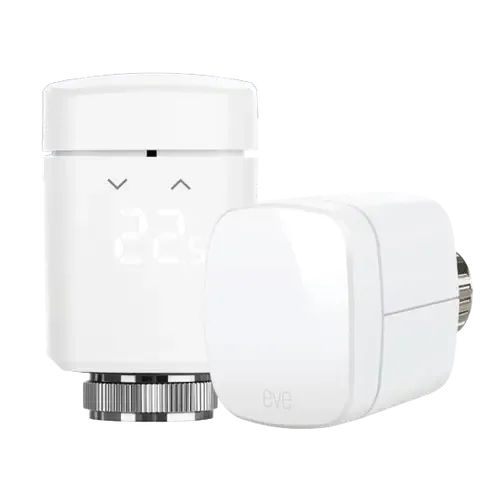
The Smart Device Compare comparison
Eve Thermo vs Sonoff TRV Gen2 Zigbee Thermostatic Radiator Valve
Understand the differences. Decide what matters to your home.
Build another comparison →Before you compare every specification
Key differences between Eve Thermo and Sonoff TRV Gen2 Zigbee Thermostatic Radiator Valve
A summary of selected recorded differences between these radiator valves. Check the full specification table below for details and conditions.
Feature differences among your selected devices
- External Temperature Sensors (features): Eve Thermo — No; Sonoff TRV Gen2 Zigbee Thermostatic Radiator Valve — Yes (Temp. Display from External Sensor lets the valve use another SONOFF sensor on the same eWeLink account as its control reference: SNZB-02, SNZB-02P, SNZB-02D, SNZB-02WD, SNZB-02LD, SNZB-02B and SNZB-02M.).
Specifications to check side by side
- Thread (connectivity): Eve Thermo — Thread Border Router required; Sonoff TRV Gen2 Zigbee Thermostatic Radiator Valve — No (The Thread Connection line in the SONOFF spec table is the M30 x 1.5 mm valve thread, not the Thread protocol.).
- Zigbee (connectivity): Eve Thermo — No; Sonoff TRV Gen2 Zigbee Thermostatic Radiator Valve — Zigbee Hub required (Zigbee 3.0 end device (IEEE 802.15.4). SONOFF lists ZBBridge-P, ZBBridge-U, NSPanel Pro, iHost and its ZBDongle coordinators as compatible hubs.).
- Screen Type (display): Eve Thermo — LED; Sonoff TRV Gen2 Zigbee Thermostatic Radiator Valve — IPS.
- Geofencing (features): Eve Thermo — Hub required (Don't live life to a fixed schedule? Have Eve Thermo reduce the temperature when everyone’s left for the day. Then as soon as someone returns home, have Eve Thermo raise the temperature automatically | To control your heating based on location, you need a home hub (HomePod mini, HomePod or Apple TV).); Sonoff TRV Gen2 Zigbee Thermostatic Radiator Valve — No.
Information still to confirm
- 1 of 27 comparison fields lack a resolved value for at least one selected device. Missing information is not evidence that a feature is absent.
- Check the full table and manufacturer documentation before ruling out a device.
These observations are derived from recorded catalog data and have not all been independently verified. Confirm details with the manufacturer before purchasing.
Compare capabilities, compatibility and setup requirements.
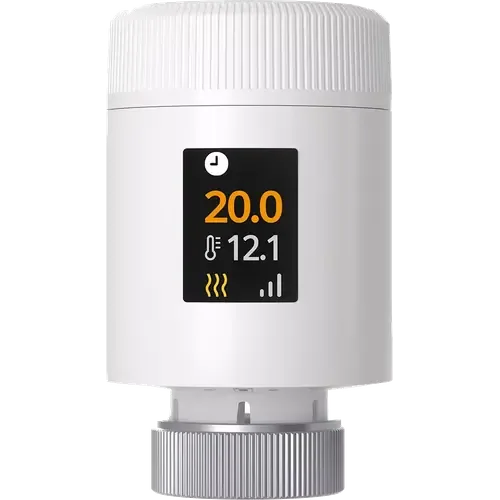
Option 2 · Sonoff
Sonoff TRV Gen2 Zigbee Thermostatic Radiator Valve
Last updated October 2026
View full device profileWhat the catalog tells us
Understand the tradeoffs.
These counts describe the available data, not a quality score. More features do not automatically make a better device.
7differences with recorded values for every device
1rows with missing or unspecified information
Consider your setup
Apple Home
- Eve ThermoYes
- Sonoff TRV Gen2 Zigbee Thermostatic Radiator ValveSONOFF Hub required
Confirm which features appear in Apple Home and whether extra hardware or a subscription is needed for your intended use.
Inspect the specificationsConsider your setup
Matter
- Eve ThermoYes
- Sonoff TRV Gen2 Zigbee Thermostatic Radiator ValveSONOFF Hub required
Confirm the exact device type and the features exposed in your chosen platform. Protocol support does not establish feature parity across apps.
Inspect the specificationsYour priorities, side by side
Focus on what changes.
Mark the specifications you care about. Open manufacturer sources for verification scope; fields without citations remain catalog data. Expand notes for other qualifications.
Showing 27 of 27 rows. “Not recorded” does not mean “No”.
Connectivity
- Eve Thermo
- No
- Sonoff TRV Gen2 Zigbee Thermostatic Radiator Valve
- No
- Eve Thermo
- No
- Sonoff TRV Gen2 Zigbee Thermostatic Radiator Valve
- No
- Eve Thermo
- Yes
- Sonoff TRV Gen2 Zigbee Thermostatic Radiator Valve
- Yes
Catalog note
The official spec sheet lists connectivity as Zigbee 3.0 / BLE. Bluetooth is used to pair the valve with the eWeLink app when the device is already joined to a third-party Zigbee platform, and the app home screen carries a BLE icon that switches the radio.
- Eve Thermo
- Thread Border Router required
- Sonoff TRV Gen2 Zigbee Thermostatic Radiator Valve
- No
Catalog note
The Thread Connection line in the SONOFF spec table is the M30 x 1.5 mm valve thread, not the Thread protocol.
- Eve Thermo
- No
- Sonoff TRV Gen2 Zigbee Thermostatic Radiator Valve
- No
- Eve Thermo
- No
- Sonoff TRV Gen2 Zigbee Thermostatic Radiator Valve
- Zigbee Hub required
Catalog note
Zigbee 3.0 end device (IEEE 802.15.4). SONOFF lists ZBBridge-P, ZBBridge-U, NSPanel Pro, iHost and its ZBDongle coordinators as compatible hubs.
Display
- Eve Thermo
- Yes
- Sonoff TRV Gen2 Zigbee Thermostatic Radiator Valve
- Yes
Catalog note
High-definition IPS colour screen showing status, current temperature and settings, with 4-way rotation so it stays upright whichever way the valve is mounted.
- Eve Thermo
- LED
- Sonoff TRV Gen2 Zigbee Thermostatic Radiator Valve
- IPS
Manufacturer source
The valve uses an IPS screen.
Sonoff TRV Gen2 Zigbee Thermostatic Radiator Valve manufacturer product page →- Source section
- Product feature description
- Model
- Sonoff TRV Gen2 Zigbee Thermostatic Radiator Valve
- Region
- Manufacturer product page; no universal regional compatibility implied
- Firmware
- Not specified by this source
- Checked
Sensor compatibility and available controls depend on the Zigbee hub.
Document check only; not a hands-on test or verification of every regional or firmware variant.
Features
- Eve Thermo
- Yes
- Sonoff TRV Gen2 Zigbee Thermostatic Radiator Valve
- Yes
Catalog note
Smart Scene triggers on open-window detection, device status or the current temperature, and can switch the valve to Auto, Anti-freeze, Manual or Boost or set a temperature between 5 and 30 degrees Celsius.
- Eve Thermo
- Yes
- Sonoff TRV Gen2 Zigbee Thermostatic Radiator Valve
- Yes
Manufacturer source
A child lock is included.
Sonoff TRV Gen2 Zigbee Thermostatic Radiator Valve manufacturer product page →- Source section
- Product feature description
- Model
- Sonoff TRV Gen2 Zigbee Thermostatic Radiator Valve
- Region
- Manufacturer product page; no universal regional compatibility implied
- Firmware
- Not specified by this source
- Checked
Sensor compatibility and available controls depend on the Zigbee hub.
Document check only; not a hands-on test or verification of every regional or firmware variant.
Catalog note
Child lock disables the knob so the valve can only be changed from the app.
- Eve Thermo
- Yes
- Sonoff TRV Gen2 Zigbee Thermostatic Radiator Valve
- Yes
Catalog note
The IPS screen shows the current temperature alongside the target temperature and the heating status.
- Eve Thermo
- No
- Sonoff TRV Gen2 Zigbee Thermostatic Radiator Valve
- Yes
Manufacturer source
A compatible remote temperature sensor can guide heating control.
Sonoff TRV Gen2 Zigbee Thermostatic Radiator Valve manufacturer product page →- Source section
- Product feature description
- Model
- Sonoff TRV Gen2 Zigbee Thermostatic Radiator Valve
- Region
- Manufacturer product page; no universal regional compatibility implied
- Firmware
- Not specified by this source
- Checked
Sensor compatibility and available controls depend on the Zigbee hub.
Document check only; not a hands-on test or verification of every regional or firmware variant.
Catalog note
Temp. Display from External Sensor lets the valve use another SONOFF sensor on the same eWeLink account as its control reference: SNZB-02, SNZB-02P, SNZB-02D, SNZB-02WD, SNZB-02LD, SNZB-02B and SNZB-02M.
- Eve Thermo
- Yes
- Sonoff TRV Gen2 Zigbee Thermostatic Radiator Valve
- Yes
Manufacturer source
Frost protection is listed.
Sonoff TRV Gen2 Zigbee Thermostatic Radiator Valve manufacturer product page →- Source section
- Product feature description
- Model
- Sonoff TRV Gen2 Zigbee Thermostatic Radiator Valve
- Region
- Manufacturer product page; no universal regional compatibility implied
- Firmware
- Not specified by this source
- Checked
Sensor compatibility and available controls depend on the Zigbee hub.
Document check only; not a hands-on test or verification of every regional or firmware variant.
Catalog note
Anti-freeze mode holds a minimum safeguard temperature to protect pipes and the heating system in cold weather, and its threshold is adjustable.
- Eve Thermo
- Hub required
Catalog note
Don't live life to a fixed schedule? Have Eve Thermo reduce the temperature when everyone’s left for the day. Then as soon as someone returns home, have Eve Thermo raise the temperature automatically | To control your heating based on location, you need a home hub (HomePod mini, HomePod or Apple TV).
- Sonoff TRV Gen2 Zigbee Thermostatic Radiator Valve
- No
Integrations
- Eve Thermo
- Yes
- Sonoff TRV Gen2 Zigbee Thermostatic Radiator Valve
- Yes
Catalog note
SONOFF documents Alexa under Third-party Platforms for this model, with working mode and temperature control. Its hub list also covers direct pairing to the Zigbee radio of the Echo Show 2nd Gen, Echo Plus 2nd Gen and Echo 4th Gen.
- Eve Thermo
- Yes
- Sonoff TRV Gen2 Zigbee Thermostatic Radiator Valve
- SONOFF Hub required
Catalog note
The product page states Works with Apple Home via Matter Bridge: the valve reaches the Home app when its Zigbee hub republishes it over Matter (Bridge-M, ZBBridge-U, iHost, NSPanel Pro or eWeLink CUBE). Apple Home has no Zigbee radio of its own.
- Eve Thermo
- Yes
- Sonoff TRV Gen2 Zigbee Thermostatic Radiator Valve
- Yes
Catalog note
SONOFF documents Google Home under Third-party Platforms for this model, with working mode and temperature control, through the eWeLink account or a SONOFF Matter bridge.
- Eve Thermo
- Yes
- Sonoff TRV Gen2 Zigbee Thermostatic Radiator Valve
- Yes
Catalog note
Zigbee2MQTT has a device page for the TRV-ZBT and SONOFF asks for Zigbee2MQTT 2.12.1 or later for full feature support. For ZHA, SONOFF publishes a quirk script while its pull request is pending, so some entities need that script until it is merged.
- Eve Thermo
- Yes
- Sonoff TRV Gen2 Zigbee Thermostatic Radiator Valve
- SONOFF Hub required
Catalog note
The valve is not a Matter device itself: it is Zigbee, and SONOFF publishes it into Matter through one of its bridges (Bridge-M, ZBBridge-U, iHost, NSPanel Pro or eWeLink CUBE running on a Raspberry Pi, a virtual machine or a NAS with a SONOFF Zigbee dongle).
- Eve Thermo
- Yes
- Sonoff TRV Gen2 Zigbee Thermostatic Radiator Valve
- Yes
Catalog note
SONOFF documents SmartThings under Third-party Platforms for this model and publishes a SmartThings driver invite for it; a Zigbee hub such as the Aeotec SmartThings Hub v3 pairs the valve directly.
Power
- Eve Thermo
- Not recorded
- Sonoff TRV Gen2 Zigbee Thermostatic Radiator Valve
- 6 months
Catalog note
SONOFF states two 2,000 mAh AA alkaline batteries last up to six months under normal use, and that valve adjustment frequency, ambient temperature and network stability shorten it.
- Eve Thermo
- 2x AA
- Sonoff TRV Gen2 Zigbee Thermostatic Radiator Valve
- 2x AA
Scheduling
- Eve Thermo
- No
- Sonoff TRV Gen2 Zigbee Thermostatic Radiator Valve
- No
- Eve Thermo
- Yes
- Sonoff TRV Gen2 Zigbee Thermostatic Radiator Valve
- Yes
Catalog note
Three switchable schedule plans, each covering all seven days of the week with up to 12 time slots per day, plus Manual and Anti-freeze operating modes and a Boost timer.
- Eve Thermo
- No
- Sonoff TRV Gen2 Zigbee Thermostatic Radiator Valve
- No
Sensors
- Eve Thermo
- No
- Sonoff TRV Gen2 Zigbee Thermostatic Radiator Valve
- No
- Eve Thermo
- Yes
- Sonoff TRV Gen2 Zigbee Thermostatic Radiator Valve
- Yes
Catalog note
The valve measures room temperature itself and shows it on the display, with a temperature offset setting to calibrate the reading.
| Specification | Eve Thermo | Sonoff TRV Gen2 Zigbee Thermostatic Radiator Valve |
|---|---|---|
| Connectivity | ||
| No | No | |
| No | No | |
| Yes | YesCatalog noteThe official spec sheet lists connectivity as Zigbee 3.0 / BLE. Bluetooth is used to pair the valve with the eWeLink app when the device is already joined to a third-party Zigbee platform, and the app home screen carries a BLE icon that switches the radio. | |
| Thread Border Router required | NoCatalog noteThe Thread Connection line in the SONOFF spec table is the M30 x 1.5 mm valve thread, not the Thread protocol. | |
| No | No | |
| No | Zigbee Hub requiredCatalog noteZigbee 3.0 end device (IEEE 802.15.4). SONOFF lists ZBBridge-P, ZBBridge-U, NSPanel Pro, iHost and its ZBDongle coordinators as compatible hubs. | |
| Display | ||
| Yes | YesCatalog noteHigh-definition IPS colour screen showing status, current temperature and settings, with 4-way rotation so it stays upright whichever way the valve is mounted. | |
| LED | IPSManufacturer sourceThe valve uses an IPS screen. Sonoff TRV Gen2 Zigbee Thermostatic Radiator Valve manufacturer product page →
Sensor compatibility and available controls depend on the Zigbee hub. Document check only; not a hands-on test or verification of every regional or firmware variant. | |
| Features | ||
| Yes | YesCatalog noteSmart Scene triggers on open-window detection, device status or the current temperature, and can switch the valve to Auto, Anti-freeze, Manual or Boost or set a temperature between 5 and 30 degrees Celsius. | |
| Yes | YesManufacturer sourceA child lock is included. Sonoff TRV Gen2 Zigbee Thermostatic Radiator Valve manufacturer product page →
Sensor compatibility and available controls depend on the Zigbee hub. Document check only; not a hands-on test or verification of every regional or firmware variant. Catalog noteChild lock disables the knob so the valve can only be changed from the app. | |
| Yes | YesCatalog noteThe IPS screen shows the current temperature alongside the target temperature and the heating status. | |
| No | YesManufacturer sourceA compatible remote temperature sensor can guide heating control. Sonoff TRV Gen2 Zigbee Thermostatic Radiator Valve manufacturer product page →
Sensor compatibility and available controls depend on the Zigbee hub. Document check only; not a hands-on test or verification of every regional or firmware variant. Catalog noteTemp. Display from External Sensor lets the valve use another SONOFF sensor on the same eWeLink account as its control reference: SNZB-02, SNZB-02P, SNZB-02D, SNZB-02WD, SNZB-02LD, SNZB-02B and SNZB-02M. | |
| Yes | YesManufacturer sourceFrost protection is listed. Sonoff TRV Gen2 Zigbee Thermostatic Radiator Valve manufacturer product page →
Sensor compatibility and available controls depend on the Zigbee hub. Document check only; not a hands-on test or verification of every regional or firmware variant. Catalog noteAnti-freeze mode holds a minimum safeguard temperature to protect pipes and the heating system in cold weather, and its threshold is adjustable. | |
Hub requiredCatalog noteDon't live life to a fixed schedule? Have Eve Thermo reduce the temperature when everyone’s left for the day. Then as soon as someone returns home, have Eve Thermo raise the temperature automatically | To control your heating based on location, you need a home hub (HomePod mini, HomePod or Apple TV). | No | |
| Integrations | ||
| Yes | YesCatalog noteSONOFF documents Alexa under Third-party Platforms for this model, with working mode and temperature control. Its hub list also covers direct pairing to the Zigbee radio of the Echo Show 2nd Gen, Echo Plus 2nd Gen and Echo 4th Gen. | |
| Yes | SONOFF Hub requiredCatalog noteThe product page states Works with Apple Home via Matter Bridge: the valve reaches the Home app when its Zigbee hub republishes it over Matter (Bridge-M, ZBBridge-U, iHost, NSPanel Pro or eWeLink CUBE). Apple Home has no Zigbee radio of its own. | |
| Yes | YesCatalog noteSONOFF documents Google Home under Third-party Platforms for this model, with working mode and temperature control, through the eWeLink account or a SONOFF Matter bridge. | |
| Yes | YesCatalog noteZigbee2MQTT has a device page for the TRV-ZBT and SONOFF asks for Zigbee2MQTT 2.12.1 or later for full feature support. For ZHA, SONOFF publishes a quirk script while its pull request is pending, so some entities need that script until it is merged. | |
| Yes | SONOFF Hub requiredCatalog noteThe valve is not a Matter device itself: it is Zigbee, and SONOFF publishes it into Matter through one of its bridges (Bridge-M, ZBBridge-U, iHost, NSPanel Pro or eWeLink CUBE running on a Raspberry Pi, a virtual machine or a NAS with a SONOFF Zigbee dongle). | |
| Yes | YesCatalog noteSONOFF documents SmartThings under Third-party Platforms for this model and publishes a SmartThings driver invite for it; a Zigbee hub such as the Aeotec SmartThings Hub v3 pairs the valve directly. | |
| Power | ||
| Not recorded | 6 monthsCatalog noteSONOFF states two 2,000 mAh AA alkaline batteries last up to six months under normal use, and that valve adjustment frequency, ambient temperature and network stability shorten it. | |
| 2x AA | 2x AA | |
| Scheduling | ||
| No | No | |
| Yes | YesCatalog noteThree switchable schedule plans, each covering all seven days of the week with up to 12 time slots per day, plus Manual and Anti-freeze operating modes and a Boost timer. | |
| No | No | |
| Sensors | ||
| No | No | |
| Yes | YesCatalog noteThe valve measures room temperature itself and shows it on the display, with a temperature offset setting to calibrate the reading. | |
Know what’s behind the comparison.
The table matches specifications by section and field. It preserves notes, separates missing data from explicit “No” values, and keeps qualifications attached to their values. No overall winner is assigned from feature counts.
Read our comparison methodology