
The Smart Device Compare comparison
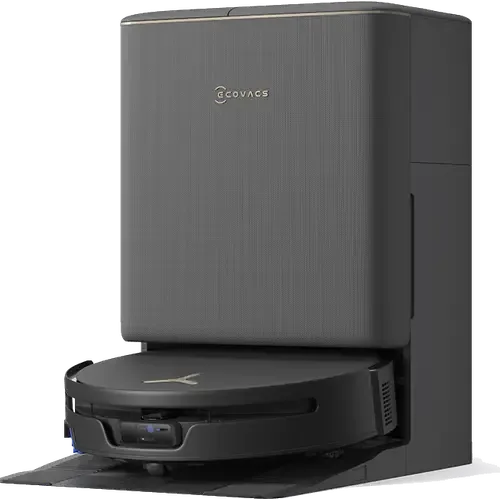
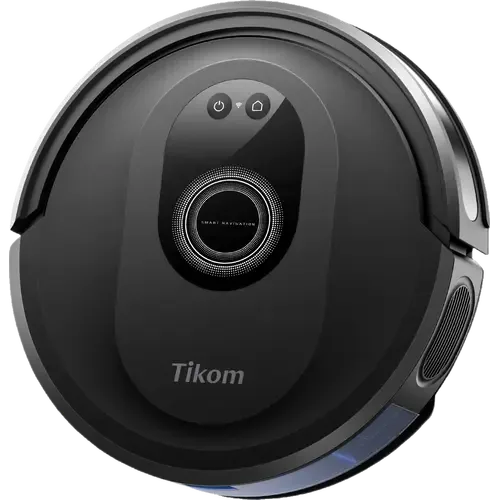
Ecovacs DEEBOT T90S PRO Omni vs Tikom G8000 Max
Understand the differences. Decide what matters to your home.
Build another comparison →Before you compare every specification
Key differences between Ecovacs DEEBOT T90S PRO Omni and Tikom G8000 Max
A summary of selected recorded differences between these robot vacuums. Check the full specification table below for details and conditions.
Feature differences among your selected devices
- Self Emptying (features): Ecovacs DEEBOT T90S PRO Omni — Yes; Tikom G8000 Max — No (The dock is a plain charging station with no dust bag: the 450 ml bin is emptied by hand).
- Apple Home (integrations): Ecovacs DEEBOT T90S PRO Omni — Yes (Via Matter); Tikom G8000 Max — No (Apple Home reaches robot vacuums only over Matter, and this one is not Matter certified; the manual names Alexa and Google Assistant as the only voice platforms).
- Matter (integrations): Ecovacs DEEBOT T90S PRO Omni — Yes (The Ecovacs Home app exposes the DEEBOT to Matter ecosystems.); Tikom G8000 Max — No (No Tikom product appears in the CSA certified-products database, and neither the manual nor any of the store listings claims Matter).
- SmartThings (integrations): Ecovacs DEEBOT T90S PRO Omni — Yes (Via Matter); Tikom G8000 Max — No (No Matter path and no SmartThings account linking: the Tuya cloud is the only bridge the manufacturer documents).
Specifications to check side by side
- Noise Level (features): Ecovacs DEEBOT T90S PRO Omni — 60dB; Tikom G8000 Max — 45dB.
- Onboard Dustbin Capacity (features): Ecovacs DEEBOT T90S PRO Omni — 250ml; Tikom G8000 Max — 450ml.
- Water Tank Capacity (mopping): Ecovacs DEEBOT T90S PRO Omni — 4L; Tikom G8000 Max — 0.3L.
- Navigation Type (navigation): Ecovacs DEEBOT T90S PRO Omni — Laser (LiDAR); Tikom G8000 Max — Gyroscope Navigation (The manual lists the navigation module as a gyroscope: the robot cleans in Smart (zig-zag), Edge, Spot and Random patterns rather than from a stored floor plan).
Information still to confirm
- 5 of 37 comparison fields lack a resolved value for at least one selected device. Missing information is not evidence that a feature is absent.
- Check the full table and manufacturer documentation before ruling out a device.
These observations are derived from recorded catalog data and have not all been independently verified. Confirm details with the manufacturer before purchasing.
Compare capabilities, compatibility and setup requirements.
What the catalog tells us
Understand the tradeoffs.
These counts describe the available data, not a quality score. More features do not automatically make a better device.
18differences with recorded values for every device
5rows with missing or unspecified information
Consider your setup
Apple Home
- Ecovacs DEEBOT T90S PRO OmniYes
- Tikom G8000 MaxNo
Confirm which features appear in Apple Home and whether extra hardware or a subscription is needed for your intended use.
Inspect the specificationsConsider your setup
Matter
- Ecovacs DEEBOT T90S PRO OmniYes
- Tikom G8000 MaxNo
Confirm the exact device type and the features exposed in your chosen platform. Protocol support does not establish feature parity across apps.
Inspect the specificationsConsider your setup
Battery Life
- Ecovacs DEEBOT T90S PRO Omni200 minutes
- Tikom G8000 Max150 minutes
Compare the stated test conditions. Catalog battery figures alone do not predict runtime in your home.
Inspect the specificationsYour priorities, side by side
Focus on what changes.
Mark the specifications you care about. Open manufacturer sources for verification scope; fields without citations remain catalog data. Expand notes for other qualifications.
Showing 37 of 37 rows. “Not recorded” does not mean “No”.
Connectivity
- Ecovacs DEEBOT T90S PRO Omni
- Yes
- Tikom G8000 Max
- Yes
- Ecovacs DEEBOT T90S PRO Omni
- No
- Tikom G8000 Max
- No
Catalog note
The manual is explicit: the robot joins 2.4 GHz networks only (WPA/WPA2 with TKIP, PSK or AES/CCMP)
- Ecovacs DEEBOT T90S PRO Omni
- Not recorded
- Tikom G8000 Max
- For Setup Only
Catalog note
The pairing steps require Bluetooth on the phone or tablet to be switched on while the robot is added
- Ecovacs DEEBOT T90S PRO Omni
- No
- Tikom G8000 Max
- No
- Ecovacs DEEBOT T90S PRO Omni
- No
- Tikom G8000 Max
- No
- Ecovacs DEEBOT T90S PRO Omni
- No
- Tikom G8000 Max
- No
Features
- Ecovacs DEEBOT T90S PRO Omni
- Not recorded
- Tikom G8000 Max
- No
- Ecovacs DEEBOT T90S PRO Omni
- 2.5L
- Tikom G8000 Max
- Not applicable / unspecified
- Ecovacs DEEBOT T90S PRO Omni
- 60dB
- Tikom G8000 Max
- 45dB
- Ecovacs DEEBOT T90S PRO Omni
- 250ml
- Tikom G8000 Max
- 450ml
- Ecovacs DEEBOT T90S PRO Omni
- Yes
- Tikom G8000 Max
- Yes
Catalog note
The Tuya Smart app has a Live Cleaning Map page that follows the robot's track while it works
- Ecovacs DEEBOT T90S PRO Omni
- Yes
- Tikom G8000 Max
- Yes
Catalog note
Scheduled cleaning is set in the app, and runs only while the robot is online and above 20% battery
- Ecovacs DEEBOT T90S PRO Omni
- Yes
- Tikom G8000 Max
- No
Catalog note
The dock is a plain charging station with no dust bag: the 450 ml bin is emptied by hand
Integrations
- Ecovacs DEEBOT T90S PRO Omni
- Yes
- Tikom G8000 Max
- Yes
Catalog note
Voice control once the Tuya Smart account is connected to Alexa, with the start, stop and dock commands listed in the manual
- Ecovacs DEEBOT T90S PRO Omni
- Yes
Catalog note
Via Matter
- Tikom G8000 Max
- No
Catalog note
Apple Home reaches robot vacuums only over Matter, and this one is not Matter certified; the manual names Alexa and Google Assistant as the only voice platforms
- Ecovacs DEEBOT T90S PRO Omni
- Yes
- Tikom G8000 Max
- Yes
Catalog note
The manual has a Work with Amazon Alexa or Google Assistant chapter: link the Tuya Smart account to Google Assistant and control the robot from Google Home
- Ecovacs DEEBOT T90S PRO Omni
- Yes
Catalog note
The official Home Assistant Ecovacs integration controls DEEBOT robot vacuums.
- Tikom G8000 Max
- Yes
Catalog note
The robot is set up in the Tuya Smart app, and Home Assistant's official Tuya integration connects that account and exposes its Vacuum entities
- Ecovacs DEEBOT T90S PRO Omni
- Yes
Catalog note
The Ecovacs Home app exposes the DEEBOT to Matter ecosystems.
- Tikom G8000 Max
- No
Catalog note
No Tikom product appears in the CSA certified-products database, and neither the manual nor any of the store listings claims Matter
- Ecovacs DEEBOT T90S PRO Omni
- Yes
Catalog note
Via Matter
- Tikom G8000 Max
- No
Catalog note
No Matter path and no SmartThings account linking: the Tuya cloud is the only bridge the manufacturer documents
Mopping
- Ecovacs DEEBOT T90S PRO Omni
- Yes
- Tikom G8000 Max
- No
- Ecovacs DEEBOT T90S PRO Omni
- Yes
- Tikom G8000 Max
- No
- Ecovacs DEEBOT T90S PRO Omni
- Yes
- Tikom G8000 Max
- No
Catalog note
The mopping cloth holder has to be taken off, or the carpet blocked with the boundary strip, to keep rugs dry
- Ecovacs DEEBOT T90S PRO Omni
- Yes
- Tikom G8000 Max
- No
Catalog note
The charging station only charges: the mopping cloth is rinsed by hand
- Ecovacs DEEBOT T90S PRO Omni
- Yes
- Tikom G8000 Max
- No
Catalog note
The manual asks for clean water only in the tank
- Ecovacs DEEBOT T90S PRO Omni
- Yes
Catalog note
OZMO Roller 3.0 self-washing roller mop with 32-way pressurized fresh-water flow
- Tikom G8000 Max
- Yes
Catalog note
An electric water tank with a mopping cloth holder lets the robot vacuum and mop in the same pass, with three water levels
- Ecovacs DEEBOT T90S PRO Omni
- 4L
- Tikom G8000 Max
- 0.3L
Navigation
- Ecovacs DEEBOT T90S PRO Omni
- Not recorded
- Tikom G8000 Max
- Yes
Catalog note
Anti-drop sensors under the robot stop it at stairs and drops, and raise a Cliff Sensor Error when they are dirty
- Ecovacs DEEBOT T90S PRO Omni
- Yes
- Tikom G8000 Max
- No
Catalog note
The manual states the app map only traces the path just cleaned and does not represent the home layout, and a new map is drawn on every run
- Ecovacs DEEBOT T90S PRO Omni
- Laser (LiDAR)
- Tikom G8000 Max
- Gyroscope Navigation
Catalog note
The manual lists the navigation module as a gyroscope: the robot cleans in Smart (zig-zag), Edge, Spot and Random patterns rather than from a stored floor plan
- Ecovacs DEEBOT T90S PRO Omni
- Yes
- Tikom G8000 Max
- No
Catalog note
There are no zones to draw in the app: areas are blocked off with the 1 m magnetic boundary strip supplied in the box
- Ecovacs DEEBOT T90S PRO Omni
- Yes
Catalog note
AIVI 3D 4.0 camera and structured-light obstacle avoidance with LED assist
- Tikom G8000 Max
- No
Catalog note
Anti-collision bumper sensors only, with no camera or laser to identify and steer around objects left on the floor
Power
- Ecovacs DEEBOT T90S PRO Omni
- Yes
- Tikom G8000 Max
- Yes
Catalog note
Returns to the charging station on its own when the battery runs low
- Ecovacs DEEBOT T90S PRO Omni
- 200 minutes
- Tikom G8000 Max
- 150 minutes
Catalog note
2600 mAh battery: about 150 minutes on Gentle suction, 120 on Normal and 90 on Strong
- Ecovacs DEEBOT T90S PRO Omni
- Not recorded
- Tikom G8000 Max
- 6.5 hours
Catalog note
The manual states a full charge takes 6 to 6.5 hours
Suction Performance
- Ecovacs DEEBOT T90S PRO Omni
- Yes
Catalog note
Carpet detection with a physical cover and 15 mm roller lift to keep rugs dry
- Tikom G8000 Max
- Yes
Catalog note
Rated for short-pile and medium-pile carpet, and the wheels climb thresholds up to 16 mm
- Ecovacs DEEBOT T90S PRO Omni
- Yes
Catalog note
ZeroTangle 4.0 anti-tangle main brush and side brush
- Tikom G8000 Max
- Yes
Catalog note
Two side brushes are included in the box
- Ecovacs DEEBOT T90S PRO Omni
- 40000Pa
- Tikom G8000 Max
- 5000Pa
Catalog note
Three suction levels selected in the app or on the remote: Gentle, Normal and Strong
| Specification | Ecovacs DEEBOT T90S PRO Omni | Tikom G8000 Max |
|---|---|---|
| Connectivity | ||
| Yes | Yes | |
| No | NoCatalog noteThe manual is explicit: the robot joins 2.4 GHz networks only (WPA/WPA2 with TKIP, PSK or AES/CCMP) | |
| Not recorded | For Setup OnlyCatalog noteThe pairing steps require Bluetooth on the phone or tablet to be switched on while the robot is added | |
| No | No | |
| No | No | |
| No | No | |
| Features | ||
| Not recorded | No | |
| 2.5L | Not applicable / unspecified | |
| 60dB | 45dB | |
| 250ml | 450ml | |
| Yes | YesCatalog noteThe Tuya Smart app has a Live Cleaning Map page that follows the robot's track while it works | |
| Yes | YesCatalog noteScheduled cleaning is set in the app, and runs only while the robot is online and above 20% battery | |
| Yes | NoCatalog noteThe dock is a plain charging station with no dust bag: the 450 ml bin is emptied by hand | |
| Integrations | ||
| Yes | YesCatalog noteVoice control once the Tuya Smart account is connected to Alexa, with the start, stop and dock commands listed in the manual | |
YesCatalog noteVia Matter | NoCatalog noteApple Home reaches robot vacuums only over Matter, and this one is not Matter certified; the manual names Alexa and Google Assistant as the only voice platforms | |
| Yes | YesCatalog noteThe manual has a Work with Amazon Alexa or Google Assistant chapter: link the Tuya Smart account to Google Assistant and control the robot from Google Home | |
YesCatalog noteThe official Home Assistant Ecovacs integration controls DEEBOT robot vacuums. | YesCatalog noteThe robot is set up in the Tuya Smart app, and Home Assistant's official Tuya integration connects that account and exposes its Vacuum entities | |
YesCatalog noteThe Ecovacs Home app exposes the DEEBOT to Matter ecosystems. | NoCatalog noteNo Tikom product appears in the CSA certified-products database, and neither the manual nor any of the store listings claims Matter | |
YesCatalog noteVia Matter | NoCatalog noteNo Matter path and no SmartThings account linking: the Tuya cloud is the only bridge the manufacturer documents | |
| Mopping | ||
| Yes | No | |
| Yes | No | |
| Yes | NoCatalog noteThe mopping cloth holder has to be taken off, or the carpet blocked with the boundary strip, to keep rugs dry | |
| Yes | NoCatalog noteThe charging station only charges: the mopping cloth is rinsed by hand | |
| Yes | NoCatalog noteThe manual asks for clean water only in the tank | |
YesCatalog noteOZMO Roller 3.0 self-washing roller mop with 32-way pressurized fresh-water flow | YesCatalog noteAn electric water tank with a mopping cloth holder lets the robot vacuum and mop in the same pass, with three water levels | |
| 4L | 0.3L | |
| Navigation | ||
| Not recorded | YesCatalog noteAnti-drop sensors under the robot stop it at stairs and drops, and raise a Cliff Sensor Error when they are dirty | |
| Yes | NoCatalog noteThe manual states the app map only traces the path just cleaned and does not represent the home layout, and a new map is drawn on every run | |
| Laser (LiDAR) | Gyroscope NavigationCatalog noteThe manual lists the navigation module as a gyroscope: the robot cleans in Smart (zig-zag), Edge, Spot and Random patterns rather than from a stored floor plan | |
| Yes | NoCatalog noteThere are no zones to draw in the app: areas are blocked off with the 1 m magnetic boundary strip supplied in the box | |
YesCatalog noteAIVI 3D 4.0 camera and structured-light obstacle avoidance with LED assist | NoCatalog noteAnti-collision bumper sensors only, with no camera or laser to identify and steer around objects left on the floor | |
| Power | ||
| Yes | YesCatalog noteReturns to the charging station on its own when the battery runs low | |
| 200 minutes | 150 minutesCatalog note2600 mAh battery: about 150 minutes on Gentle suction, 120 on Normal and 90 on Strong | |
| Not recorded | 6.5 hoursCatalog noteThe manual states a full charge takes 6 to 6.5 hours | |
| Suction Performance | ||
YesCatalog noteCarpet detection with a physical cover and 15 mm roller lift to keep rugs dry | YesCatalog noteRated for short-pile and medium-pile carpet, and the wheels climb thresholds up to 16 mm | |
YesCatalog noteZeroTangle 4.0 anti-tangle main brush and side brush | YesCatalog noteTwo side brushes are included in the box | |
| 40000Pa | 5000PaCatalog noteThree suction levels selected in the app or on the remote: Gentle, Normal and Strong | |
Know what’s behind the comparison.
The table matches specifications by section and field. It preserves notes, separates missing data from explicit “No” values, and keeps qualifications attached to their values. No overall winner is assigned from feature counts.
Read our comparison methodology