
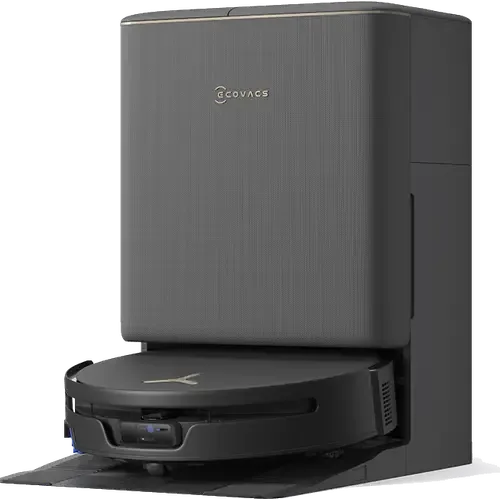
The Smart Device Compare comparison
Ecovacs DEEBOT T90S PRO Omni vs Tikom L8000 Plus
Understand the differences. Decide what matters to your home.
Build another comparison →Before you compare every specification
Key differences between Ecovacs DEEBOT T90S PRO Omni and Tikom L8000 Plus
A summary of selected recorded differences between these robot vacuums. Check the full specification table below for details and conditions.
Feature differences among your selected devices
- 5 GHz Wi-Fi (connectivity): Ecovacs DEEBOT T90S PRO Omni — No; Tikom L8000 Plus — Yes.
- Apple Home (integrations): Ecovacs DEEBOT T90S PRO Omni — Yes (Via Matter); Tikom L8000 Plus — No.
- Matter (integrations): Ecovacs DEEBOT T90S PRO Omni — Yes (The Ecovacs Home app exposes the DEEBOT to Matter ecosystems.); Tikom L8000 Plus — No.
- SmartThings (integrations): Ecovacs DEEBOT T90S PRO Omni — Yes (Via Matter); Tikom L8000 Plus — No.
Specifications to check side by side
- Dock Dustbin Capacity (features): Ecovacs DEEBOT T90S PRO Omni — 2.5L; Tikom L8000 Plus — 3L.
- Onboard Dustbin Capacity (features): Ecovacs DEEBOT T90S PRO Omni — 250ml; Tikom L8000 Plus — 450ml.
- Water Tank Capacity (mopping): Ecovacs DEEBOT T90S PRO Omni — 4L; Tikom L8000 Plus — 0.3L.
- Battery Life (power): Ecovacs DEEBOT T90S PRO Omni — 200 minutes; Tikom L8000 Plus — 150 minutes (2600 mAh battery: about 150 minutes in Eco, 120 in Standard and 90 in Max).
Information still to confirm
- 4 of 37 comparison fields lack a resolved value for at least one selected device. Missing information is not evidence that a feature is absent.
- Check the full table and manufacturer documentation before ruling out a device.
These observations are derived from recorded catalog data and have not all been independently verified. Confirm details with the manufacturer before purchasing.
Compare capabilities, compatibility and setup requirements.
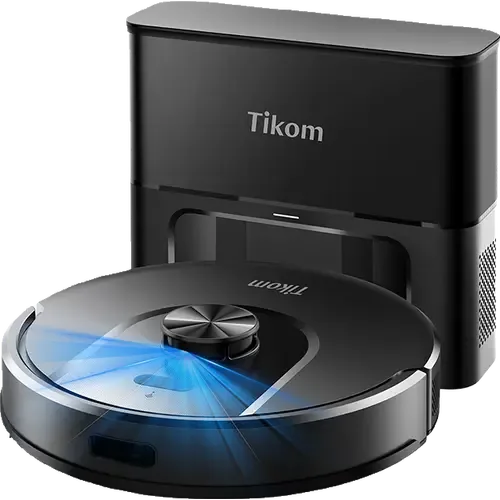
What the catalog tells us
Understand the tradeoffs.
These counts describe the available data, not a quality score. More features do not automatically make a better device.
15differences with recorded values for every device
4rows with missing or unspecified information
Consider your setup
Apple Home
- Ecovacs DEEBOT T90S PRO OmniYes
- Tikom L8000 PlusNo
Confirm which features appear in Apple Home and whether extra hardware or a subscription is needed for your intended use.
Inspect the specificationsConsider your setup
Matter
- Ecovacs DEEBOT T90S PRO OmniYes
- Tikom L8000 PlusNo
Confirm the exact device type and the features exposed in your chosen platform. Protocol support does not establish feature parity across apps.
Inspect the specificationsConsider your setup
Battery Life
- Ecovacs DEEBOT T90S PRO Omni200 minutes
- Tikom L8000 Plus150 minutes
Compare the stated test conditions. Catalog battery figures alone do not predict runtime in your home.
Inspect the specificationsYour priorities, side by side
Focus on what changes.
Mark the specifications you care about. Open manufacturer sources for verification scope; fields without citations remain catalog data. Expand notes for other qualifications.
Showing 37 of 37 rows. “Not recorded” does not mean “No”.
Connectivity
- Ecovacs DEEBOT T90S PRO Omni
- Yes
- Tikom L8000 Plus
- Yes
- Ecovacs DEEBOT T90S PRO Omni
- No
- Tikom L8000 Plus
- Yes
- Ecovacs DEEBOT T90S PRO Omni
- Not recorded
- Tikom L8000 Plus
- For Setup Only
Catalog note
The manual requires Bluetooth on the phone to be on while pairing the robot
- Ecovacs DEEBOT T90S PRO Omni
- No
- Tikom L8000 Plus
- No
- Ecovacs DEEBOT T90S PRO Omni
- No
- Tikom L8000 Plus
- No
- Ecovacs DEEBOT T90S PRO Omni
- No
- Tikom L8000 Plus
- No
Features
- Ecovacs DEEBOT T90S PRO Omni
- Not recorded
- Tikom L8000 Plus
- Not recorded
- Ecovacs DEEBOT T90S PRO Omni
- 2.5L
- Tikom L8000 Plus
- 3L
- Ecovacs DEEBOT T90S PRO Omni
- 60dB
- Tikom L8000 Plus
- 60dB
- Ecovacs DEEBOT T90S PRO Omni
- 250ml
- Tikom L8000 Plus
- 450ml
- Ecovacs DEEBOT T90S PRO Omni
- Yes
- Tikom L8000 Plus
- Yes
Catalog note
The app shows a real-time map with cleaning area, elapsed time and remaining battery
- Ecovacs DEEBOT T90S PRO Omni
- Yes
- Tikom L8000 Plus
- Yes
- Ecovacs DEEBOT T90S PRO Omni
- Yes
- Tikom L8000 Plus
- Yes
Catalog note
Self-empty base with a 3 L sealed dust bag, rated for about 90 days between changes
Integrations
- Ecovacs DEEBOT T90S PRO Omni
- Yes
- Tikom L8000 Plus
- Yes
Catalog note
Voice control through the Tuya Smart account linked to Alexa
- Ecovacs DEEBOT T90S PRO Omni
- Yes
Catalog note
Via Matter
- Tikom L8000 Plus
- No
- Ecovacs DEEBOT T90S PRO Omni
- Yes
- Tikom L8000 Plus
- Yes
Catalog note
Voice control through the Tuya Smart account linked to Google Assistant
- Ecovacs DEEBOT T90S PRO Omni
- Yes
Catalog note
The official Home Assistant Ecovacs integration controls DEEBOT robot vacuums.
- Tikom L8000 Plus
- Yes
Catalog note
Reachable through the Tuya cloud integration, the same path the rest of the Tuya catalog uses
- Ecovacs DEEBOT T90S PRO Omni
- Yes
Catalog note
The Ecovacs Home app exposes the DEEBOT to Matter ecosystems.
- Tikom L8000 Plus
- No
- Ecovacs DEEBOT T90S PRO Omni
- Yes
Catalog note
Via Matter
- Tikom L8000 Plus
- No
Mopping
- Ecovacs DEEBOT T90S PRO Omni
- Yes
- Tikom L8000 Plus
- No
- Ecovacs DEEBOT T90S PRO Omni
- Yes
- Tikom L8000 Plus
- No
- Ecovacs DEEBOT T90S PRO Omni
- Yes
- Tikom L8000 Plus
- No
Catalog note
The manual asks for the mop holder to be removed or a no-mop zone drawn so carpet stays dry
- Ecovacs DEEBOT T90S PRO Omni
- Yes
- Tikom L8000 Plus
- No
Catalog note
The base empties the dustbin only, the mop pad is rinsed by hand
- Ecovacs DEEBOT T90S PRO Omni
- Yes
- Tikom L8000 Plus
- No
- Ecovacs DEEBOT T90S PRO Omni
- Yes
Catalog note
OZMO Roller 3.0 self-washing roller mop with 32-way pressurized fresh-water flow
- Tikom L8000 Plus
- Yes
Catalog note
Mop pad over a 300 ml water tank with three water flow settings, vacuuming and mopping in the same pass
- Ecovacs DEEBOT T90S PRO Omni
- 4L
- Tikom L8000 Plus
- 0.3L
Navigation
- Ecovacs DEEBOT T90S PRO Omni
- Not recorded
- Tikom L8000 Plus
- Yes
- Ecovacs DEEBOT T90S PRO Omni
- Yes
- Tikom L8000 Plus
- Yes
Catalog note
Saves up to 5 floor maps and supports room, zone and spot cleaning
- Ecovacs DEEBOT T90S PRO Omni
- Laser (LiDAR)
- Tikom L8000 Plus
- Laser (LiDAR)
Catalog note
360 degree LiDAR scanning with room mapping and up to 5 saved multi-floor maps
- Ecovacs DEEBOT T90S PRO Omni
- Yes
- Tikom L8000 Plus
- Yes
Catalog note
No-go zones, no-mop zones and virtual walls are set in the app
- Ecovacs DEEBOT T90S PRO Omni
- Yes
Catalog note
AIVI 3D 4.0 camera and structured-light obstacle avoidance with LED assist
- Tikom L8000 Plus
- No
Catalog note
No front-facing camera or dedicated obstacle sensor: the LiDAR maps walls but small objects on the floor are bumped
Power
- Ecovacs DEEBOT T90S PRO Omni
- Yes
- Tikom L8000 Plus
- Yes
Catalog note
Recharges when the battery drops below 15% and resumes where it left off once charged to 80%
- Ecovacs DEEBOT T90S PRO Omni
- 200 minutes
- Tikom L8000 Plus
- 150 minutes
Catalog note
2600 mAh battery: about 150 minutes in Eco, 120 in Standard and 90 in Max
- Ecovacs DEEBOT T90S PRO Omni
- Not recorded
- Tikom L8000 Plus
- Not recorded
Suction Performance
- Ecovacs DEEBOT T90S PRO Omni
- Yes
Catalog note
Carpet detection with a physical cover and 15 mm roller lift to keep rugs dry
- Tikom L8000 Plus
- Yes
- Ecovacs DEEBOT T90S PRO Omni
- Yes
Catalog note
ZeroTangle 4.0 anti-tangle main brush and side brush
- Tikom L8000 Plus
- Yes
- Ecovacs DEEBOT T90S PRO Omni
- 40000Pa
- Tikom L8000 Plus
- 6000Pa
Catalog note
Three suction levels, with Carpet Boost raising it to the 6000 Pa maximum on carpet
| Specification | Ecovacs DEEBOT T90S PRO Omni | Tikom L8000 Plus |
|---|---|---|
| Connectivity | ||
| Yes | Yes | |
| No | Yes | |
| Not recorded | For Setup OnlyCatalog noteThe manual requires Bluetooth on the phone to be on while pairing the robot | |
| No | No | |
| No | No | |
| No | No | |
| Features | ||
| Not recorded | Not recorded | |
| 2.5L | 3L | |
| 60dB | 60dB | |
| 250ml | 450ml | |
| Yes | YesCatalog noteThe app shows a real-time map with cleaning area, elapsed time and remaining battery | |
| Yes | Yes | |
| Yes | YesCatalog noteSelf-empty base with a 3 L sealed dust bag, rated for about 90 days between changes | |
| Integrations | ||
| Yes | YesCatalog noteVoice control through the Tuya Smart account linked to Alexa | |
YesCatalog noteVia Matter | No | |
| Yes | YesCatalog noteVoice control through the Tuya Smart account linked to Google Assistant | |
YesCatalog noteThe official Home Assistant Ecovacs integration controls DEEBOT robot vacuums. | YesCatalog noteReachable through the Tuya cloud integration, the same path the rest of the Tuya catalog uses | |
YesCatalog noteThe Ecovacs Home app exposes the DEEBOT to Matter ecosystems. | No | |
YesCatalog noteVia Matter | No | |
| Mopping | ||
| Yes | No | |
| Yes | No | |
| Yes | NoCatalog noteThe manual asks for the mop holder to be removed or a no-mop zone drawn so carpet stays dry | |
| Yes | NoCatalog noteThe base empties the dustbin only, the mop pad is rinsed by hand | |
| Yes | No | |
YesCatalog noteOZMO Roller 3.0 self-washing roller mop with 32-way pressurized fresh-water flow | YesCatalog noteMop pad over a 300 ml water tank with three water flow settings, vacuuming and mopping in the same pass | |
| 4L | 0.3L | |
| Navigation | ||
| Not recorded | Yes | |
| Yes | YesCatalog noteSaves up to 5 floor maps and supports room, zone and spot cleaning | |
| Laser (LiDAR) | Laser (LiDAR)Catalog note360 degree LiDAR scanning with room mapping and up to 5 saved multi-floor maps | |
| Yes | YesCatalog noteNo-go zones, no-mop zones and virtual walls are set in the app | |
YesCatalog noteAIVI 3D 4.0 camera and structured-light obstacle avoidance with LED assist | NoCatalog noteNo front-facing camera or dedicated obstacle sensor: the LiDAR maps walls but small objects on the floor are bumped | |
| Power | ||
| Yes | YesCatalog noteRecharges when the battery drops below 15% and resumes where it left off once charged to 80% | |
| 200 minutes | 150 minutesCatalog note2600 mAh battery: about 150 minutes in Eco, 120 in Standard and 90 in Max | |
| Not recorded | Not recorded | |
| Suction Performance | ||
YesCatalog noteCarpet detection with a physical cover and 15 mm roller lift to keep rugs dry | Yes | |
YesCatalog noteZeroTangle 4.0 anti-tangle main brush and side brush | Yes | |
| 40000Pa | 6000PaCatalog noteThree suction levels, with Carpet Boost raising it to the 6000 Pa maximum on carpet | |
Know what’s behind the comparison.
The table matches specifications by section and field. It preserves notes, separates missing data from explicit “No” values, and keeps qualifications attached to their values. No overall winner is assigned from feature counts.
Read our comparison methodology