
The Smart Device Compare comparison
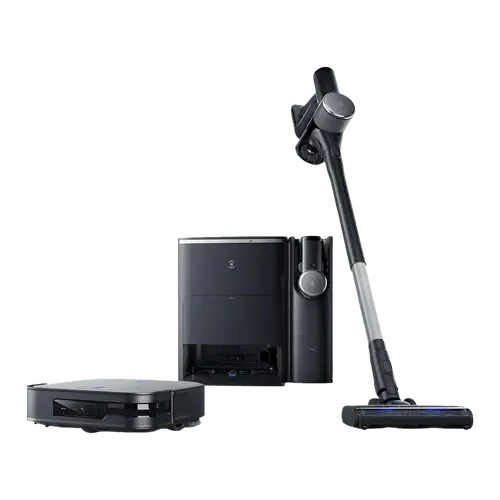
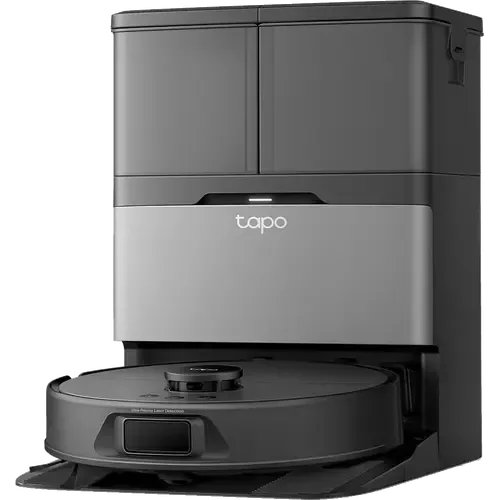
Ecovacs DEEBOT X2 COMBO vs TP-Link Tapo RV50 Pro Omni
Understand the differences. Decide what matters to your home.
Build another comparison →Before you compare every specification
Key differences between Ecovacs DEEBOT X2 COMBO and TP-Link Tapo RV50 Pro Omni
A summary of selected recorded differences between these robot vacuums. Check the full specification table below for details and conditions.
Specifications to check side by side
- Onboard Dustbin Capacity (features): Ecovacs DEEBOT X2 COMBO — 420ml; TP-Link Tapo RV50 Pro Omni — 280ml.
- Water Tank Capacity (mopping): Ecovacs DEEBOT X2 COMBO — 4L; TP-Link Tapo RV50 Pro Omni — 5L (5L clean water tank and 4L dirty water tank in the dock; 95 ml tank in the robot.).
- Battery Life (power): Ecovacs DEEBOT X2 COMBO — 212 minutes; TP-Link Tapo RV50 Pro Omni — 250 minutes.
- Suction Power (suction performance): Ecovacs DEEBOT X2 COMBO — 8700Pa; TP-Link Tapo RV50 Pro Omni — 15000Pa.
Information still to confirm
- 3 of 37 comparison fields lack a resolved value for at least one selected device. Missing information is not evidence that a feature is absent.
- Check the full table and manufacturer documentation before ruling out a device.
These observations are derived from recorded catalog data and have not all been independently verified. Confirm details with the manufacturer before purchasing.
Compare capabilities, compatibility and setup requirements.
What the catalog tells us
Understand the tradeoffs.
These counts describe the available data, not a quality score. More features do not automatically make a better device.
4differences with recorded values for every device
3rows with missing or unspecified information
Consider your setup
Battery Life
- Ecovacs DEEBOT X2 COMBO212 minutes
- TP-Link Tapo RV50 Pro Omni250 minutes
Compare the stated test conditions. Catalog battery figures alone do not predict runtime in your home.
Inspect the specificationsYour priorities, side by side
Focus on what changes.
Mark the specifications you care about. Open manufacturer sources for verification scope; fields without citations remain catalog data. Expand notes for other qualifications.
Showing 37 of 37 rows. “Not recorded” does not mean “No”.
Connectivity
- Ecovacs DEEBOT X2 COMBO
- Yes
- TP-Link Tapo RV50 Pro Omni
- Yes
- Ecovacs DEEBOT X2 COMBO
- No
- TP-Link Tapo RV50 Pro Omni
- No
- Ecovacs DEEBOT X2 COMBO
- Yes
- TP-Link Tapo RV50 Pro Omni
- Yes
Catalog note
Bluetooth 4.2, used for setup only.
- Ecovacs DEEBOT X2 COMBO
- No
- TP-Link Tapo RV50 Pro Omni
- No
- Ecovacs DEEBOT X2 COMBO
- No
- TP-Link Tapo RV50 Pro Omni
- No
- Ecovacs DEEBOT X2 COMBO
- No
- TP-Link Tapo RV50 Pro Omni
- No
Features
- Ecovacs DEEBOT X2 COMBO
- Not recorded
- TP-Link Tapo RV50 Pro Omni
- Yes
- Ecovacs DEEBOT X2 COMBO
- 3L
- TP-Link Tapo RV50 Pro Omni
- 3L
- Ecovacs DEEBOT X2 COMBO
- 64.9dB
- TP-Link Tapo RV50 Pro Omni
- Not recorded
- Ecovacs DEEBOT X2 COMBO
- 420ml
- TP-Link Tapo RV50 Pro Omni
- 280ml
- Ecovacs DEEBOT X2 COMBO
- Yes
- TP-Link Tapo RV50 Pro Omni
- Yes
- Ecovacs DEEBOT X2 COMBO
- Yes
- TP-Link Tapo RV50 Pro Omni
- Yes
- Ecovacs DEEBOT X2 COMBO
- Yes
- TP-Link Tapo RV50 Pro Omni
- Yes
Manufacturer source
The dock empties the robot dustbin.
TP-Link Tapo RV50 Pro Omni manufacturer product page →- Source section
- Product description
- Model
- TP-Link Tapo RV50 Pro Omni
- Region
- Manufacturer product page; no universal regional compatibility implied
- Firmware
- Not specified by this source
- Checked
Check the connected ecosystem for exposed controls. Suction pressure alone does not measure pickup performance.
Document check only; not a hands-on test or verification of every regional or firmware variant.
Integrations
- Ecovacs DEEBOT X2 COMBO
- Yes
- TP-Link Tapo RV50 Pro Omni
- Yes
- Ecovacs DEEBOT X2 COMBO
- Yes
- TP-Link Tapo RV50 Pro Omni
- Yes
Catalog note
Via Matter
- Ecovacs DEEBOT X2 COMBO
- Yes
- TP-Link Tapo RV50 Pro Omni
- Yes
- Ecovacs DEEBOT X2 COMBO
- Yes
- TP-Link Tapo RV50 Pro Omni
- Yes
Catalog note
Via Matter
- Ecovacs DEEBOT X2 COMBO
- Yes
- TP-Link Tapo RV50 Pro Omni
- Yes
Manufacturer source
Matter compatibility is listed.
TP-Link Tapo RV50 Pro Omni manufacturer product page →- Source section
- Product description
- Model
- TP-Link Tapo RV50 Pro Omni
- Region
- Manufacturer product page; no universal regional compatibility implied
- Firmware
- Not specified by this source
- Checked
Check the connected ecosystem for exposed controls. Suction pressure alone does not measure pickup performance.
Document check only; not a hands-on test or verification of every regional or firmware variant.
Catalog note
TP-Link lists Amazon Alexa, Google Home and Matter as its third-party compatibility, and notes the robot has to be set up in the Tapo app before it is added to a Matter controller.
- Ecovacs DEEBOT X2 COMBO
- Yes
- TP-Link Tapo RV50 Pro Omni
- Yes
Catalog note
Via Matter
Mopping
- Ecovacs DEEBOT X2 COMBO
- Yes
- TP-Link Tapo RV50 Pro Omni
- Yes
- Ecovacs DEEBOT X2 COMBO
- Yes
- TP-Link Tapo RV50 Pro Omni
- Yes
Catalog note
Warm air drying at 50°C (122°F).
- Ecovacs DEEBOT X2 COMBO
- Yes
- TP-Link Tapo RV50 Pro Omni
- Yes
Catalog note
Lifts the mops 12 mm over short-pile carpet and leaves them at the dock before cleaning high-pile carpet.
- Ecovacs DEEBOT X2 COMBO
- Yes
- TP-Link Tapo RV50 Pro Omni
- Yes
Manufacturer source
The station washes the mop using heated water.
TP-Link Tapo RV50 Pro Omni manufacturer product page →- Source section
- Product description
- Model
- TP-Link Tapo RV50 Pro Omni
- Region
- Manufacturer product page; no universal regional compatibility implied
- Firmware
- Not specified by this source
- Checked
Check the connected ecosystem for exposed controls. Suction pressure alone does not measure pickup performance.
Document check only; not a hands-on test or verification of every regional or firmware variant.
Catalog note
Hot water mop washing at 60°C (140°F).
- Ecovacs DEEBOT X2 COMBO
- Yes
- TP-Link Tapo RV50 Pro Omni
- Yes
Catalog note
Ships with a hard floor cleaning solution that the dock dispenses.
- Ecovacs DEEBOT X2 COMBO
- Yes
- TP-Link Tapo RV50 Pro Omni
- Yes
Catalog note
Dual spinning mops with the DeepEdge extending mop arm.
- Ecovacs DEEBOT X2 COMBO
- 4L
- TP-Link Tapo RV50 Pro Omni
- 5L
Catalog note
5L clean water tank and 4L dirty water tank in the dock; 95 ml tank in the robot.
Navigation
- Ecovacs DEEBOT X2 COMBO
- Yes
- TP-Link Tapo RV50 Pro Omni
- Yes
Catalog note
Four anti-drop sensors.
- Ecovacs DEEBOT X2 COMBO
- Yes
- TP-Link Tapo RV50 Pro Omni
- Yes
Catalog note
Up to 3 saved maps plus 1 temporary map.
- Ecovacs DEEBOT X2 COMBO
- Laser (LiDAR)
- TP-Link Tapo RV50 Pro Omni
- Laser (LiDAR)
Catalog note
dToF LiDAR mapping, with front and side lasers for obstacle avoidance.
- Ecovacs DEEBOT X2 COMBO
- Yes
- TP-Link Tapo RV50 Pro Omni
- Yes
- Ecovacs DEEBOT X2 COMBO
- Yes
- TP-Link Tapo RV50 Pro Omni
- Yes
Catalog note
Dual-laser precision avoidance (front and side line lasers).
Power
- Ecovacs DEEBOT X2 COMBO
- Yes
- TP-Link Tapo RV50 Pro Omni
- Yes
Catalog note
Recharge & Resume: returns to the dock when the battery runs low and picks up where it left off.
- Ecovacs DEEBOT X2 COMBO
- 212 minutes
- TP-Link Tapo RV50 Pro Omni
- 250 minutes
- Ecovacs DEEBOT X2 COMBO
- 5.5 hours
- TP-Link Tapo RV50 Pro Omni
- Not recorded
Suction Performance
- Ecovacs DEEBOT X2 COMBO
- Yes
- TP-Link Tapo RV50 Pro Omni
- Yes
Catalog note
Carpet detection with automatic suction boost.
- Ecovacs DEEBOT X2 COMBO
- Yes
- TP-Link Tapo RV50 Pro Omni
- Yes
Catalog note
Anti-tangle side brush.
- Ecovacs DEEBOT X2 COMBO
- 8700Pa
- TP-Link Tapo RV50 Pro Omni
- 15000Pa
Manufacturer source
The advertised maximum suction pressure is 15,000 Pa.
TP-Link Tapo RV50 Pro Omni manufacturer product page →- Source section
- Product description
- Model
- TP-Link Tapo RV50 Pro Omni
- Region
- Manufacturer product page; no universal regional compatibility implied
- Firmware
- Not specified by this source
- Checked
Check the connected ecosystem for exposed controls. Suction pressure alone does not measure pickup performance.
Document check only; not a hands-on test or verification of every regional or firmware variant.
| Specification | Ecovacs DEEBOT X2 COMBO | TP-Link Tapo RV50 Pro Omni |
|---|---|---|
| Connectivity | ||
| Yes | Yes | |
| No | No | |
| Yes | YesCatalog noteBluetooth 4.2, used for setup only. | |
| No | No | |
| No | No | |
| No | No | |
| Features | ||
| Not recorded | Yes | |
| 3L | 3L | |
| 64.9dB | Not recorded | |
| 420ml | 280ml | |
| Yes | Yes | |
| Yes | Yes | |
| Yes | YesManufacturer sourceThe dock empties the robot dustbin. TP-Link Tapo RV50 Pro Omni manufacturer product page →
Check the connected ecosystem for exposed controls. Suction pressure alone does not measure pickup performance. Document check only; not a hands-on test or verification of every regional or firmware variant. | |
| Integrations | ||
| Yes | Yes | |
| Yes | YesCatalog noteVia Matter | |
| Yes | Yes | |
| Yes | YesCatalog noteVia Matter | |
| Yes | YesManufacturer sourceMatter compatibility is listed. TP-Link Tapo RV50 Pro Omni manufacturer product page →
Check the connected ecosystem for exposed controls. Suction pressure alone does not measure pickup performance. Document check only; not a hands-on test or verification of every regional or firmware variant. Catalog noteTP-Link lists Amazon Alexa, Google Home and Matter as its third-party compatibility, and notes the robot has to be set up in the Tapo app before it is added to a Matter controller. | |
| Yes | YesCatalog noteVia Matter | |
| Mopping | ||
| Yes | Yes | |
| Yes | YesCatalog noteWarm air drying at 50°C (122°F). | |
| Yes | YesCatalog noteLifts the mops 12 mm over short-pile carpet and leaves them at the dock before cleaning high-pile carpet. | |
| Yes | YesManufacturer sourceThe station washes the mop using heated water. TP-Link Tapo RV50 Pro Omni manufacturer product page →
Check the connected ecosystem for exposed controls. Suction pressure alone does not measure pickup performance. Document check only; not a hands-on test or verification of every regional or firmware variant. Catalog noteHot water mop washing at 60°C (140°F). | |
| Yes | YesCatalog noteShips with a hard floor cleaning solution that the dock dispenses. | |
| Yes | YesCatalog noteDual spinning mops with the DeepEdge extending mop arm. | |
| 4L | 5LCatalog note5L clean water tank and 4L dirty water tank in the dock; 95 ml tank in the robot. | |
| Navigation | ||
| Yes | YesCatalog noteFour anti-drop sensors. | |
| Yes | YesCatalog noteUp to 3 saved maps plus 1 temporary map. | |
| Laser (LiDAR) | Laser (LiDAR)Catalog notedToF LiDAR mapping, with front and side lasers for obstacle avoidance. | |
| Yes | Yes | |
| Yes | YesCatalog noteDual-laser precision avoidance (front and side line lasers). | |
| Power | ||
| Yes | YesCatalog noteRecharge & Resume: returns to the dock when the battery runs low and picks up where it left off. | |
| 212 minutes | 250 minutes | |
| 5.5 hours | Not recorded | |
| Suction Performance | ||
| Yes | YesCatalog noteCarpet detection with automatic suction boost. | |
| Yes | YesCatalog noteAnti-tangle side brush. | |
| 8700Pa | 15000PaManufacturer sourceThe advertised maximum suction pressure is 15,000 Pa. TP-Link Tapo RV50 Pro Omni manufacturer product page →
Check the connected ecosystem for exposed controls. Suction pressure alone does not measure pickup performance. Document check only; not a hands-on test or verification of every regional or firmware variant. | |
Know what’s behind the comparison.
The table matches specifications by section and field. It preserves notes, separates missing data from explicit “No” values, and keeps qualifications attached to their values. No overall winner is assigned from feature counts.
Read our comparison methodology