
The Smart Device Compare comparison
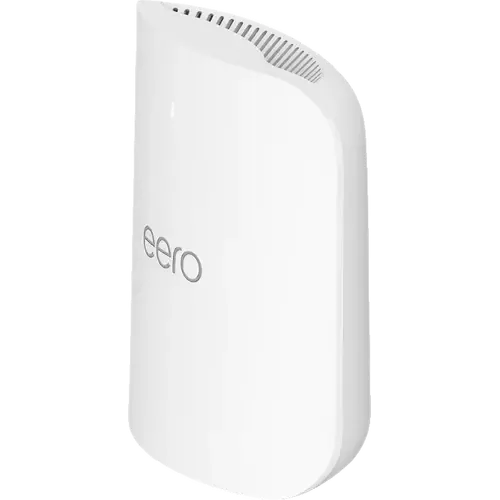
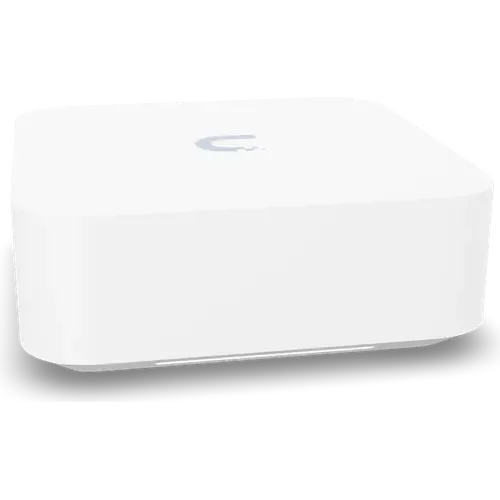
eero Pro 7 vs Ubiquiti UniFi Express 7
Understand the differences. Decide what matters to your home.
Build another comparison →Before you compare every specification
Key differences between eero Pro 7 and Ubiquiti UniFi Express 7
A summary of selected recorded differences between these routers. Check the full specification table below for details and conditions.
Feature differences among your selected devices
- Configuration Backup Restore (features): eero Pro 7 — No; Ubiquiti UniFi Express 7 — Yes.
- Cli (management): eero Pro 7 — No; Ubiquiti UniFi Express 7 — Yes.
- Snmp (management): eero Pro 7 — No; Ubiquiti UniFi Express 7 — Yes.
- Web Interface (management): eero Pro 7 — No (Setup and every network setting live in the eero app for Android and iOS; eero publishes no browser console.); Ubiquiti UniFi Express 7 — Yes.
Specifications to check side by side
- Max Connected Devices (features): eero Pro 7 — 200; Ubiquiti UniFi Express 7 — 300+.
- 10 Gbps WAN-capable ports (network ports): eero Pro 7 — 0; Ubiquiti UniFi Express 7 — 1.
- 2.5 Gbps LAN ports (network ports): eero Pro 7 — 0; Ubiquiti UniFi Express 7 — 1.
- Lan Port Count (network ports): eero Pro 7 — 2; Ubiquiti UniFi Express 7 — 1.
Information still to confirm
- 12 of 75 comparison fields lack a resolved value for at least one selected device. Missing information is not evidence that a feature is absent.
- Check the full table and manufacturer documentation before ruling out a device.
These observations are derived from recorded catalog data and have not all been independently verified. Confirm details with the manufacturer before purchasing.
Compare capabilities, compatibility and setup requirements.
What the catalog tells us
Understand the tradeoffs.
These counts describe the available data, not a quality score. More features do not automatically make a better device.
22differences with recorded values for every device
12rows with missing or unspecified information
Consider your setup
2.5 Gbps LAN ports
- eero Pro 70
- Ubiquiti UniFi Express 71
Count the wired devices you plan to connect directly. A port count can reveal whether you will need an additional switch.
Inspect the specificationsYour priorities, side by side
Focus on what changes.
Mark the specifications you care about. Open manufacturer sources for verification scope; fields without citations remain catalog data. Expand notes for other qualifications.
Showing 75 of 75 rows. “Not recorded” does not mean “No”.
Cellular Connectivity
- eero Pro 7
- Not applicable / unspecified
- Ubiquiti UniFi Express 7
- Not applicable / unspecified
- eero Pro 7
- Not applicable / unspecified
- Ubiquiti UniFi Express 7
- Not applicable / unspecified
- eero Pro 7
- 0
- Ubiquiti UniFi Express 7
- Not applicable / unspecified
- eero Pro 7
- Not applicable / unspecified
- Ubiquiti UniFi Express 7
- Not applicable / unspecified
- eero Pro 7
- Not applicable / unspecified
- Ubiquiti UniFi Express 7
- Not applicable / unspecified
- eero Pro 7
- Not applicable / unspecified
- Ubiquiti UniFi Express 7
- Not applicable / unspecified
- eero Pro 7
- No
- Ubiquiti UniFi Express 7
- No
Features
- eero Pro 7
- No
- Ubiquiti UniFi Express 7
- Yes
- eero Pro 7
- Yes
- Ubiquiti UniFi Express 7
- Yes
- eero Pro 7
- 200
- Ubiquiti UniFi Express 7
- 300+
- eero Pro 7
- Yes
- Ubiquiti UniFi Express 7
- Yes
- eero Pro 7
- Yes
- Ubiquiti UniFi Express 7
- Yes
- eero Pro 7
- Yes
Catalog note
Smart Queue Management (SQM), toggled in the eero app, manages how traffic is queued to cut latency on calls and gaming.
- Ubiquiti UniFi Express 7
- Yes
- eero Pro 7
- Yes
- Ubiquiti UniFi Express 7
- Yes
Management
- eero Pro 7
- Yes
- Ubiquiti UniFi Express 7
- Yes
- eero Pro 7
- No
- Ubiquiti UniFi Express 7
- Yes
- eero Pro 7
- Yes
- Ubiquiti UniFi Express 7
- Yes
- eero Pro 7
- No
- Ubiquiti UniFi Express 7
- Yes
- eero Pro 7
- No
Catalog note
Setup and every network setting live in the eero app for Android and iOS; eero publishes no browser console.
- Ubiquiti UniFi Express 7
- Yes
Network Ports
- eero Pro 7
- 0
- Ubiquiti UniFi Express 7
- 0
- eero Pro 7
- 0
- Ubiquiti UniFi Express 7
- 1
- eero Pro 7
- 0
- Ubiquiti UniFi Express 7
- 1
- eero Pro 7
- 0
- Ubiquiti UniFi Express 7
- 0
- eero Pro 7
- 0
- Ubiquiti UniFi Express 7
- 0
- eero Pro 7
- No
- Ubiquiti UniFi Express 7
- No
- eero Pro 7
- 2
- Ubiquiti UniFi Express 7
- 1
- eero Pro 7
- 0
- Ubiquiti UniFi Express 7
- 0
- eero Pro 7
- 0
- Ubiquiti UniFi Express 7
- 0
- eero Pro 7
- 2
- Ubiquiti UniFi Express 7
- 2
- eero Pro 7
- 0
- Ubiquiti UniFi Express 7
- 0
- eero Pro 7
- 2
- Ubiquiti UniFi Express 7
- 1
- eero Pro 7
- 0
- Ubiquiti UniFi Express 7
- 0
- eero Pro 7
- 0
- Ubiquiti UniFi Express 7
- 0
Parental Controls
- eero Pro 7
- Subscription required
Catalog note
Profiles, schedules and instant pause are free in the eero app; content filters and site blocking need eero Plus.
- Ubiquiti UniFi Express 7
- Yes
- eero Pro 7
- Yes
- Ubiquiti UniFi Express 7
- Yes
- eero Pro 7
- Yes
- Ubiquiti UniFi Express 7
- Yes
Power
- eero Pro 7
- 27W
- Ubiquiti UniFi Express 7
- 22W
Smart Home Protocols
- eero Pro 7
- Yes
Catalog note
eero supports Matter as a controller only, and lists eero Pro 7 among the models that do.
- Ubiquiti UniFi Express 7
- No
- eero Pro 7
- Yes
Catalog note
eero states that eero 7 and eero Pro 7 can act as a Thread border router and carry a built-in Zigbee smart home hub.
- Ubiquiti UniFi Express 7
- No
Usb Ports
- eero Pro 7
- 0
- Ubiquiti UniFi Express 7
- 0
- eero Pro 7
- 0
- Ubiquiti UniFi Express 7
- 0
Usb Storage
- eero Pro 7
- No
- Ubiquiti UniFi Express 7
- No
- eero Pro 7
- No
- Ubiquiti UniFi Express 7
- No
- eero Pro 7
- No
- Ubiquiti UniFi Express 7
- No
- eero Pro 7
- No
- Ubiquiti UniFi Express 7
- No
Vpn
- eero Pro 7
- Subscription required
Catalog note
eero lists Dynamic DNS among its advanced features and states it requires an eero Plus subscription.
- Ubiquiti UniFi Express 7
- Yes
- eero Pro 7
- No
- Ubiquiti UniFi Express 7
- Yes
- eero Pro 7
- No
- Ubiquiti UniFi Express 7
- Yes
- eero Pro 7
- No
- Ubiquiti UniFi Express 7
- No
- eero Pro 7
- No
- Ubiquiti UniFi Express 7
- Yes
- eero Pro 7
- No
- Ubiquiti UniFi Express 7
- Yes
- eero Pro 7
- No
- Ubiquiti UniFi Express 7
- Yes
Wan Redundancy
- eero Pro 7
- No
Catalog note
The router has no cellular modem or SIM slot: Hotspot Backup reaches a phone hotspot over wifi, not over its own cellular radio.
- Ubiquiti UniFi Express 7
- No
- eero Pro 7
- No
- Ubiquiti UniFi Express 7
- No
- eero Pro 7
- Subscription required
Catalog note
eero Hotspot Backup fails the network over to a saved hotspot or nearby network when the wired line drops, and switches back automatically. It is an eero Plus feature.
- Ubiquiti UniFi Express 7
- No
Wifi Antennas
- eero Pro 7
- Not applicable / unspecified
- Ubiquiti UniFi Express 7
- Not recorded
- eero Pro 7
- 0
- Ubiquiti UniFi Express 7
- 0
- eero Pro 7
- Not recorded
- Ubiquiti UniFi Express 7
- Not recorded
Wifi Bands
- eero Pro 7
- Not recorded
- Ubiquiti UniFi Express 7
- 688 Mbps
- eero Pro 7
- 1
- Ubiquiti UniFi Express 7
- 1
- eero Pro 7
- 1
- Ubiquiti UniFi Express 7
- 1
- eero Pro 7
- Not recorded
- Ubiquiti UniFi Express 7
- 4300 Mbps
- eero Pro 7
- 1
- Ubiquiti UniFi Express 7
- 1
- eero Pro 7
- Not recorded
- Ubiquiti UniFi Express 7
- 5700 Mbps
Wifi Features
- eero Pro 7
- Yes
Catalog note
eero calls it bridge mode: the eero network keeps serving wifi while an existing router handles routing.
- Ubiquiti UniFi Express 7
- Not recorded
- eero Pro 7
- Yes
- Ubiquiti UniFi Express 7
- Yes
- eero Pro 7
- Subscription required
Catalog note
A dedicated IoT SSID is an eero Business feature, and eero lists the Pro 7 as compatible with eero Business.
- Ubiquiti UniFi Express 7
- Yes
- eero Pro 7
- 10.8 Gbps
Catalog note
eero rates the Pro 7 at BE10800 across its three bands; the highest single-device wireless throughput eero quotes is 3.9 Gbps.
- Ubiquiti UniFi Express 7
- 10.7 Gbps
- eero Pro 7
- Proprietary
- Ubiquiti UniFi Express 7
- Proprietary
- eero Pro 7
- Yes
- Ubiquiti UniFi Express 7
- Yes
- eero Pro 7
- Yes
- Ubiquiti UniFi Express 7
- Yes
Wifi Generation
- eero Pro 7
- Yes
- Ubiquiti UniFi Express 7
- Yes
- eero Pro 7
- Yes
- Ubiquiti UniFi Express 7
- Yes
- eero Pro 7
- Yes
- Ubiquiti UniFi Express 7
- Yes
- eero Pro 7
- Yes
- Ubiquiti UniFi Express 7
- Yes
Manufacturer source
The model includes Wi-Fi 7.
Ubiquiti UniFi Express 7 manufacturer product page →- Source section
- Model overview
- Model
- Ubiquiti UniFi Express 7
- Region
- US Ubiquiti store
- Firmware
- Not specified by this source
- Checked
Client support and regional radio availability affect usable features.
Document check only; not a hands-on test or verification of every regional or firmware variant.
| Specification | eero Pro 7 | Ubiquiti UniFi Express 7 |
|---|---|---|
| Cellular Connectivity | ||
| Not applicable / unspecified | Not applicable / unspecified | |
| Not applicable / unspecified | Not applicable / unspecified | |
| 0 | Not applicable / unspecified | |
| Not applicable / unspecified | Not applicable / unspecified | |
| Not applicable / unspecified | Not applicable / unspecified | |
| Not applicable / unspecified | Not applicable / unspecified | |
| No | No | |
| Features | ||
| No | Yes | |
| Yes | Yes | |
| 200 | 300+ | |
| Yes | Yes | |
| Yes | Yes | |
YesCatalog noteSmart Queue Management (SQM), toggled in the eero app, manages how traffic is queued to cut latency on calls and gaming. | Yes | |
| Yes | Yes | |
| Management | ||
| Yes | Yes | |
| No | Yes | |
| Yes | Yes | |
| No | Yes | |
NoCatalog noteSetup and every network setting live in the eero app for Android and iOS; eero publishes no browser console. | Yes | |
| Network Ports | ||
| 0 | 0 | |
| 0 | 1 | |
| 0 | 1 | |
| 0 | 0 | |
| 0 | 0 | |
| No | No | |
| 2 | 1 | |
| 0 | 0 | |
| 0 | 0 | |
| 2 | 2 | |
| 0 | 0 | |
| 2 | 1 | |
| 0 | 0 | |
| 0 | 0 | |
| Parental Controls | ||
Subscription requiredCatalog noteProfiles, schedules and instant pause are free in the eero app; content filters and site blocking need eero Plus. | Yes | |
| Yes | Yes | |
| Yes | Yes | |
| Power | ||
| 27W | 22W | |
| Smart Home Protocols | ||
YesCatalog noteeero supports Matter as a controller only, and lists eero Pro 7 among the models that do. | No | |
YesCatalog noteeero states that eero 7 and eero Pro 7 can act as a Thread border router and carry a built-in Zigbee smart home hub. | No | |
| Usb Ports | ||
| 0 | 0 | |
| 0 | 0 | |
| Usb Storage | ||
| No | No | |
| No | No | |
| No | No | |
| No | No | |
| Vpn | ||
Subscription requiredCatalog noteeero lists Dynamic DNS among its advanced features and states it requires an eero Plus subscription. | Yes | |
| No | Yes | |
| No | Yes | |
| No | No | |
| No | Yes | |
| No | Yes | |
| No | Yes | |
| Wan Redundancy | ||
NoCatalog noteThe router has no cellular modem or SIM slot: Hotspot Backup reaches a phone hotspot over wifi, not over its own cellular radio. | No | |
| No | No | |
Subscription requiredCatalog noteeero Hotspot Backup fails the network over to a saved hotspot or nearby network when the wired line drops, and switches back automatically. It is an eero Plus feature. | No | |
| Wifi Antennas | ||
| Not applicable / unspecified | Not recorded | |
| 0 | 0 | |
| Not recorded | Not recorded | |
| Wifi Bands | ||
| Not recorded | 688 Mbps | |
| 1 | 1 | |
| 1 | 1 | |
| Not recorded | 4300 Mbps | |
| 1 | 1 | |
| Not recorded | 5700 Mbps | |
| Wifi Features | ||
YesCatalog noteeero calls it bridge mode: the eero network keeps serving wifi while an existing router handles routing. | Not recorded | |
| Yes | Yes | |
Subscription requiredCatalog noteA dedicated IoT SSID is an eero Business feature, and eero lists the Pro 7 as compatible with eero Business. | Yes | |
10.8 GbpsCatalog noteeero rates the Pro 7 at BE10800 across its three bands; the highest single-device wireless throughput eero quotes is 3.9 Gbps. | 10.7 Gbps | |
| Proprietary | Proprietary | |
| Yes | Yes | |
| Yes | Yes | |
| Wifi Generation | ||
| Yes | Yes | |
| Yes | Yes | |
| Yes | Yes | |
| Yes | YesManufacturer sourceThe model includes Wi-Fi 7. Ubiquiti UniFi Express 7 manufacturer product page →
Client support and regional radio availability affect usable features. Document check only; not a hands-on test or verification of every regional or firmware variant. | |
Know what’s behind the comparison.
The table matches specifications by section and field. It preserves notes, separates missing data from explicit “No” values, and keeps qualifications attached to their values. No overall winner is assigned from feature counts.
Read our comparison methodology