
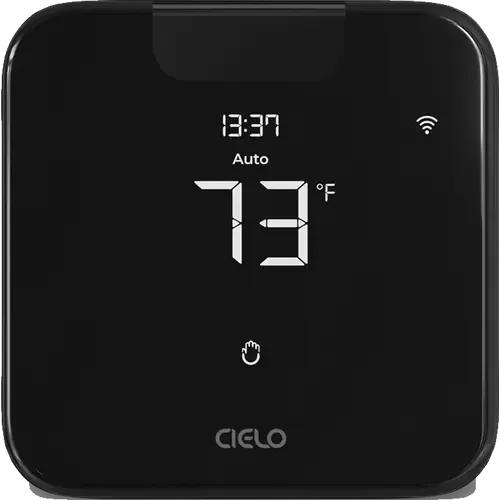
The Smart Device Compare comparison
Cielo Breez Max vs Honeywell Home X2S Smart Thermostat
Understand the differences. Decide what matters to your home.
Build another comparison →Before you compare every specification
Key differences between Cielo Breez Max and Honeywell Home X2S Smart Thermostat
A summary of selected recorded differences between these thermostats. Check the full specification table below for details and conditions.
Feature differences among your selected devices
- 5 GHz Wi-Fi (connectivity): Cielo Breez Max — No; Honeywell Home X2S Smart Thermostat — Yes.
- Bluetooth (connectivity): Cielo Breez Max — Yes (The device carries a Bluetooth indicator on its display and pairs with the phone over Bluetooth during registration, per the Breez Max user manual.); Honeywell Home X2S Smart Thermostat — No.
- Touch Screen (display): Cielo Breez Max — Yes (The front panel carries touch controls for menu, up, down, power and presets, and the manual works through them by touching and holding combinations.); Honeywell Home X2S Smart Thermostat — No (Push-button control).
- Apple Home (integrations): Cielo Breez Max — No (Cielo supports Siri Shortcuts ("Add to Siri"), which runs app shortcuts rather than exposing the device to the Apple Home app. There is no HomeKit profile and no Matter path, so the thermostat does not appear as an Apple Home accessory.); Honeywell Home X2S Smart Thermostat — Yes.
Information still to confirm
- 3 of 43 comparison fields lack a resolved value for at least one selected device. Missing information is not evidence that a feature is absent.
- Check the full table and manufacturer documentation before ruling out a device.
These observations are derived from recorded catalog data and have not all been independently verified. Confirm details with the manufacturer before purchasing.
Compare capabilities, compatibility and setup requirements.
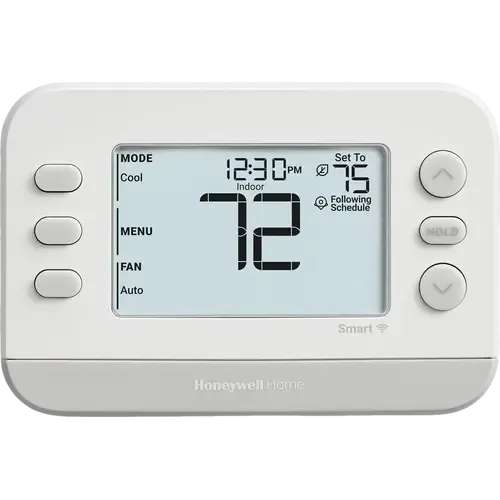
Option 2 · Honeywell Home
Honeywell Home X2S Smart Thermostat
Last updated October 2026
View full device profileWhat the catalog tells us
Understand the tradeoffs.
These counts describe the available data, not a quality score. More features do not automatically make a better device.
5differences with recorded values for every device
3rows with missing or unspecified information
Consider your setup
Apple Home
- Cielo Breez MaxNo
- Honeywell Home X2S Smart ThermostatYes
Confirm which features appear in Apple Home and whether extra hardware or a subscription is needed for your intended use.
Inspect the specificationsConsider your setup
Matter
- Cielo Breez MaxNo
- Honeywell Home X2S Smart ThermostatYes
Confirm the exact device type and the features exposed in your chosen platform. Protocol support does not establish feature parity across apps.
Inspect the specificationsYour priorities, side by side
Focus on what changes.
Mark the specifications you care about. Open manufacturer sources for verification scope; fields without citations remain catalog data. Expand notes for other qualifications.
Showing 43 of 43 rows. “Not recorded” does not mean “No”.
Alerts
- Cielo Breez Max
- No
- Honeywell Home X2S Smart Thermostat
- No
- Cielo Breez Max
- No
- Honeywell Home X2S Smart Thermostat
- No
- Cielo Breez Max
- No
- Honeywell Home X2S Smart Thermostat
- No
- Cielo Breez Max
- Not recorded
- Honeywell Home X2S Smart Thermostat
- No
Connectivity
- Cielo Breez Max
- Yes
Catalog note
Radio parameters on the official submittal sheet: 2.412 to 2.484 GHz, IEEE 802.11 b/g/n, WLAN channels 1 to 11.
- Honeywell Home X2S Smart Thermostat
- Yes
- Cielo Breez Max
- No
- Honeywell Home X2S Smart Thermostat
- Yes
- Cielo Breez Max
- Yes
Catalog note
The device carries a Bluetooth indicator on its display and pairs with the phone over Bluetooth during registration, per the Breez Max user manual.
- Honeywell Home X2S Smart Thermostat
- No
- Cielo Breez Max
- No
- Honeywell Home X2S Smart Thermostat
- No
- Cielo Breez Max
- No
- Honeywell Home X2S Smart Thermostat
- No
- Cielo Breez Max
- No
- Honeywell Home X2S Smart Thermostat
- No
Display
- Cielo Breez Max
- No
Catalog note
Cielo describes it as a sharp LCD segment display; the full color touchscreen belongs to the Breez Edge Pro.
- Honeywell Home X2S Smart Thermostat
- No
- Cielo Breez Max
- Yes
- Honeywell Home X2S Smart Thermostat
- Yes
- Cielo Breez Max
- Not applicable / unspecified
- Honeywell Home X2S Smart Thermostat
- Not recorded
- Cielo Breez Max
- Not recorded
- Honeywell Home X2S Smart Thermostat
- Not recorded
- Cielo Breez Max
- LCD
- Honeywell Home X2S Smart Thermostat
- LCD
- Cielo Breez Max
- Yes
Catalog note
The front panel carries touch controls for menu, up, down, power and presets, and the manual works through them by touching and holding combinations.
- Honeywell Home X2S Smart Thermostat
- No
Catalog note
Push-button control
Features
- Cielo Breez Max
- Yes
Catalog note
The display shows the set point, the room temperature and the room humidity at once.
- Honeywell Home X2S Smart Thermostat
- Yes
- Cielo Breez Max
- Yes
- Honeywell Home X2S Smart Thermostat
- Yes
- Cielo Breez Max
- No
Catalog note
Cielo's own model comparison grants the live weather display to the Breez Edge Pro only.
- Honeywell Home X2S Smart Thermostat
- No
- Cielo Breez Max
- Yes
Catalog note
ENERGY STAR certified, with usage history, temperature range lock and the Comfy Max mode that stops the air conditioner overcooling or overheating the room.
- Honeywell Home X2S Smart Thermostat
- Yes
Catalog note
ENERGY STAR certified, demand response capable
- Cielo Breez Max
- No
- Honeywell Home X2S Smart Thermostat
- No
- Cielo Breez Max
- No
- Honeywell Home X2S Smart Thermostat
- No
- Cielo Breez Max
- Yes
Catalog note
AC Filter Status tracks runtime and raises an alert when the air conditioner's filter needs cleaning.
- Honeywell Home X2S Smart Thermostat
- Yes
Catalog note
Filter change and heat pump failure reminders
- Cielo Breez Max
- Yes
Catalog note
Amazon Alexa, Google Assistant and Siri Shortcuts.
- Honeywell Home X2S Smart Thermostat
- Yes
Included Accessories
- Cielo Breez Max
- No
- Honeywell Home X2S Smart Thermostat
- No
- Cielo Breez Max
- No
Catalog note
The box holds the Breez Max, a backplate, a table stand, mounting screws with drywall anchors, a 5V DC USB adapter with cable and the manual. The backplate is the wall mount, not a cover plate for an older thermostat's footprint.
- Honeywell Home X2S Smart Thermostat
- No
Catalog note
UWP wall plate included, decorative cover plate sold separately
Integrations
- Cielo Breez Max
- Yes
Catalog note
The official submittal sheet carries the "Just ask Alexa" badge.
- Honeywell Home X2S Smart Thermostat
- Yes
- Cielo Breez Max
- No
Catalog note
Cielo supports Siri Shortcuts ("Add to Siri"), which runs app shortcuts rather than exposing the device to the Apple Home app. There is no HomeKit profile and no Matter path, so the thermostat does not appear as an Apple Home accessory.
- Honeywell Home X2S Smart Thermostat
- Yes
- Cielo Breez Max
- No
Catalog note
The built-in sensors are the only ones it reads. Follow Me makes the air conditioner track the Breez Max's own temperature sensor instead of the one inside the indoor unit; Cielo sells no remote sensor for it.
- Honeywell Home X2S Smart Thermostat
- No
- Cielo Breez Max
- Yes
Catalog note
The official submittal sheet carries the "works with Hey Google" badge.
- Honeywell Home X2S Smart Thermostat
- Yes
- Cielo Breez Max
- Yes
Catalog note
The official Home Assistant Cielo Home integration names this exact model in its supported devices list, connecting through the cloud-based Cielo Connect API.
- Honeywell Home X2S Smart Thermostat
- Yes
Catalog note
Via the Home Assistant Matter integration
- Cielo Breez Max
- No
Catalog note
No Cielo product appears in the CSA certified-products database, and neither the product page nor the submittal sheet claims Matter.
- Honeywell Home X2S Smart Thermostat
- Yes
Catalog note
Matter certified per Resideo
- Cielo Breez Max
- Yes
Catalog note
The official submittal sheet carries the "Works with SmartThings" badge.
- Honeywell Home X2S Smart Thermostat
- Yes
Catalog note
Via Matter
Scheduling
- Cielo Breez Max
- Yes
Catalog note
Comfy Max holds the room at the chosen temperature on its own, and Comfy Mode, geofencing and Freeze Protection each drive the air conditioner without input.
- Honeywell Home X2S Smart Thermostat
- Yes
Catalog note
Auto-away
- Cielo Breez Max
- Yes
Catalog note
Weekly schedules, one-time or repeating, keep running on the device even if the internet connection drops.
- Honeywell Home X2S Smart Thermostat
- Yes
Catalog note
7-day, 5-1-1, 5-2 or 1-week programming, or scheduling off
- Cielo Breez Max
- No
- Honeywell Home X2S Smart Thermostat
- No
Sensors
- Cielo Breez Max
- No
Catalog note
The submittal sheet lists only a temperature sensor and a humidity sensor as built in.
- Honeywell Home X2S Smart Thermostat
- No
- Cielo Breez Max
- No
- Honeywell Home X2S Smart Thermostat
- No
- Cielo Breez Max
- Yes
Catalog note
Built-in humidity sensor; room humidity is shown on the device display and in the app.
- Honeywell Home X2S Smart Thermostat
- Yes
Catalog note
Indoor humidity display option
- Cielo Breez Max
- No
- Honeywell Home X2S Smart Thermostat
- No
- Cielo Breez Max
- No
Catalog note
Cielo's own model comparison grants the proximity sensor to the Breez Edge Pro only.
- Honeywell Home X2S Smart Thermostat
- No
- Cielo Breez Max
- Yes
Catalog note
Built-in temperature sensor, calibratable from the app, with a stated static accuracy of 1.0 F.
- Honeywell Home X2S Smart Thermostat
- Yes
- Cielo Breez Max
- No
- Honeywell Home X2S Smart Thermostat
- No
| Specification | Cielo Breez Max | Honeywell Home X2S Smart Thermostat |
|---|---|---|
| Alerts | ||
| No | No | |
| No | No | |
| No | No | |
| Not recorded | No | |
| Connectivity | ||
YesCatalog noteRadio parameters on the official submittal sheet: 2.412 to 2.484 GHz, IEEE 802.11 b/g/n, WLAN channels 1 to 11. | Yes | |
| No | Yes | |
YesCatalog noteThe device carries a Bluetooth indicator on its display and pairs with the phone over Bluetooth during registration, per the Breez Max user manual. | No | |
| No | No | |
| No | No | |
| No | No | |
| Display | ||
NoCatalog noteCielo describes it as a sharp LCD segment display; the full color touchscreen belongs to the Breez Edge Pro. | No | |
| Yes | Yes | |
| Not applicable / unspecified | Not recorded | |
| Not recorded | Not recorded | |
| LCD | LCD | |
YesCatalog noteThe front panel carries touch controls for menu, up, down, power and presets, and the manual works through them by touching and holding combinations. | NoCatalog notePush-button control | |
| Features | ||
YesCatalog noteThe display shows the set point, the room temperature and the room humidity at once. | Yes | |
| Yes | Yes | |
NoCatalog noteCielo's own model comparison grants the live weather display to the Breez Edge Pro only. | No | |
YesCatalog noteENERGY STAR certified, with usage history, temperature range lock and the Comfy Max mode that stops the air conditioner overcooling or overheating the room. | YesCatalog noteENERGY STAR certified, demand response capable | |
| No | No | |
| No | No | |
YesCatalog noteAC Filter Status tracks runtime and raises an alert when the air conditioner's filter needs cleaning. | YesCatalog noteFilter change and heat pump failure reminders | |
YesCatalog noteAmazon Alexa, Google Assistant and Siri Shortcuts. | Yes | |
| Included Accessories | ||
| No | No | |
NoCatalog noteThe box holds the Breez Max, a backplate, a table stand, mounting screws with drywall anchors, a 5V DC USB adapter with cable and the manual. The backplate is the wall mount, not a cover plate for an older thermostat's footprint. | NoCatalog noteUWP wall plate included, decorative cover plate sold separately | |
| Integrations | ||
YesCatalog noteThe official submittal sheet carries the "Just ask Alexa" badge. | Yes | |
NoCatalog noteCielo supports Siri Shortcuts ("Add to Siri"), which runs app shortcuts rather than exposing the device to the Apple Home app. There is no HomeKit profile and no Matter path, so the thermostat does not appear as an Apple Home accessory. | Yes | |
NoCatalog noteThe built-in sensors are the only ones it reads. Follow Me makes the air conditioner track the Breez Max's own temperature sensor instead of the one inside the indoor unit; Cielo sells no remote sensor for it. | No | |
YesCatalog noteThe official submittal sheet carries the "works with Hey Google" badge. | Yes | |
YesCatalog noteThe official Home Assistant Cielo Home integration names this exact model in its supported devices list, connecting through the cloud-based Cielo Connect API. | YesCatalog noteVia the Home Assistant Matter integration | |
NoCatalog noteNo Cielo product appears in the CSA certified-products database, and neither the product page nor the submittal sheet claims Matter. | YesCatalog noteMatter certified per Resideo | |
YesCatalog noteThe official submittal sheet carries the "Works with SmartThings" badge. | YesCatalog noteVia Matter | |
| Scheduling | ||
YesCatalog noteComfy Max holds the room at the chosen temperature on its own, and Comfy Mode, geofencing and Freeze Protection each drive the air conditioner without input. | YesCatalog noteAuto-away | |
YesCatalog noteWeekly schedules, one-time or repeating, keep running on the device even if the internet connection drops. | YesCatalog note7-day, 5-1-1, 5-2 or 1-week programming, or scheduling off | |
| No | No | |
| Sensors | ||
NoCatalog noteThe submittal sheet lists only a temperature sensor and a humidity sensor as built in. | No | |
| No | No | |
YesCatalog noteBuilt-in humidity sensor; room humidity is shown on the device display and in the app. | YesCatalog noteIndoor humidity display option | |
| No | No | |
NoCatalog noteCielo's own model comparison grants the proximity sensor to the Breez Edge Pro only. | No | |
YesCatalog noteBuilt-in temperature sensor, calibratable from the app, with a stated static accuracy of 1.0 F. | Yes | |
| No | No | |
Know what’s behind the comparison.
The table matches specifications by section and field. It preserves notes, separates missing data from explicit “No” values, and keeps qualifications attached to their values. No overall winner is assigned from feature counts.
Read our comparison methodology