
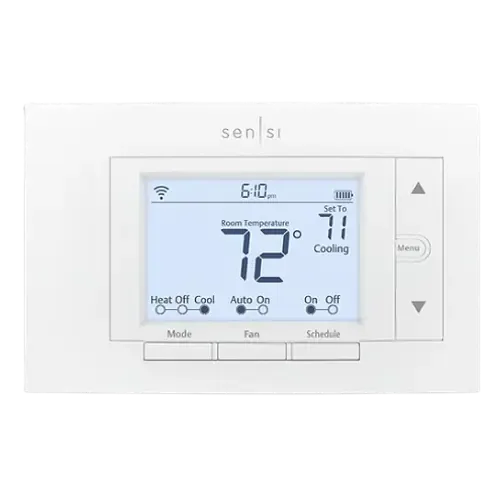
The Smart Device Compare comparison
Sensi Smart thermostat vs Sensi Touch smart thermostat
Understand the differences. Decide what matters to your home.
Build another comparison →Before you compare every specification
Key differences between Sensi Smart thermostat and Sensi Touch smart thermostat
A summary of selected recorded differences between these thermostats. Check the full specification table below for details and conditions.
Feature differences among your selected devices
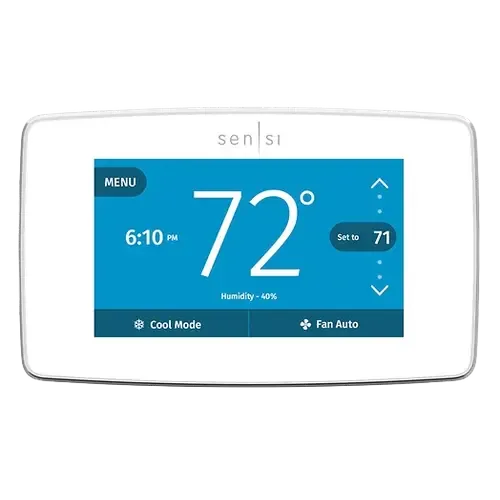
- Color Screen (display): Sensi Smart thermostat — No; Sensi Touch smart thermostat — Yes.
- Touch Screen (display): Sensi Smart thermostat — No; Sensi Touch smart thermostat — Yes.
- Apple Home (integrations): Sensi Smart thermostat — No (Sensi lists the Sensi smart thermostat as not compatible with Apple HomeKit. Some earlier ST55 units shipped with HomeKit hardware, but a unit that shows version 33 (Menu, then Mode) is not compatible, and HomeKit cannot be added by a software or firmware update.); Sensi Touch smart thermostat — Yes.
Specifications to check side by side
- Screen Size (display): Sensi Smart thermostat — 5"; Sensi Touch smart thermostat — 4.3".
- Screen Type (display): Sensi Smart thermostat — LED; Sensi Touch smart thermostat — LCD.
Information still to confirm
- 1 of 43 comparison fields lack a resolved value for at least one selected device. Missing information is not evidence that a feature is absent.
- Check the full table and manufacturer documentation before ruling out a device.
These observations are derived from recorded catalog data and have not all been independently verified. Confirm details with the manufacturer before purchasing.
Compare capabilities, compatibility and setup requirements.
What the catalog tells us
Understand the tradeoffs.
These counts describe the available data, not a quality score. More features do not automatically make a better device.
5differences with recorded values for every device
1rows with missing or unspecified information
Consider your setup
Apple Home
- Sensi Smart thermostatNo
- Sensi Touch smart thermostatYes
Confirm which features appear in Apple Home and whether extra hardware or a subscription is needed for your intended use.
Inspect the specificationsYour priorities, side by side
Focus on what changes.
Mark the specifications you care about. Open manufacturer sources for verification scope; fields without citations remain catalog data. Expand notes for other qualifications.
Showing 43 of 43 rows. “Not recorded” does not mean “No”.
Alerts
- Sensi Smart thermostat
- No
- Sensi Touch smart thermostat
- No
- Sensi Smart thermostat
- No
- Sensi Touch smart thermostat
- No
- Sensi Smart thermostat
- No
- Sensi Touch smart thermostat
- No
- Sensi Smart thermostat
- No
- Sensi Touch smart thermostat
- No
Connectivity
- Sensi Smart thermostat
- Yes
- Sensi Touch smart thermostat
- Yes
- Sensi Smart thermostat
- No
- Sensi Touch smart thermostat
- No
- Sensi Smart thermostat
- No
- Sensi Touch smart thermostat
- No
- Sensi Smart thermostat
- No
- Sensi Touch smart thermostat
- No
- Sensi Smart thermostat
- No
- Sensi Touch smart thermostat
- No
- Sensi Smart thermostat
- No
- Sensi Touch smart thermostat
- No
Display
- Sensi Smart thermostat
- No
- Sensi Touch smart thermostat
- Yes
- Sensi Smart thermostat
- Yes
- Sensi Touch smart thermostat
- Yes
- Sensi Smart thermostat
- Not recorded
- Sensi Touch smart thermostat
- Not recorded
- Sensi Smart thermostat
- 5"
- Sensi Touch smart thermostat
- 4.3"
- Sensi Smart thermostat
- LED
- Sensi Touch smart thermostat
- LCD
- Sensi Smart thermostat
- No
- Sensi Touch smart thermostat
- Yes
Features
- Sensi Smart thermostat
- Yes
- Sensi Touch smart thermostat
- Yes
- Sensi Smart thermostat
- Yes
- Sensi Touch smart thermostat
- Yes
- Sensi Smart thermostat
- No
Catalog note
The manual lists what the wall unit shows: Wi-Fi status, time, keypad lockout, battery level, set temperature and room temperature. Local weather is a feature of the Sensi app, not of the thermostat display.
- Sensi Touch smart thermostat
- No
- Sensi Smart thermostat
- Yes
- Sensi Touch smart thermostat
- Yes
- Sensi Smart thermostat
- No
- Sensi Touch smart thermostat
- No
- Sensi Smart thermostat
- No
- Sensi Touch smart thermostat
- No
- Sensi Smart thermostat
- No
- Sensi Touch smart thermostat
- No
- Sensi Smart thermostat
- Yes
- Sensi Touch smart thermostat
- Yes
Included Accessories
- Sensi Smart thermostat
- No
- Sensi Touch smart thermostat
- No
- Sensi Smart thermostat
- No
- Sensi Touch smart thermostat
- No
Integrations
- Sensi Smart thermostat
- Yes
- Sensi Touch smart thermostat
- Yes
- Sensi Smart thermostat
- No
Catalog note
Sensi lists the Sensi smart thermostat as not compatible with Apple HomeKit. Some earlier ST55 units shipped with HomeKit hardware, but a unit that shows version 33 (Menu, then Mode) is not compatible, and HomeKit cannot be added by a software or firmware update.
- Sensi Touch smart thermostat
- Yes
- Sensi Smart thermostat
- No
- Sensi Touch smart thermostat
- No
- Sensi Smart thermostat
- Yes
- Sensi Touch smart thermostat
- Yes
- Sensi Smart thermostat
- Yes
- Sensi Touch smart thermostat
- Yes
- Sensi Smart thermostat
- No
- Sensi Touch smart thermostat
- No
- Sensi Smart thermostat
- Yes
- Sensi Touch smart thermostat
- Yes
Scheduling
- Sensi Smart thermostat
- Yes
- Sensi Touch smart thermostat
- Yes
- Sensi Smart thermostat
- Yes
- Sensi Touch smart thermostat
- Yes
- Sensi Smart thermostat
- No
- Sensi Touch smart thermostat
- No
Sensors
- Sensi Smart thermostat
- No
- Sensi Touch smart thermostat
- No
- Sensi Smart thermostat
- No
- Sensi Touch smart thermostat
- No
- Sensi Smart thermostat
- Yes
- Sensi Touch smart thermostat
- Yes
- Sensi Smart thermostat
- No
- Sensi Touch smart thermostat
- No
- Sensi Smart thermostat
- No
- Sensi Touch smart thermostat
- No
- Sensi Smart thermostat
- Yes
- Sensi Touch smart thermostat
- Yes
- Sensi Smart thermostat
- No
- Sensi Touch smart thermostat
- No
| Specification | Sensi Smart thermostat | Sensi Touch smart thermostat |
|---|---|---|
| Alerts | ||
| No | No | |
| No | No | |
| No | No | |
| No | No | |
| Connectivity | ||
| Yes | Yes | |
| No | No | |
| No | No | |
| No | No | |
| No | No | |
| No | No | |
| Display | ||
| No | Yes | |
| Yes | Yes | |
| Not recorded | Not recorded | |
| 5" | 4.3" | |
| LED | LCD | |
| No | Yes | |
| Features | ||
| Yes | Yes | |
| Yes | Yes | |
NoCatalog noteThe manual lists what the wall unit shows: Wi-Fi status, time, keypad lockout, battery level, set temperature and room temperature. Local weather is a feature of the Sensi app, not of the thermostat display. | No | |
| Yes | Yes | |
| No | No | |
| No | No | |
| No | No | |
| Yes | Yes | |
| Included Accessories | ||
| No | No | |
| No | No | |
| Integrations | ||
| Yes | Yes | |
NoCatalog noteSensi lists the Sensi smart thermostat as not compatible with Apple HomeKit. Some earlier ST55 units shipped with HomeKit hardware, but a unit that shows version 33 (Menu, then Mode) is not compatible, and HomeKit cannot be added by a software or firmware update. | Yes | |
| No | No | |
| Yes | Yes | |
| Yes | Yes | |
| No | No | |
| Yes | Yes | |
| Scheduling | ||
| Yes | Yes | |
| Yes | Yes | |
| No | No | |
| Sensors | ||
| No | No | |
| No | No | |
| Yes | Yes | |
| No | No | |
| No | No | |
| Yes | Yes | |
| No | No | |
Know what’s behind the comparison.
The table matches specifications by section and field. It preserves notes, separates missing data from explicit “No” values, and keeps qualifications attached to their values. No overall winner is assigned from feature counts.
Read our comparison methodology