
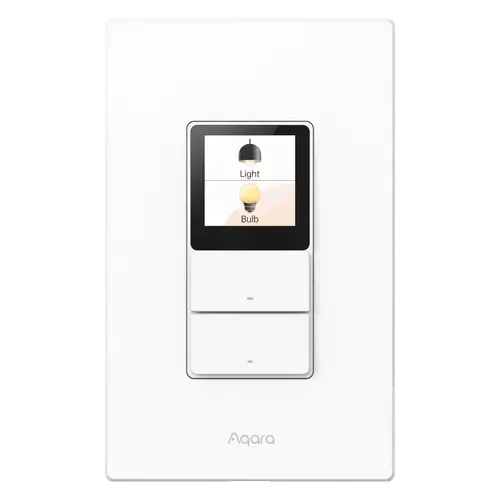
The Smart Device Compare comparison
Aqara Touchscreen Switch S100 US vs Lutron Caseta Diva Smart Dimmer Switch
Understand the differences. Decide what matters to your home.
Build another comparison →Before you compare every specification
Key differences between Aqara Touchscreen Switch S100 US and Lutron Caseta Diva Smart Dimmer Switch
A summary of selected recorded differences between these wall switches. Check the full specification table below for details and conditions.
Feature differences among your selected devices
- 2.4 GHz Wi-Fi (connectivity): Aqara Touchscreen Switch S100 US — Yes (Wi-Fi IEEE 802.11 a/b/g/n/ac/ax, 2.4GHz and 5GHz); Lutron Caseta Diva Smart Dimmer Switch — No (The dimmer reaches the Lutron Smart Hub, Pico remotes and Caseta motion sensors over Lutron's own Clear Connect RF rather than Wi-Fi, which is why the lights keep responding when the router is down).
- 5 GHz Wi-Fi (connectivity): Aqara Touchscreen Switch S100 US — Yes (Wi-Fi IEEE 802.11 a/b/g/n/ac/ax, 2.4GHz and 5GHz); Lutron Caseta Diva Smart Dimmer Switch — No.
- Bluetooth (connectivity): Aqara Touchscreen Switch S100 US — Yes; Lutron Caseta Diva Smart Dimmer Switch — No.
- Thread (connectivity): Aqara Touchscreen Switch S100 US — Yes (Built-in Thread Border Router. The border router function is supported in Aqara Home and Samsung SmartThings.); Lutron Caseta Diva Smart Dimmer Switch — No.
Specifications to check side by side
- Switches (features): Aqara Touchscreen Switch S100 US — 2; Lutron Caseta Diva Smart Dimmer Switch — 1.
- Alexa (integrations): Aqara Touchscreen Switch S100 US — Yes (Via Matter); Lutron Caseta Diva Smart Dimmer Switch — Lutron Hub required (Lutron lists Amazon Alexa among the platforms Caseta works with, through the Lutron Smart Hub).
- Apple Home (integrations): Aqara Touchscreen Switch S100 US — Yes (Via Matter); Lutron Caseta Diva Smart Dimmer Switch — Lutron Hub required (Lutron lists Apple Home among the platforms Caseta works with; the Apple Home technology sits in the smart hub, so Siri controls the dimmer once it is paired to one).
- Google Home (integrations): Aqara Touchscreen Switch S100 US — Yes (Via Matter); Lutron Caseta Diva Smart Dimmer Switch — Lutron Hub required (Lutron lists Google Assistant among the platforms Caseta works with, through the Lutron Smart Hub).
Information still to confirm
- 9 of 34 comparison fields lack a resolved value for at least one selected device. Missing information is not evidence that a feature is absent.
- Check the full table and manufacturer documentation before ruling out a device.
These observations are derived from recorded catalog data and have not all been independently verified. Confirm details with the manufacturer before purchasing.
Compare capabilities, compatibility and setup requirements.
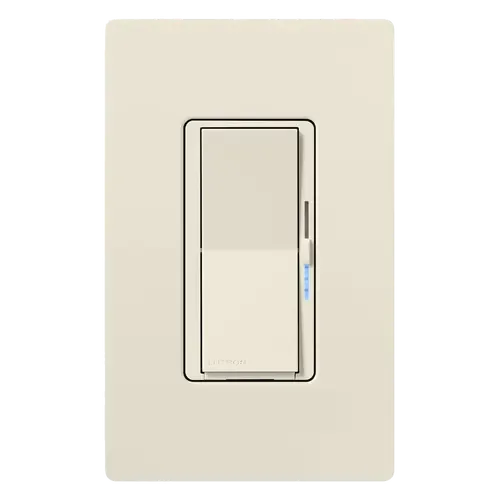
Option 2 · Lutron
Lutron Caseta Diva Smart Dimmer Switch
Last updated October 2026
View full device profileWhat the catalog tells us
Understand the tradeoffs.
These counts describe the available data, not a quality score. More features do not automatically make a better device.
17differences with recorded values for every device
9rows with missing or unspecified information
Consider your setup
Apple Home
- Aqara Touchscreen Switch S100 USYes
- Lutron Caseta Diva Smart Dimmer SwitchLutron Hub required
Confirm which features appear in Apple Home and whether extra hardware or a subscription is needed for your intended use.
Inspect the specificationsConsider your setup
Home Assistant
- Aqara Touchscreen Switch S100 USYes
- Lutron Caseta Diva Smart Dimmer SwitchLutron Hub required
Check the integration method, supported model and firmware. A catalog Yes does not establish local control or official support.
Inspect the specificationsConsider your setup
Matter
- Aqara Touchscreen Switch S100 USYes
- Lutron Caseta Diva Smart Dimmer SwitchNo
Confirm the exact device type and the features exposed in your chosen platform. Protocol support does not establish feature parity across apps.
Inspect the specificationsYour priorities, side by side
Focus on what changes.
Mark the specifications you care about. Open manufacturer sources for verification scope; fields without citations remain catalog data. Expand notes for other qualifications.
Showing 34 of 34 rows. “Not recorded” does not mean “No”.
Connectivity
- Aqara Touchscreen Switch S100 US
- Yes
Catalog note
Wi-Fi IEEE 802.11 a/b/g/n/ac/ax, 2.4GHz and 5GHz
- Lutron Caseta Diva Smart Dimmer Switch
- No
Catalog note
The dimmer reaches the Lutron Smart Hub, Pico remotes and Caseta motion sensors over Lutron's own Clear Connect RF rather than Wi-Fi, which is why the lights keep responding when the router is down
- Aqara Touchscreen Switch S100 US
- Yes
Catalog note
Wi-Fi IEEE 802.11 a/b/g/n/ac/ax, 2.4GHz and 5GHz
- Lutron Caseta Diva Smart Dimmer Switch
- No
- Aqara Touchscreen Switch S100 US
- Yes
- Lutron Caseta Diva Smart Dimmer Switch
- No
- Aqara Touchscreen Switch S100 US
- Yes
Catalog note
Built-in Thread Border Router. The border router function is supported in Aqara Home and Samsung SmartThings.
- Lutron Caseta Diva Smart Dimmer Switch
- No
- Aqara Touchscreen Switch S100 US
- No
- Lutron Caseta Diva Smart Dimmer Switch
- No
- Aqara Touchscreen Switch S100 US
- No
Catalog note
The manual states the device supports only the Matter platform over Wi-Fi and does not support protocol switching to Zigbee. It can still control Aqara Zigbee devices on screen through an Aqara Matter hub.
- Lutron Caseta Diva Smart Dimmer Switch
- No
Features
- Aqara Touchscreen Switch S100 US
- Not recorded
- Lutron Caseta Diva Smart Dimmer Switch
- Yes
Catalog note
Lutron documents that the Diva's status LED can be switched on or off from the Lutron app (it is on by default), and the same screen adjusts the dimmer's high-end and low-end trim
- Aqara Touchscreen Switch S100 US
- Yes
Catalog note
Eight wireless switches (six on-screen plus the two physical buttons) can trigger scenes and automations, and scenes can be run from the screen.
- Lutron Caseta Diva Smart Dimmer Switch
- Yes
Catalog note
Scenes, schedules, geofencing and Smart Away from the Lutron app, plus up to 10 Pico remotes or Caseta motion sensors paired directly to the dimmer with no hub at all
- Aqara Touchscreen Switch S100 US
- Yes
Catalog note
Real-time power consumption plus daily, weekly, monthly and yearly history. Power metering availability varies by Matter platform.
- Lutron Caseta Diva Smart Dimmer Switch
- No
- Aqara Touchscreen Switch S100 US
- Yes
Catalog note
Power-Off Memory is listed among the in-app settings in the official user manual.
- Lutron Caseta Diva Smart Dimmer Switch
- Yes
Catalog note
Power failure memory: should power be interrupted, the control returns to the level it was set to before the interruption
- Aqara Touchscreen Switch S100 US
- Yes
Catalog note
Green indicator light reporting power-on, pairing and pairing success.
- Lutron Caseta Diva Smart Dimmer Switch
- Yes
Catalog note
A white soft-glow light bar runs beside the slider and shows the light level, which is what makes the dimmer readable in a dark room
- Aqara Touchscreen Switch S100 US
- 2
- Lutron Caseta Diva Smart Dimmer Switch
- 1
- Aqara Touchscreen Switch S100 US
- Yes
Catalog note
Three button modes (Dual, Standard, Wireless). Wireless Mode isolates the wired light from the physical button so the press only triggers automations.
- Lutron Caseta Diva Smart Dimmer Switch
- No
Catalog note
The dimmer is wired to the load it controls; the wire-free half of the system is the separate Pico remote or the Claro accessory switch
Integrations
- Aqara Touchscreen Switch S100 US
- Yes
Catalog note
Via Matter
- Lutron Caseta Diva Smart Dimmer Switch
- Lutron Hub required
Catalog note
Lutron lists Amazon Alexa among the platforms Caseta works with, through the Lutron Smart Hub
- Aqara Touchscreen Switch S100 US
- Yes
Catalog note
Via Matter
- Lutron Caseta Diva Smart Dimmer Switch
- Lutron Hub required
Catalog note
Lutron lists Apple Home among the platforms Caseta works with; the Apple Home technology sits in the smart hub, so Siri controls the dimmer once it is paired to one
- Aqara Touchscreen Switch S100 US
- Yes
Catalog note
Via Matter
- Lutron Caseta Diva Smart Dimmer Switch
- Lutron Hub required
Catalog note
Lutron lists Google Assistant among the platforms Caseta works with, through the Lutron Smart Hub
- Aqara Touchscreen Switch S100 US
- Yes
Catalog note
Via Matter | Home Assistant is named in the third-party ecosystem table of the official user manual, with on/off, power metering and wireless switch exposure.
- Lutron Caseta Diva Smart Dimmer Switch
- Lutron Hub required
Catalog note
The core Lutron Caseta integration connects to the Lutron Caseta Smart Hub (L-BDG2-WH) and exposes wall dimmers as lights
- Aqara Touchscreen Switch S100 US
- Yes
Catalog note
Native Matter over Wi-Fi. A Matter hub of the chosen ecosystem is required to control the device, as with any Matter accessory.
- Lutron Caseta Diva Smart Dimmer Switch
- No
Catalog note
The CSA certified-product database holds no Matter certification for Lutron (only three Zigbee 3.0 Aurora dimmers), and Lutron's own Caseta compatibility page never mentions Matter
- Aqara Touchscreen Switch S100 US
- Yes
Catalog note
Via Matter
- Lutron Caseta Diva Smart Dimmer Switch
- Lutron Hub required
Catalog note
Lutron lists Samsung SmartThings among the platforms Caseta works with, through the Lutron Smart Hub
Power
- Aqara Touchscreen Switch S100 US
- 100-240V
Catalog note
Input Power: 100-240V~, 50/60Hz
- Lutron Caseta Diva Smart Dimmer Switch
- 120V
Catalog note
Operating voltage 120 V~ 50/60 Hz, listed for the DVRF-6L in Lutron's Caseta load controls specification submittal
- Aqara Touchscreen Switch S100 US
- Yes
Catalog note
Rated Load: Max. 400W (LED/CFL)
- Lutron Caseta Diva Smart Dimmer Switch
- Yes
Catalog note
Dimmable CFL up to 150 W, listed alongside LED in the derating chart of the Diva's own installation guide
- Aqara Touchscreen Switch S100 US
- Not recorded
- Lutron Caseta Diva Smart Dimmer Switch
- Not recorded
- Aqara Touchscreen Switch S100 US
- 400W
- Lutron Caseta Diva Smart Dimmer Switch
- 150W
- Aqara Touchscreen Switch S100 US
- Not recorded
- Lutron Caseta Diva Smart Dimmer Switch
- Yes
Catalog note
Dimmable LED rated for 120 V~, up to 150 W with Lutron's LED+ forward-phase dimming
- Aqara Touchscreen Switch S100 US
- Not recorded
- Lutron Caseta Diva Smart Dimmer Switch
- Not recorded
- Aqara Touchscreen Switch S100 US
- Not recorded
- Lutron Caseta Diva Smart Dimmer Switch
- 150W
- Aqara Touchscreen Switch S100 US
- Yes
Catalog note
The wiring diagram in the official manual uses line, neutral, ground and two load terminals, and the always-on touchscreen needs the neutral.
- Lutron Caseta Diva Smart Dimmer Switch
- No
Catalog note
Simple two-wire installation, so no neutral wire is needed in the wallbox
- Aqara Touchscreen Switch S100 US
- Yes
Catalog note
Rated Load: Max. 10A (Incandescent Lamp)
- Lutron Caseta Diva Smart Dimmer Switch
- Yes
Catalog note
Incandescent and halogen loads, 25 W minimum and 600 W maximum when the dimmer is not ganged
- Aqara Touchscreen Switch S100 US
- 10A
- Lutron Caseta Diva Smart Dimmer Switch
- Not recorded
- Aqara Touchscreen Switch S100 US
- Not recorded
- Lutron Caseta Diva Smart Dimmer Switch
- 600W
Catalog note
600 W single gang, derated to 500 W in a double gang and 400 W in a triple gang wallbox
Safety Features
- Aqara Touchscreen Switch S100 US
- Not recorded
- Lutron Caseta Diva Smart Dimmer Switch
- No
- Aqara Touchscreen Switch S100 US
- Yes
Catalog note
The relay switch includes safety sensors for overload and over-temperature protection.
- Lutron Caseta Diva Smart Dimmer Switch
- Yes
Catalog note
The dimmer has an Over Temperature Protection (OTP) mode: it drops the load and blinks the light bar four times when it runs too hot, typically after being overloaded or ganged without derating
- Aqara Touchscreen Switch S100 US
- Yes
Catalog note
The relay switch includes safety sensors for overload and over-temperature protection.
- Lutron Caseta Diva Smart Dimmer Switch
- No
Catalog note
An overload is caught by the thermal protection rather than by a separate power cutoff, so exceeding the wattage rating is prevented by the derating chart, not by the dimmer
- Aqara Touchscreen Switch S100 US
- Not recorded
- Lutron Caseta Diva Smart Dimmer Switch
- No
Catalog note
Lutron documents surge withstand testing to IEEE C62.41-1991, which is immunity rather than a protective cutoff, and claims no overvoltage protection function
| Specification | Aqara Touchscreen Switch S100 US | Lutron Caseta Diva Smart Dimmer Switch |
|---|---|---|
| Connectivity | ||
YesCatalog noteWi-Fi IEEE 802.11 a/b/g/n/ac/ax, 2.4GHz and 5GHz | NoCatalog noteThe dimmer reaches the Lutron Smart Hub, Pico remotes and Caseta motion sensors over Lutron's own Clear Connect RF rather than Wi-Fi, which is why the lights keep responding when the router is down | |
YesCatalog noteWi-Fi IEEE 802.11 a/b/g/n/ac/ax, 2.4GHz and 5GHz | No | |
| Yes | No | |
YesCatalog noteBuilt-in Thread Border Router. The border router function is supported in Aqara Home and Samsung SmartThings. | No | |
| No | No | |
NoCatalog noteThe manual states the device supports only the Matter platform over Wi-Fi and does not support protocol switching to Zigbee. It can still control Aqara Zigbee devices on screen through an Aqara Matter hub. | No | |
| Features | ||
| Not recorded | YesCatalog noteLutron documents that the Diva's status LED can be switched on or off from the Lutron app (it is on by default), and the same screen adjusts the dimmer's high-end and low-end trim | |
YesCatalog noteEight wireless switches (six on-screen plus the two physical buttons) can trigger scenes and automations, and scenes can be run from the screen. | YesCatalog noteScenes, schedules, geofencing and Smart Away from the Lutron app, plus up to 10 Pico remotes or Caseta motion sensors paired directly to the dimmer with no hub at all | |
YesCatalog noteReal-time power consumption plus daily, weekly, monthly and yearly history. Power metering availability varies by Matter platform. | No | |
YesCatalog notePower-Off Memory is listed among the in-app settings in the official user manual. | YesCatalog notePower failure memory: should power be interrupted, the control returns to the level it was set to before the interruption | |
YesCatalog noteGreen indicator light reporting power-on, pairing and pairing success. | YesCatalog noteA white soft-glow light bar runs beside the slider and shows the light level, which is what makes the dimmer readable in a dark room | |
| 2 | 1 | |
YesCatalog noteThree button modes (Dual, Standard, Wireless). Wireless Mode isolates the wired light from the physical button so the press only triggers automations. | NoCatalog noteThe dimmer is wired to the load it controls; the wire-free half of the system is the separate Pico remote or the Claro accessory switch | |
| Integrations | ||
YesCatalog noteVia Matter | Lutron Hub requiredCatalog noteLutron lists Amazon Alexa among the platforms Caseta works with, through the Lutron Smart Hub | |
YesCatalog noteVia Matter | Lutron Hub requiredCatalog noteLutron lists Apple Home among the platforms Caseta works with; the Apple Home technology sits in the smart hub, so Siri controls the dimmer once it is paired to one | |
YesCatalog noteVia Matter | Lutron Hub requiredCatalog noteLutron lists Google Assistant among the platforms Caseta works with, through the Lutron Smart Hub | |
YesCatalog noteVia Matter | Home Assistant is named in the third-party ecosystem table of the official user manual, with on/off, power metering and wireless switch exposure. | Lutron Hub requiredCatalog noteThe core Lutron Caseta integration connects to the Lutron Caseta Smart Hub (L-BDG2-WH) and exposes wall dimmers as lights | |
YesCatalog noteNative Matter over Wi-Fi. A Matter hub of the chosen ecosystem is required to control the device, as with any Matter accessory. | NoCatalog noteThe CSA certified-product database holds no Matter certification for Lutron (only three Zigbee 3.0 Aurora dimmers), and Lutron's own Caseta compatibility page never mentions Matter | |
YesCatalog noteVia Matter | Lutron Hub requiredCatalog noteLutron lists Samsung SmartThings among the platforms Caseta works with, through the Lutron Smart Hub | |
| Power | ||
100-240VCatalog noteInput Power: 100-240V~, 50/60Hz | 120VCatalog noteOperating voltage 120 V~ 50/60 Hz, listed for the DVRF-6L in Lutron's Caseta load controls specification submittal | |
YesCatalog noteRated Load: Max. 400W (LED/CFL) | YesCatalog noteDimmable CFL up to 150 W, listed alongside LED in the derating chart of the Diva's own installation guide | |
| Not recorded | Not recorded | |
| 400W | 150W | |
| Not recorded | YesCatalog noteDimmable LED rated for 120 V~, up to 150 W with Lutron's LED+ forward-phase dimming | |
| Not recorded | Not recorded | |
| Not recorded | 150W | |
YesCatalog noteThe wiring diagram in the official manual uses line, neutral, ground and two load terminals, and the always-on touchscreen needs the neutral. | NoCatalog noteSimple two-wire installation, so no neutral wire is needed in the wallbox | |
YesCatalog noteRated Load: Max. 10A (Incandescent Lamp) | YesCatalog noteIncandescent and halogen loads, 25 W minimum and 600 W maximum when the dimmer is not ganged | |
| 10A | Not recorded | |
| Not recorded | 600WCatalog note600 W single gang, derated to 500 W in a double gang and 400 W in a triple gang wallbox | |
| Safety Features | ||
| Not recorded | No | |
YesCatalog noteThe relay switch includes safety sensors for overload and over-temperature protection. | YesCatalog noteThe dimmer has an Over Temperature Protection (OTP) mode: it drops the load and blinks the light bar four times when it runs too hot, typically after being overloaded or ganged without derating | |
YesCatalog noteThe relay switch includes safety sensors for overload and over-temperature protection. | NoCatalog noteAn overload is caught by the thermal protection rather than by a separate power cutoff, so exceeding the wattage rating is prevented by the derating chart, not by the dimmer | |
| Not recorded | NoCatalog noteLutron documents surge withstand testing to IEEE C62.41-1991, which is immunity rather than a protective cutoff, and claims no overvoltage protection function | |
Know what’s behind the comparison.
The table matches specifications by section and field. It preserves notes, separates missing data from explicit “No” values, and keeps qualifications attached to their values. No overall winner is assigned from feature counts.
Read our comparison methodology