
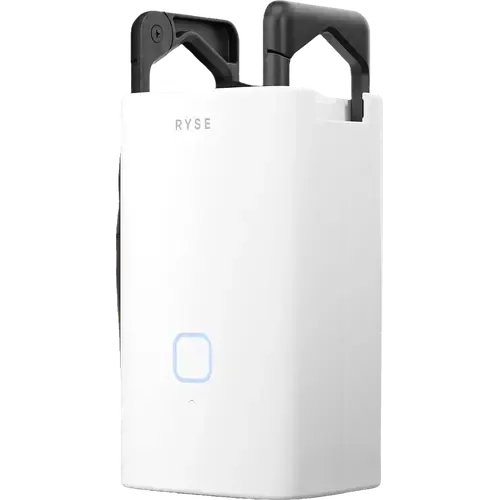
The Smart Device Compare comparison
RYSE SmartCurtain vs Yoolax Motorized Roller Shade
Understand the differences. Decide what matters to your home.
Build another comparison →Before you compare every specification
Key differences between RYSE SmartCurtain and Yoolax Motorized Roller Shade
A summary of selected recorded differences between these window coverings. Check the full specification table below for details and conditions.
Feature differences among your selected devices
- Remote Control Included (features): RYSE SmartCurtain — No (Buttons on the device itself, plus the app; no physical remote in the box.); Yoolax Motorized Roller Shade — Yes.
- Custom Sizing (installation): RYSE SmartCurtain — No; Yoolax Motorized Roller Shade — Yes (Each shade is cut to the submitted window dimensions, which Yoolax confirms before production.).
- Retrofit Kit (installation): RYSE SmartCurtain — Yes; Yoolax Motorized Roller Shade — No.
- Tool Free Installation (installation): RYSE SmartCurtain — Yes (Hooks onto the existing rod and auto-calibrates in under ten minutes, with no tools.); Yoolax Motorized Roller Shade — No.
Specifications to check side by side
- 2.4 GHz Wi-Fi (connectivity): RYSE SmartCurtain — RYSE SmartBridge required (Remote access arrives with the SmartBridge, which joins the network over Wi-Fi or Ethernet.); Yoolax Motorized Roller Shade — No.
- Other (connectivity): RYSE SmartCurtain — No; Yoolax Motorized Roller Shade — RF (The bundled remote drives the motor over its own radio link.).
- Thread (connectivity): RYSE SmartCurtain — No; Yoolax Motorized Roller Shade — Thread Border Router required (The Matter motor option joins over Thread.).
- Zigbee (connectivity): RYSE SmartCurtain — No; Yoolax Motorized Roller Shade — Zigbee Hub required.
Information still to confirm
- 9 of 37 comparison fields lack a resolved value for at least one selected device. Missing information is not evidence that a feature is absent.
- Check the full table and manufacturer documentation before ruling out a device.
These observations are derived from recorded catalog data and have not all been independently verified. Confirm details with the manufacturer before purchasing.
Compare capabilities, compatibility and setup requirements.
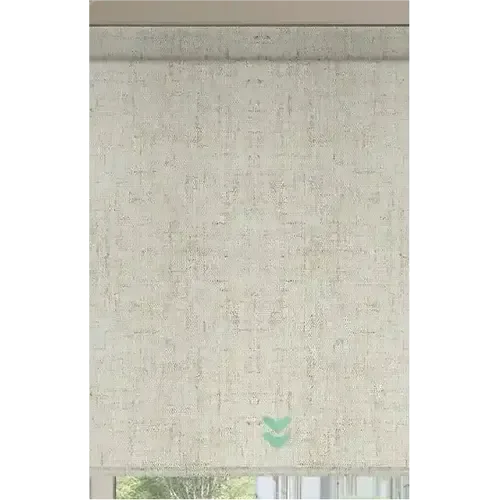
What the catalog tells us
Understand the tradeoffs.
These counts describe the available data, not a quality score. More features do not automatically make a better device.
19differences with recorded values for every device
9rows with missing or unspecified information
Consider your setup
Apple Home
- RYSE SmartCurtainRYSE SmartBridge required
- Yoolax Motorized Roller ShadeYes
Confirm which features appear in Apple Home and whether extra hardware or a subscription is needed for your intended use.
Inspect the specificationsConsider your setup
Matter
- RYSE SmartCurtainNo
- Yoolax Motorized Roller ShadeYes
Confirm the exact device type and the features exposed in your chosen platform. Protocol support does not establish feature parity across apps.
Inspect the specificationsConsider your setup
Battery Life
- RYSE SmartCurtain8 months
- Yoolax Motorized Roller Shade6 months
Compare the stated test conditions. Catalog battery figures alone do not predict runtime in your home.
Inspect the specificationsYour priorities, side by side
Focus on what changes.
Mark the specifications you care about. Open manufacturer sources for verification scope; fields without citations remain catalog data. Expand notes for other qualifications.
Showing 37 of 37 rows. “Not recorded” does not mean “No”.
Connectivity
- RYSE SmartCurtain
- RYSE SmartBridge required
Catalog note
Remote access arrives with the SmartBridge, which joins the network over Wi-Fi or Ethernet.
- Yoolax Motorized Roller Shade
- No
- RYSE SmartCurtain
- Yes
- Yoolax Motorized Roller Shade
- Yes
Catalog note
The Bluetooth motor option runs from the Yoolax app with no hub at all.
- RYSE SmartCurtain
- No
- Yoolax Motorized Roller Shade
- RF
Catalog note
The bundled remote drives the motor over its own radio link.
- RYSE SmartCurtain
- No
- Yoolax Motorized Roller Shade
- Thread Border Router required
Catalog note
The Matter motor option joins over Thread.
- RYSE SmartCurtain
- No
- Yoolax Motorized Roller Shade
- No
- RYSE SmartCurtain
- No
- Yoolax Motorized Roller Shade
- Zigbee Hub required
Covering
- RYSE SmartCurtain
- Curtains
Catalog note
Hangs from the curtain rod between the back folds of the fabric and walks along it.
- Yoolax Motorized Roller Shade
- Roller Shades
Catalog note
A made to measure blackout roller shade, offered in 17 colours across three fabric types.
Features
- RYSE SmartCurtain
- RYSE SmartBridge required
- Yoolax Motorized Roller Shade
- Yes
- RYSE SmartCurtain
- RYSE SmartBridge required
- Yoolax Motorized Roller Shade
- Yes
Catalog note
One remote handles up to 16 shades, individually or as groups.
- RYSE SmartCurtain
- No
- Yoolax Motorized Roller Shade
- No
- RYSE SmartCurtain
- No
- Yoolax Motorized Roller Shade
- No
- RYSE SmartCurtain
- No
Catalog note
Buttons on the device itself, plus the app; no physical remote in the box.
- Yoolax Motorized Roller Shade
- Yes
- RYSE SmartCurtain
- RYSE SmartBridge required
Catalog note
Routines and schedules need the SmartBridge, which is sold separately.
- Yoolax Motorized Roller Shade
- Yes
- RYSE SmartCurtain
- Not recorded
- Yoolax Motorized Roller Shade
- Not recorded
Installation
- RYSE SmartCurtain
- No
- Yoolax Motorized Roller Shade
- Yes
Catalog note
Each shade is cut to the submitted window dimensions, which Yoolax confirms before production.
- RYSE SmartCurtain
- Not recorded
- Yoolax Motorized Roller Shade
- Not applicable / unspecified
- RYSE SmartCurtain
- Not applicable / unspecified
- Yoolax Motorized Roller Shade
- Not recorded
- RYSE SmartCurtain
- Yes
- Yoolax Motorized Roller Shade
- No
- RYSE SmartCurtain
- Yes
Catalog note
Hooks onto the existing rod and auto-calibrates in under ten minutes, with no tools.
- Yoolax Motorized Roller Shade
- No
Integrations
- RYSE SmartCurtain
- RYSE SmartBridge required
- Yoolax Motorized Roller Shade
- Yes
- RYSE SmartCurtain
- RYSE SmartBridge required
- Yoolax Motorized Roller Shade
- Yes
Catalog note
Via Matter.
- RYSE SmartCurtain
- RYSE SmartBridge required
- Yoolax Motorized Roller Shade
- Yes
- RYSE SmartCurtain
- Not recorded
- Yoolax Motorized Roller Shade
- Yes
Catalog note
Home Assistant is a certified Matter controller, which is how the Matter over Thread motor reaches it.
- RYSE SmartCurtain
- No
Catalog note
RYSE reaches the voice platforms through its own SmartBridge; neither the curtain nor the bridge is Matter certified.
- Yoolax Motorized Roller Shade
- Yes
Catalog note
Matter over Thread is one of the motor options the shade is ordered with.
- RYSE SmartCurtain
- No
- Yoolax Motorized Roller Shade
- Yes
Catalog note
Via Matter.
Light Control
- RYSE SmartCurtain
- Not applicable / unspecified
- Yoolax Motorized Roller Shade
- Yes
- RYSE SmartCurtain
- Not applicable / unspecified
- Yoolax Motorized Roller Shade
- No
- RYSE SmartCurtain
- Not applicable / unspecified
- Yoolax Motorized Roller Shade
- Yes
Catalog note
A thermal insulated backing behind the blackout fabric.
Motor
- RYSE SmartCurtain
- Yes
Catalog note
A tug on the curtain tells the motor to finish opening or closing it.
- Yoolax Motorized Roller Shade
- Not recorded
- RYSE SmartCurtain
- Not recorded
- Yoolax Motorized Roller Shade
- Not recorded
- RYSE SmartCurtain
- Yes
- Yoolax Motorized Roller Shade
- Yes
- RYSE SmartCurtain
- No
- Yoolax Motorized Roller Shade
- No
Power
- RYSE SmartCurtain
- 8 months
- Yoolax Motorized Roller Shade
- 6 months
- RYSE SmartCurtain
- Lithium-ion
- Yoolax Motorized Roller Shade
- Lithium-ion
- RYSE SmartCurtain
- Yes
- Yoolax Motorized Roller Shade
- Yes
- RYSE SmartCurtain
- No
- Yoolax Motorized Roller Shade
- Sold separately
- RYSE SmartCurtain
- No
- Yoolax Motorized Roller Shade
- No
| Specification | RYSE SmartCurtain | Yoolax Motorized Roller Shade |
|---|---|---|
| Connectivity | ||
RYSE SmartBridge requiredCatalog noteRemote access arrives with the SmartBridge, which joins the network over Wi-Fi or Ethernet. | No | |
| Yes | YesCatalog noteThe Bluetooth motor option runs from the Yoolax app with no hub at all. | |
| No | RFCatalog noteThe bundled remote drives the motor over its own radio link. | |
| No | Thread Border Router requiredCatalog noteThe Matter motor option joins over Thread. | |
| No | No | |
| No | Zigbee Hub required | |
| Covering | ||
CurtainsCatalog noteHangs from the curtain rod between the back folds of the fabric and walks along it. | Roller ShadesCatalog noteA made to measure blackout roller shade, offered in 17 colours across three fabric types. | |
| Features | ||
| RYSE SmartBridge required | Yes | |
| RYSE SmartBridge required | YesCatalog noteOne remote handles up to 16 shades, individually or as groups. | |
| No | No | |
| No | No | |
NoCatalog noteButtons on the device itself, plus the app; no physical remote in the box. | Yes | |
RYSE SmartBridge requiredCatalog noteRoutines and schedules need the SmartBridge, which is sold separately. | Yes | |
| Not recorded | Not recorded | |
| Installation | ||
| No | YesCatalog noteEach shade is cut to the submitted window dimensions, which Yoolax confirms before production. | |
| Not recorded | Not applicable / unspecified | |
| Not applicable / unspecified | Not recorded | |
| Yes | No | |
YesCatalog noteHooks onto the existing rod and auto-calibrates in under ten minutes, with no tools. | No | |
| Integrations | ||
| RYSE SmartBridge required | Yes | |
| RYSE SmartBridge required | YesCatalog noteVia Matter. | |
| RYSE SmartBridge required | Yes | |
| Not recorded | YesCatalog noteHome Assistant is a certified Matter controller, which is how the Matter over Thread motor reaches it. | |
NoCatalog noteRYSE reaches the voice platforms through its own SmartBridge; neither the curtain nor the bridge is Matter certified. | YesCatalog noteMatter over Thread is one of the motor options the shade is ordered with. | |
| No | YesCatalog noteVia Matter. | |
| Light Control | ||
| Not applicable / unspecified | Yes | |
| Not applicable / unspecified | No | |
| Not applicable / unspecified | YesCatalog noteA thermal insulated backing behind the blackout fabric. | |
| Motor | ||
YesCatalog noteA tug on the curtain tells the motor to finish opening or closing it. | Not recorded | |
| Not recorded | Not recorded | |
| Yes | Yes | |
| No | No | |
| Power | ||
| 8 months | 6 months | |
| Lithium-ion | Lithium-ion | |
| Yes | Yes | |
| No | Sold separately | |
| No | No | |
Know what’s behind the comparison.
The table matches specifications by section and field. It preserves notes, separates missing data from explicit “No” values, and keeps qualifications attached to their values. No overall winner is assigned from feature counts.
Read our comparison methodology