
The Smart Device Compare comparison
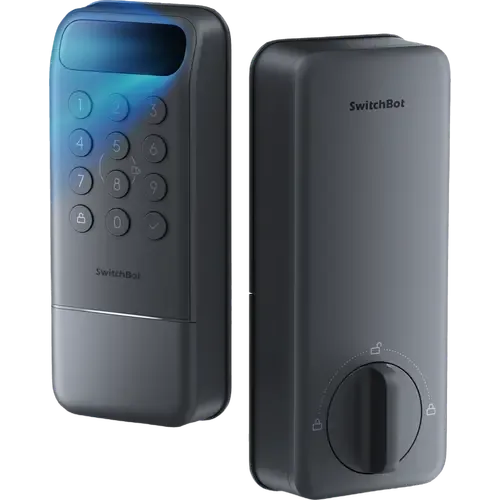
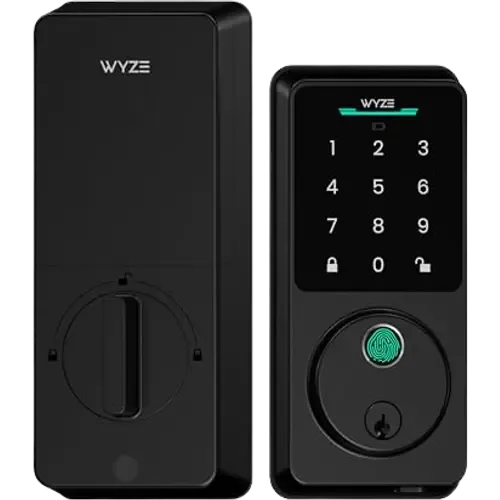
SwitchBot Lock Vision vs Wyze Auto-Lock Bolt v2
Understand the differences. Decide what matters to your home.
Build another comparison →Before you compare every specification
Key differences between SwitchBot Lock Vision and Wyze Auto-Lock Bolt v2
A summary of selected recorded differences between these door locks. Check the full specification table below for details and conditions.
Feature differences among your selected devices
- Away (automatic lock): SwitchBot Lock Vision — Yes (Geo-fence auto-lock secures the door when you leave); Wyze Auto-Lock Bolt v2 — No.
- Apple Home (integrations): SwitchBot Lock Vision — Yes (Via Matter, with Siri voice unlock); Wyze Auto-Lock Bolt v2 — No.
- Matter (integrations): SwitchBot Lock Vision — Yes (CSA-certified Matter over Wi-Fi, no bridge required); Wyze Auto-Lock Bolt v2 — No.
- SmartThings (integrations): SwitchBot Lock Vision — Yes (Via Matter); Wyze Auto-Lock Bolt v2 — No.
Specifications to check side by side
- Backup Battery (power): SwitchBot Lock Vision — CR123A (500 emergency unlocks with 5-year standby, and a USB-C port on the exterior escutcheon that accepts any power bank.); Wyze Auto-Lock Bolt v2 — USB-C Emergency Port.
- Battery Life (power): SwitchBot Lock Vision — 12 months; Wyze Auto-Lock Bolt v2 — 8 months.
- Battery Type (power): SwitchBot Lock Vision — 10000mAh Li-Po; Wyze Auto-Lock Bolt v2 — 8x AA.
Information still to confirm
- 11 of 45 comparison fields lack a resolved value for at least one selected device. Missing information is not evidence that a feature is absent.
- Check the full table and manufacturer documentation before ruling out a device.
These observations are derived from recorded catalog data and have not all been independently verified. Confirm details with the manufacturer before purchasing.
Compare capabilities, compatibility and setup requirements.
What the catalog tells us
Understand the tradeoffs.
These counts describe the available data, not a quality score. More features do not automatically make a better device.
10differences with recorded values for every device
11rows with missing or unspecified information
Consider your setup
Apple Home
- SwitchBot Lock VisionYes
- Wyze Auto-Lock Bolt v2No
Confirm which features appear in Apple Home and whether extra hardware or a subscription is needed for your intended use.
Inspect the specificationsConsider your setup
Matter
- SwitchBot Lock VisionYes
- Wyze Auto-Lock Bolt v2No
Confirm the exact device type and the features exposed in your chosen platform. Protocol support does not establish feature parity across apps.
Inspect the specificationsConsider your setup
Battery Life
- SwitchBot Lock Vision12 months
- Wyze Auto-Lock Bolt v28 months
Compare the stated test conditions. Catalog battery figures alone do not predict runtime in your home.
Inspect the specificationsYour priorities, side by side
Focus on what changes.
Mark the specifications you care about. Open manufacturer sources for verification scope; fields without citations remain catalog data. Expand notes for other qualifications.
Showing 45 of 45 rows. “Not recorded” does not mean “No”.
Alerts
- SwitchBot Lock Vision
- Yes
Catalog note
Real-time push notifications, with unlock logs stored locally for up to 6 months
- Wyze Auto-Lock Bolt v2
- Yes
- SwitchBot Lock Vision
- Yes
Catalog note
App warning at low power and an audible alert at the door at critical level
- Wyze Auto-Lock Bolt v2
- Yes
- SwitchBot Lock Vision
- Yes
Catalog note
Auto-lockout after repeated failed unlock attempts
- Wyze Auto-Lock Bolt v2
- Not recorded
- SwitchBot Lock Vision
- Yes
- Wyze Auto-Lock Bolt v2
- Not recorded
Automatic Lock
- SwitchBot Lock Vision
- Yes
Catalog note
A magnetic door sensor detects the door closing, with auto-lock and auto-relock timers from 30 seconds to 30 minutes
- Wyze Auto-Lock Bolt v2
- Yes
Catalog note
Auto-lock
- SwitchBot Lock Vision
- Yes
Catalog note
Geo-fence auto-lock secures the door when you leave
- Wyze Auto-Lock Bolt v2
- No
- SwitchBot Lock Vision
- Yes
Catalog note
Geo-fence auto-unlock on arrival
- Wyze Auto-Lock Bolt v2
- Not recorded
Connectivity
- SwitchBot Lock Vision
- Yes
- Wyze Auto-Lock Bolt v2
- Yes
- SwitchBot Lock Vision
- No
- Wyze Auto-Lock Bolt v2
- No
- SwitchBot Lock Vision
- Yes
- Wyze Auto-Lock Bolt v2
- Not recorded
- SwitchBot Lock Vision
- No
- Wyze Auto-Lock Bolt v2
- No
- SwitchBot Lock Vision
- No
- Wyze Auto-Lock Bolt v2
- No
- SwitchBot Lock Vision
- No
- Wyze Auto-Lock Bolt v2
- No
- SwitchBot Lock Vision
- No
- Wyze Auto-Lock Bolt v2
- No
Features
- SwitchBot Lock Vision
- Yes
Catalog note
Random digits can be typed before or after the real code on the keypad
- Wyze Auto-Lock Bolt v2
- Yes
- SwitchBot Lock Vision
- No
- Wyze Auto-Lock Bolt v2
- No
- SwitchBot Lock Vision
- No
- Wyze Auto-Lock Bolt v2
- No
- SwitchBot Lock Vision
- Yes
- Wyze Auto-Lock Bolt v2
- Not recorded
- SwitchBot Lock Vision
- Yes
Catalog note
Time-limited passcodes for guests, deliveries and service visits
- Wyze Auto-Lock Bolt v2
- Not recorded
Integrations
- SwitchBot Lock Vision
- Yes
Catalog note
Via Matter
- Wyze Auto-Lock Bolt v2
- Yes
Catalog note
Wyze lists Alexa among the ways to operate the Bolt v2; locking by voice is allowed and unlocking is not, which is Alexa's own restriction on locks
- SwitchBot Lock Vision
- Yes
Catalog note
Via Matter, with Siri voice unlock
- Wyze Auto-Lock Bolt v2
- No
- SwitchBot Lock Vision
- Yes
Catalog note
Via Matter
- Wyze Auto-Lock Bolt v2
- Not recorded
- SwitchBot Lock Vision
- Yes
Catalog note
Via Matter, and through the official SwitchBot integration
- Wyze Auto-Lock Bolt v2
- Not recorded
- SwitchBot Lock Vision
- Yes
Catalog note
CSA-certified Matter over Wi-Fi, no bridge required
- Wyze Auto-Lock Bolt v2
- No
- SwitchBot Lock Vision
- Yes
Catalog note
Via Matter
- Wyze Auto-Lock Bolt v2
- No
Lock System
- SwitchBot Lock Vision
- No
- Wyze Auto-Lock Bolt v2
- No
- SwitchBot Lock Vision
- Yes
- Wyze Auto-Lock Bolt v2
- Not recorded
- SwitchBot Lock Vision
- Yes
Manufacturer source
Structured-light 3D face recognition is supported.
SwitchBot Lock Vision manufacturer product page →- Source section
- Product description
- Model
- SwitchBot Lock Vision
- Region
- US manufacturer page
- Firmware
- Not specified by this source
- Checked
Battery life depends on use; the CR123A backup and USB-C emergency supply are separate from normal main-battery operation.
Document check only; not a hands-on test or verification of every regional or firmware variant.
Catalog note
3D structured light projecting over 20,000 infrared dots, up to 100 stored faces, works in total darkness
- Wyze Auto-Lock Bolt v2
- No
- SwitchBot Lock Vision
- No
Catalog note
The semiconductor fingerprint sensor is exclusive to the Lock Vision Pro
- Wyze Auto-Lock Bolt v2
- Yes
Catalog note
AI learning fingerprint scanner, unlocks in 0.5 seconds
- SwitchBot Lock Vision
- Yes
Catalog note
Up to 100 NFC cards
- Wyze Auto-Lock Bolt v2
- No
- SwitchBot Lock Vision
- Yes
Catalog note
6 to 12 digit codes, up to 90 permanent passcodes and 10 emergency passcodes
- Wyze Auto-Lock Bolt v2
- Yes
Catalog note
Anti-peep keypad
- SwitchBot Lock Vision
- Yes
- Wyze Auto-Lock Bolt v2
- Yes
Catalog note
Backup keys included
- SwitchBot Lock Vision
- Yes
- Wyze Auto-Lock Bolt v2
- Yes
Catalog note
Built-in Wi-Fi, manage via the Wyze app
Power
- SwitchBot Lock Vision
- CR123A
Catalog note
500 emergency unlocks with 5-year standby, and a USB-C port on the exterior escutcheon that accepts any power bank.
- Wyze Auto-Lock Bolt v2
- USB-C Emergency Port
- SwitchBot Lock Vision
- 12 months
Manufacturer source
The main battery is advertised to last up to 12 months.
SwitchBot Lock Vision manufacturer product page →- Source section
- Product description
- Model
- SwitchBot Lock Vision
- Region
- US manufacturer page
- Firmware
- Not specified by this source
- Checked
Battery life depends on use; the CR123A backup and USB-C emergency supply are separate from normal main-battery operation.
Document check only; not a hands-on test or verification of every regional or firmware variant.
- Wyze Auto-Lock Bolt v2
- 8 months
- SwitchBot Lock Vision
- 10000mAh Li-Po
- Wyze Auto-Lock Bolt v2
- 8x AA
Sensors
- SwitchBot Lock Vision
- Yes
Catalog note
The magnetic door sensor reports a door left ajar
- Wyze Auto-Lock Bolt v2
- Not recorded
Video
- SwitchBot Lock Vision
- No
- Wyze Auto-Lock Bolt v2
- No
- SwitchBot Lock Vision
- No
- Wyze Auto-Lock Bolt v2
- No
- SwitchBot Lock Vision
- No
- Wyze Auto-Lock Bolt v2
- No
- SwitchBot Lock Vision
- No
- Wyze Auto-Lock Bolt v2
- No
- SwitchBot Lock Vision
- No
- Wyze Auto-Lock Bolt v2
- No
- SwitchBot Lock Vision
- No
- Wyze Auto-Lock Bolt v2
- No
- SwitchBot Lock Vision
- No
- Wyze Auto-Lock Bolt v2
- No
- SwitchBot Lock Vision
- Not applicable / unspecified
- Wyze Auto-Lock Bolt v2
- Not applicable / unspecified
| Specification | SwitchBot Lock Vision | Wyze Auto-Lock Bolt v2 |
|---|---|---|
| Alerts | ||
YesCatalog noteReal-time push notifications, with unlock logs stored locally for up to 6 months | Yes | |
YesCatalog noteApp warning at low power and an audible alert at the door at critical level | Yes | |
YesCatalog noteAuto-lockout after repeated failed unlock attempts | Not recorded | |
| Yes | Not recorded | |
| Automatic Lock | ||
YesCatalog noteA magnetic door sensor detects the door closing, with auto-lock and auto-relock timers from 30 seconds to 30 minutes | YesCatalog noteAuto-lock | |
YesCatalog noteGeo-fence auto-lock secures the door when you leave | No | |
YesCatalog noteGeo-fence auto-unlock on arrival | Not recorded | |
| Connectivity | ||
| Yes | Yes | |
| No | No | |
| Yes | Not recorded | |
| No | No | |
| No | No | |
| No | No | |
| No | No | |
| Features | ||
YesCatalog noteRandom digits can be typed before or after the real code on the keypad | Yes | |
| No | No | |
| No | No | |
| Yes | Not recorded | |
YesCatalog noteTime-limited passcodes for guests, deliveries and service visits | Not recorded | |
| Integrations | ||
YesCatalog noteVia Matter | YesCatalog noteWyze lists Alexa among the ways to operate the Bolt v2; locking by voice is allowed and unlocking is not, which is Alexa's own restriction on locks | |
YesCatalog noteVia Matter, with Siri voice unlock | No | |
YesCatalog noteVia Matter | Not recorded | |
YesCatalog noteVia Matter, and through the official SwitchBot integration | Not recorded | |
YesCatalog noteCSA-certified Matter over Wi-Fi, no bridge required | No | |
YesCatalog noteVia Matter | No | |
| Lock System | ||
| No | No | |
| Yes | Not recorded | |
YesManufacturer sourceStructured-light 3D face recognition is supported. SwitchBot Lock Vision manufacturer product page →
Battery life depends on use; the CR123A backup and USB-C emergency supply are separate from normal main-battery operation. Document check only; not a hands-on test or verification of every regional or firmware variant. Catalog note3D structured light projecting over 20,000 infrared dots, up to 100 stored faces, works in total darkness | No | |
NoCatalog noteThe semiconductor fingerprint sensor is exclusive to the Lock Vision Pro | YesCatalog noteAI learning fingerprint scanner, unlocks in 0.5 seconds | |
YesCatalog noteUp to 100 NFC cards | No | |
YesCatalog note6 to 12 digit codes, up to 90 permanent passcodes and 10 emergency passcodes | YesCatalog noteAnti-peep keypad | |
| Yes | YesCatalog noteBackup keys included | |
| Yes | YesCatalog noteBuilt-in Wi-Fi, manage via the Wyze app | |
| Power | ||
CR123ACatalog note500 emergency unlocks with 5-year standby, and a USB-C port on the exterior escutcheon that accepts any power bank. | USB-C Emergency Port | |
12 monthsManufacturer sourceThe main battery is advertised to last up to 12 months. SwitchBot Lock Vision manufacturer product page →
Battery life depends on use; the CR123A backup and USB-C emergency supply are separate from normal main-battery operation. Document check only; not a hands-on test or verification of every regional or firmware variant. | 8 months | |
| 10000mAh Li-Po | 8x AA | |
| Sensors | ||
YesCatalog noteThe magnetic door sensor reports a door left ajar | Not recorded | |
| Video | ||
| No | No | |
| No | No | |
| No | No | |
| No | No | |
| No | No | |
| No | No | |
| No | No | |
| Not applicable / unspecified | Not applicable / unspecified | |
Know what’s behind the comparison.
The table matches specifications by section and field. It preserves notes, separates missing data from explicit “No” values, and keeps qualifications attached to their values. No overall winner is assigned from feature counts.
Read our comparison methodology