
The Smart Device Compare comparison
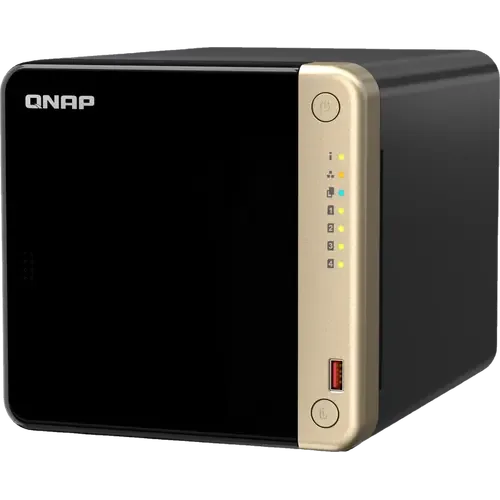
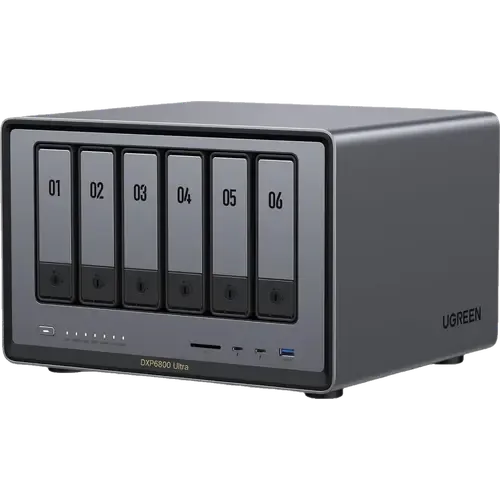
QNAP TS-464-8G-US vs UGREEN NASync DXP6800 Ultra
Understand the differences. Decide what matters to your home.
Build another comparison →Before you compare every specification
Key differences between QNAP TS-464-8G-US and UGREEN NASync DXP6800 Ultra
A summary of selected recorded differences between these nas. Check the full specification table below for details and conditions.
Feature differences among your selected devices
- Usb Copy (backup): QNAP TS-464-8G-US — Yes (Dedicated USB copy button on the front panel); UGREEN NASync DXP6800 Ultra — No (UGOS Pro documents no one-touch USB copy app or front-panel button; an attached drive is mounted in Storage Manager and copied by a Sync & Backup task).
- Ecc (memory): QNAP TS-464-8G-US — No; UGREEN NASync DXP6800 Ultra — Yes (UGREEN's spec table lists ODECC (on-die ECC) as supported, which protects the memory chip internally rather than reporting errors to the system).
- Btrfs (raid): QNAP TS-464-8G-US — No (QTS formats internal drives as EXT4); UGREEN NASync DXP6800 Ultra — Yes (UGOS Pro offers Btrfs or EXT4 when a volume is created, and snapshot-based recovery requires Btrfs).
- Vpn Server (remote access): QNAP TS-464-8G-US — Yes (QVPN Service serves PPTP, L2TP/IPSec, OpenVPN, WireGuard and QBelt, up to 100 clients); UGREEN NASync DXP6800 Ultra — No (The published UGOS Pro app list carries no VPN server, and UGREEN's own remote access guide covers UGREENlink, DDNS and Tailscale, with Tailscale running in Docker and WireGuard left to the user to operate).
Specifications to check side by side
- Operating System (apps): QNAP TS-464-8G-US — QNAP QTS; UGREEN NASync DXP6800 Ultra — UGOS Pro.
- Maximum Capacity (memory): QNAP TS-464-8G-US — 16 GB; UGREEN NASync DXP6800 Ultra — 96 GB (Two DDR5 slots, shipped with 8GB and expandable to 96GB per UGREEN's spec table).
- Type (memory): QNAP TS-464-8G-US — DDR4; UGREEN NASync DXP6800 Ultra — DDR5.
- 10 Gbe Ports (network): QNAP TS-464-8G-US — 0; UGREEN NASync DXP6800 Ultra — 2.
Information still to confirm
- 2 of 53 comparison fields lack a resolved value for at least one selected device. Missing information is not evidence that a feature is absent.
- Check the full table and manufacturer documentation before ruling out a device.
These observations are derived from recorded catalog data and have not all been independently verified. Confirm details with the manufacturer before purchasing.
Compare capabilities, compatibility and setup requirements.
What the catalog tells us
Understand the tradeoffs.
These counts describe the available data, not a quality score. More features do not automatically make a better device.
21differences with recorded values for every device
2rows with missing or unspecified information
Your priorities, side by side
Focus on what changes.
Mark the specifications you care about. Open manufacturer sources for verification scope; fields without citations remain catalog data. Expand notes for other qualifications.
Showing 53 of 53 rows. “Not recorded” does not mean “No”.
Apps
- QNAP TS-464-8G-US
- Yes
Catalog note
QuMagie sorts photos by people, things and places
- UGREEN NASync DXP6800 Ultra
- Yes
Catalog note
Local AI photo tools cover people recognition, OCR, object and scene recognition, duplicate detection, pet recognition and custom learning
- QNAP TS-464-8G-US
- Yes
Catalog note
Container Station runs Docker and LXC/LXD containers
- UGREEN NASync DXP6800 Ultra
- Yes
Catalog note
UGREEN lists Docker containers among the workloads this model runs, and Docker is installed from the UGOS Pro App Center
- QNAP TS-464-8G-US
- QNAP QTS
- UGREEN NASync DXP6800 Ultra
- UGOS Pro
- QNAP TS-464-8G-US
- Yes
- UGREEN NASync DXP6800 Ultra
- Yes
Catalog note
UGREEN documents Plex Media Server running through Docker on all DXP series models, with Intel Quick Sync hardware transcoding inside the container; UGOS Pro ships no separate App Center package for it
- QNAP TS-464-8G-US
- Yes
Catalog note
QVR Pro ships 8 free camera channels, QVR Surveillance 2
- UGREEN NASync DXP6800 Ultra
- Yes
Catalog note
Surveillance Center handles live view, playback and alerts, and UGREEN states it supports face, people, pet and vehicle detection on this model
- QNAP TS-464-8G-US
- Yes
Catalog note
Virtualization Station suggests up to 4 virtual machines and needs at least 4 GB of memory
- UGREEN NASync DXP6800 Ultra
- Yes
Catalog note
UGOS Pro ships a Virtual Machine Manager, and UGREEN lists running virtual machines among this model's workloads
Backup
- QNAP TS-464-8G-US
- Yes
Catalog note
Hybrid Backup Sync covers cloud backup, cloud sync and two-way sync
- UGREEN NASync DXP6800 Ultra
- Yes
Catalog note
The Cloud Drives app syncs NAS storage with cloud services, and UGREEN lists cloud drives among this model's UGOS Pro workloads
- QNAP TS-464-8G-US
- Yes
Catalog note
Apple Time Machine backup through Hybrid Backup Sync
- UGREEN NASync DXP6800 Ultra
- Yes
Catalog note
UGOS Pro provides a dedicated Time Machine destination over SMB and Bonjour, and backs up Windows and Mac folders through Sync & Backup with the desktop client
- QNAP TS-464-8G-US
- Yes
Catalog note
Dedicated USB copy button on the front panel
- UGREEN NASync DXP6800 Ultra
- No
Catalog note
UGOS Pro documents no one-touch USB copy app or front-panel button; an attached drive is mounted in Storage Manager and copied by a Sync & Backup task
Features
- QNAP TS-464-8G-US
- Yes
- UGREEN NASync DXP6800 Ultra
- Yes
Catalog note
UGOS Pro sets boot and shutdown schedules from Control Panel > Hardware & Power > Scheduled startup and shutdown
- QNAP TS-464-8G-US
- Yes
Catalog note
USB and network UPS from Control Panel > External Device > UPS
- UGREEN NASync DXP6800 Ultra
- Yes
Catalog note
A UPS is connected from Control Panel > Hardware & Power > UPS so the NAS enters standby or shuts down safely; UGREEN publishes its own US2000 and US3000 DC units and a tested third-party compatibility list
File Services
- QNAP TS-464-8G-US
- Yes
- UGREEN NASync DXP6800 Ultra
- Yes
Catalog note
SAN Manager creates block storage that connected devices mount like a local drive, and UGREEN lists it among the services this model runs
- QNAP TS-464-8G-US
- Yes
Catalog note
NFS v2/3/4/4.1 alongside CIFS/SMB and AFP
- UGREEN NASync DXP6800 Ultra
- Yes
Catalog note
UGOS Pro serves SMB, NFS, WebDAV, FTP and SFTP from Control Panel > File Services
- QNAP TS-464-8G-US
- Yes
Catalog note
Hybrid Backup Sync syncs to and from an rsync server
- UGREEN NASync DXP6800 Ultra
- Yes
Catalog note
UGOS Pro lists rsync among its file protocol services, and UGREEN documents backing up to a second NAS or remote server over rsync or WebDAV
Memory
- QNAP TS-464-8G-US
- 8 GB
- UGREEN NASync DXP6800 Ultra
- 8 GB
- QNAP TS-464-8G-US
- No
- UGREEN NASync DXP6800 Ultra
- Yes
Catalog note
UGREEN's spec table lists ODECC (on-die ECC) as supported, which protects the memory chip internally rather than reporting errors to the system
- QNAP TS-464-8G-US
- 16 GB
- UGREEN NASync DXP6800 Ultra
- 96 GB
Catalog note
Two DDR5 slots, shipped with 8GB and expandable to 96GB per UGREEN's spec table
- QNAP TS-464-8G-US
- DDR4
- UGREEN NASync DXP6800 Ultra
- DDR5
Network
- QNAP TS-464-8G-US
- 0
- UGREEN NASync DXP6800 Ultra
- 0
- QNAP TS-464-8G-US
- 0
- UGREEN NASync DXP6800 Ultra
- 2
- QNAP TS-464-8G-US
- 2
- UGREEN NASync DXP6800 Ultra
- 0
- QNAP TS-464-8G-US
- Yes
Catalog note
Port trunking with 7 modes across the two 2.5GbE ports
- UGREEN NASync DXP6800 Ultra
- Yes
Catalog note
UGREEN states the two 10GbE ports can be aggregated into 20G of bandwidth for reads of up to 2500MB/s, and describes link aggregation and SMB multichannel on this range
- QNAP TS-464-8G-US
- 0
- UGREEN NASync DXP6800 Ultra
- 0
- QNAP TS-464-8G-US
- Yes
- UGREEN NASync DXP6800 Ultra
- Yes
Catalog note
UGREEN states that all its NAS support Wake on LAN, enabled from Control Panel > Hardware & Power > Power and triggered from the UGREEN NAS client
Ports
- QNAP TS-464-8G-US
- YES (4K 60Hz)
Catalog note
HDMI 2.1, up to 4096 x 2160 at 60 Hz
- UGREEN NASync DXP6800 Ultra
- YES (8K)
Catalog note
HDMI 2.1 output, listed by UGREEN as 8K
- QNAP TS-464-8G-US
- No
- UGREEN NASync DXP6800 Ultra
- YES (SD 4.0)
Catalog note
Front SD 4.0 UHS-II card reader
- QNAP TS-464-8G-US
- No
- UGREEN NASync DXP6800 Ultra
- YES (Thunderbolt 4)
- QNAP TS-464-8G-US
- 4
- UGREEN NASync DXP6800 Ultra
- 4
Catalog note
Two USB-A at 10Gb/s (one front, one rear) and two rear USB 2.0 at 480Mb/s, alongside the two Thunderbolt 4 ports
- QNAP TS-464-8G-US
- No
- UGREEN NASync DXP6800 Ultra
- YES (Thunderbolt 4)
Catalog note
Two front Thunderbolt 4 ports at 40Gb/s, usable for a direct link to a workstation
Power
- QNAP TS-464-8G-US
- Not recorded
- UGREEN NASync DXP6800 Ultra
- Not recorded
- QNAP TS-464-8G-US
- 40.536 W
- UGREEN NASync DXP6800 Ultra
- 43.07 W
Catalog note
UGREEN states 43.07 W under drive access and 24.91 W in drive hibernation
Processor
- QNAP TS-464-8G-US
- x86-64
- UGREEN NASync DXP6800 Ultra
- x86-64
- QNAP TS-464-8G-US
- 4
- UGREEN NASync DXP6800 Ultra
- 10
- QNAP TS-464-8G-US
- Yes
Catalog note
Intel AES-NI encryption engine
- UGREEN NASync DXP6800 Ultra
- Yes
Catalog note
Intel AES New Instructions are listed as supported on the Core 5 120U
- QNAP TS-464-8G-US
- Yes
Catalog note
Built-in Intel UHD Graphics handles hardware-accelerated transcoding
- UGREEN NASync DXP6800 Ultra
- Yes
Catalog note
Intel lists Quick Sync Video as supported on the Core 5 120U fitted here, and UGREEN builds the 8K HDMI output and Plex transcoding around it
- QNAP TS-464-8G-US
- Intel Celeron N5095
- UGREEN NASync DXP6800 Ultra
- Intel Core 5 120U
- QNAP TS-464-8G-US
- Not applicable / unspecified
- UGREEN NASync DXP6800 Ultra
- Not applicable / unspecified
Catalog note
The Core 5 120U is a Raptor Lake-U Refresh part and Intel lists no AI Boost NPU for it; the local AI photo features run on the CPU and integrated graphics
Raid
- QNAP TS-464-8G-US
- No
Catalog note
QTS formats internal drives as EXT4
- UGREEN NASync DXP6800 Ultra
- Yes
Catalog note
UGOS Pro offers Btrfs or EXT4 when a volume is created, and snapshot-based recovery requires Btrfs
- QNAP TS-464-8G-US
- No
- UGREEN NASync DXP6800 Ultra
- No
Catalog note
The published storage modes are JBOD, Basic and RAID 0, 1, 5, 6 and 10, with no flexible mixed-drive mode
- QNAP TS-464-8G-US
- Yes
- UGREEN NASync DXP6800 Ultra
- Yes
- QNAP TS-464-8G-US
- Yes
- UGREEN NASync DXP6800 Ultra
- Yes
- QNAP TS-464-8G-US
- Yes
Catalog note
Block-based volume and LUN snapshots, minimum interval 5 minutes
- UGREEN NASync DXP6800 Ultra
- Yes
Catalog note
UGOS Pro ships a Snapshot app that captures point-in-time versions of files, and UGREEN lists snapshot management among this model's workloads
- QNAP TS-464-8G-US
- YES (QuTS hero)
Catalog note
ZFS requires switching the NAS from QTS to the QuTS hero operating system, supported from QTS 5.2.1
- UGREEN NASync DXP6800 Ultra
- No
Catalog note
UGOS Pro offers only Btrfs and EXT4 at volume creation
Remote Access
- QNAP TS-464-8G-US
- Yes
- UGREEN NASync DXP6800 Ultra
- Yes
Catalog note
UGREEN documents DDNS as the advanced alternative to UGREENlink, reaching the NAS through your own domain with router-side port forwarding
- QNAP TS-464-8G-US
- YES (myQNAPcloud)
- UGREEN NASync DXP6800 Ultra
- YES (UGREENlink)
Catalog note
UGREENlink is the built-in remote access feature, enabled from Control Panel > Device Connection > Remote access and reached through a custom ug.link address without port forwarding
- QNAP TS-464-8G-US
- Yes
- UGREEN NASync DXP6800 Ultra
- Yes
Catalog note
UGREEN documents enabling SSH from Control Panel > Terminal, with root privileges through sudo
- QNAP TS-464-8G-US
- Yes
Catalog note
QVPN Service serves PPTP, L2TP/IPSec, OpenVPN, WireGuard and QBelt, up to 100 clients
- UGREEN NASync DXP6800 Ultra
- No
Catalog note
The published UGOS Pro app list carries no VPN server, and UGREEN's own remote access guide covers UGREENlink, DDNS and Tailscale, with Tailscale running in Docker and WireGuard left to the user to operate
Storage
- QNAP TS-464-8G-US
- YES (TL/TR enclosures)
- UGREEN NASync DXP6800 Ultra
- No
Catalog note
UGREEN publishes no expansion enclosure for the NASync range; extra hardware goes through the PCIe Gen4 x4 slot instead
- QNAP TS-464-8G-US
- Yes
Catalog note
Hot-swappable for the four SATA bays, not for the M.2 slots
- UGREEN NASync DXP6800 Ultra
- Yes
Catalog note
UGREEN states that its NAS support hot-swapping hard drives, while recommending a shutdown first for data safety
- QNAP TS-464-8G-US
- 2
- UGREEN NASync DXP6800 Ultra
- 2
- QNAP TS-464-8G-US
- Yes
Catalog note
The two M.2 2280 PCIe Gen 3 x1 slots can hold a cache or a storage pool
- UGREEN NASync DXP6800 Ultra
- Yes
Catalog note
UGOS Pro can build a separate M.2 SSD storage pool on the DXP models that carry M.2 slots, instead of using them only as read or read-write cache
- QNAP TS-464-8G-US
- 96 TB
- UGREEN NASync DXP6800 Ultra
- 208 TB
Manufacturer source
The stated maximum raw storage capacity is 208 TB.
UGREEN NASync DXP6800 Ultra manufacturer product page →- Source section
- Product description
- Model
- UGREEN NASync DXP6800 Ultra
- Region
- Manufacturer product page; no universal regional compatibility implied
- Firmware
- Not specified by this source
- Checked
This is a maximum across supported drives, not included or usable storage capacity.
Document check only; not a hands-on test or verification of every regional or firmware variant.
Catalog note
UGREEN states 208TB across six 32TB SATA drives and two 8TB M.2 SSDs
- QNAP TS-464-8G-US
- 4
- UGREEN NASync DXP6800 Ultra
- 6
Manufacturer source
The enclosure has six SATA drive bays.
UGREEN NASync DXP6800 Ultra manufacturer product page →- Source section
- Product description
- Model
- UGREEN NASync DXP6800 Ultra
- Region
- Manufacturer product page; no universal regional compatibility implied
- Firmware
- Not specified by this source
- Checked
This is a maximum across supported drives, not included or usable storage capacity.
Document check only; not a hands-on test or verification of every regional or firmware variant.
| Specification | QNAP TS-464-8G-US | UGREEN NASync DXP6800 Ultra |
|---|---|---|
| Apps | ||
YesCatalog noteQuMagie sorts photos by people, things and places | YesCatalog noteLocal AI photo tools cover people recognition, OCR, object and scene recognition, duplicate detection, pet recognition and custom learning | |
YesCatalog noteContainer Station runs Docker and LXC/LXD containers | YesCatalog noteUGREEN lists Docker containers among the workloads this model runs, and Docker is installed from the UGOS Pro App Center | |
| QNAP QTS | UGOS Pro | |
| Yes | YesCatalog noteUGREEN documents Plex Media Server running through Docker on all DXP series models, with Intel Quick Sync hardware transcoding inside the container; UGOS Pro ships no separate App Center package for it | |
YesCatalog noteQVR Pro ships 8 free camera channels, QVR Surveillance 2 | YesCatalog noteSurveillance Center handles live view, playback and alerts, and UGREEN states it supports face, people, pet and vehicle detection on this model | |
YesCatalog noteVirtualization Station suggests up to 4 virtual machines and needs at least 4 GB of memory | YesCatalog noteUGOS Pro ships a Virtual Machine Manager, and UGREEN lists running virtual machines among this model's workloads | |
| Backup | ||
YesCatalog noteHybrid Backup Sync covers cloud backup, cloud sync and two-way sync | YesCatalog noteThe Cloud Drives app syncs NAS storage with cloud services, and UGREEN lists cloud drives among this model's UGOS Pro workloads | |
YesCatalog noteApple Time Machine backup through Hybrid Backup Sync | YesCatalog noteUGOS Pro provides a dedicated Time Machine destination over SMB and Bonjour, and backs up Windows and Mac folders through Sync & Backup with the desktop client | |
YesCatalog noteDedicated USB copy button on the front panel | NoCatalog noteUGOS Pro documents no one-touch USB copy app or front-panel button; an attached drive is mounted in Storage Manager and copied by a Sync & Backup task | |
| Features | ||
| Yes | YesCatalog noteUGOS Pro sets boot and shutdown schedules from Control Panel > Hardware & Power > Scheduled startup and shutdown | |
YesCatalog noteUSB and network UPS from Control Panel > External Device > UPS | YesCatalog noteA UPS is connected from Control Panel > Hardware & Power > UPS so the NAS enters standby or shuts down safely; UGREEN publishes its own US2000 and US3000 DC units and a tested third-party compatibility list | |
| File Services | ||
| Yes | YesCatalog noteSAN Manager creates block storage that connected devices mount like a local drive, and UGREEN lists it among the services this model runs | |
YesCatalog noteNFS v2/3/4/4.1 alongside CIFS/SMB and AFP | YesCatalog noteUGOS Pro serves SMB, NFS, WebDAV, FTP and SFTP from Control Panel > File Services | |
YesCatalog noteHybrid Backup Sync syncs to and from an rsync server | YesCatalog noteUGOS Pro lists rsync among its file protocol services, and UGREEN documents backing up to a second NAS or remote server over rsync or WebDAV | |
| Memory | ||
| 8 GB | 8 GB | |
| No | YesCatalog noteUGREEN's spec table lists ODECC (on-die ECC) as supported, which protects the memory chip internally rather than reporting errors to the system | |
| 16 GB | 96 GBCatalog noteTwo DDR5 slots, shipped with 8GB and expandable to 96GB per UGREEN's spec table | |
| DDR4 | DDR5 | |
| Network | ||
| 0 | 0 | |
| 0 | 2 | |
| 2 | 0 | |
YesCatalog notePort trunking with 7 modes across the two 2.5GbE ports | YesCatalog noteUGREEN states the two 10GbE ports can be aggregated into 20G of bandwidth for reads of up to 2500MB/s, and describes link aggregation and SMB multichannel on this range | |
| 0 | 0 | |
| Yes | YesCatalog noteUGREEN states that all its NAS support Wake on LAN, enabled from Control Panel > Hardware & Power > Power and triggered from the UGREEN NAS client | |
| Ports | ||
YES (4K 60Hz)Catalog noteHDMI 2.1, up to 4096 x 2160 at 60 Hz | YES (8K)Catalog noteHDMI 2.1 output, listed by UGREEN as 8K | |
| No | YES (SD 4.0)Catalog noteFront SD 4.0 UHS-II card reader | |
| No | YES (Thunderbolt 4) | |
| 4 | 4Catalog noteTwo USB-A at 10Gb/s (one front, one rear) and two rear USB 2.0 at 480Mb/s, alongside the two Thunderbolt 4 ports | |
| No | YES (Thunderbolt 4)Catalog noteTwo front Thunderbolt 4 ports at 40Gb/s, usable for a direct link to a workstation | |
| Power | ||
| Not recorded | Not recorded | |
| 40.536 W | 43.07 WCatalog noteUGREEN states 43.07 W under drive access and 24.91 W in drive hibernation | |
| Processor | ||
| x86-64 | x86-64 | |
| 4 | 10 | |
YesCatalog noteIntel AES-NI encryption engine | YesCatalog noteIntel AES New Instructions are listed as supported on the Core 5 120U | |
YesCatalog noteBuilt-in Intel UHD Graphics handles hardware-accelerated transcoding | YesCatalog noteIntel lists Quick Sync Video as supported on the Core 5 120U fitted here, and UGREEN builds the 8K HDMI output and Plex transcoding around it | |
| Intel Celeron N5095 | Intel Core 5 120U | |
| Not applicable / unspecified | Not applicable / unspecifiedCatalog noteThe Core 5 120U is a Raptor Lake-U Refresh part and Intel lists no AI Boost NPU for it; the local AI photo features run on the CPU and integrated graphics | |
| Raid | ||
NoCatalog noteQTS formats internal drives as EXT4 | YesCatalog noteUGOS Pro offers Btrfs or EXT4 when a volume is created, and snapshot-based recovery requires Btrfs | |
| No | NoCatalog noteThe published storage modes are JBOD, Basic and RAID 0, 1, 5, 6 and 10, with no flexible mixed-drive mode | |
| Yes | Yes | |
| Yes | Yes | |
YesCatalog noteBlock-based volume and LUN snapshots, minimum interval 5 minutes | YesCatalog noteUGOS Pro ships a Snapshot app that captures point-in-time versions of files, and UGREEN lists snapshot management among this model's workloads | |
YES (QuTS hero)Catalog noteZFS requires switching the NAS from QTS to the QuTS hero operating system, supported from QTS 5.2.1 | NoCatalog noteUGOS Pro offers only Btrfs and EXT4 at volume creation | |
| Remote Access | ||
| Yes | YesCatalog noteUGREEN documents DDNS as the advanced alternative to UGREENlink, reaching the NAS through your own domain with router-side port forwarding | |
| YES (myQNAPcloud) | YES (UGREENlink)Catalog noteUGREENlink is the built-in remote access feature, enabled from Control Panel > Device Connection > Remote access and reached through a custom ug.link address without port forwarding | |
| Yes | YesCatalog noteUGREEN documents enabling SSH from Control Panel > Terminal, with root privileges through sudo | |
YesCatalog noteQVPN Service serves PPTP, L2TP/IPSec, OpenVPN, WireGuard and QBelt, up to 100 clients | NoCatalog noteThe published UGOS Pro app list carries no VPN server, and UGREEN's own remote access guide covers UGREENlink, DDNS and Tailscale, with Tailscale running in Docker and WireGuard left to the user to operate | |
| Storage | ||
| YES (TL/TR enclosures) | NoCatalog noteUGREEN publishes no expansion enclosure for the NASync range; extra hardware goes through the PCIe Gen4 x4 slot instead | |
YesCatalog noteHot-swappable for the four SATA bays, not for the M.2 slots | YesCatalog noteUGREEN states that its NAS support hot-swapping hard drives, while recommending a shutdown first for data safety | |
| 2 | 2 | |
YesCatalog noteThe two M.2 2280 PCIe Gen 3 x1 slots can hold a cache or a storage pool | YesCatalog noteUGOS Pro can build a separate M.2 SSD storage pool on the DXP models that carry M.2 slots, instead of using them only as read or read-write cache | |
| 96 TB | 208 TBManufacturer sourceThe stated maximum raw storage capacity is 208 TB. UGREEN NASync DXP6800 Ultra manufacturer product page →
This is a maximum across supported drives, not included or usable storage capacity. Document check only; not a hands-on test or verification of every regional or firmware variant. Catalog noteUGREEN states 208TB across six 32TB SATA drives and two 8TB M.2 SSDs | |
| 4 | 6Manufacturer sourceThe enclosure has six SATA drive bays. UGREEN NASync DXP6800 Ultra manufacturer product page →
This is a maximum across supported drives, not included or usable storage capacity. Document check only; not a hands-on test or verification of every regional or firmware variant. | |
Know what’s behind the comparison.
The table matches specifications by section and field. It preserves notes, separates missing data from explicit “No” values, and keeps qualifications attached to their values. No overall winner is assigned from feature counts.
Read our comparison methodology