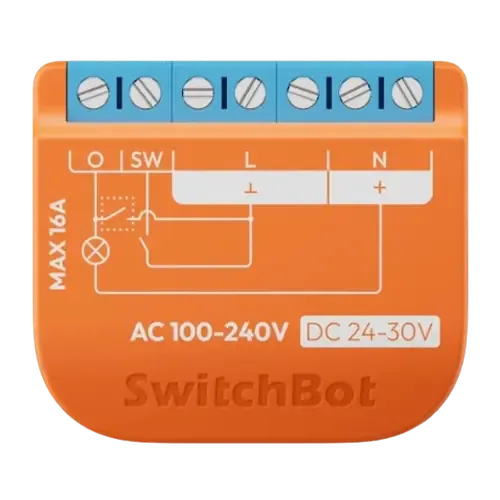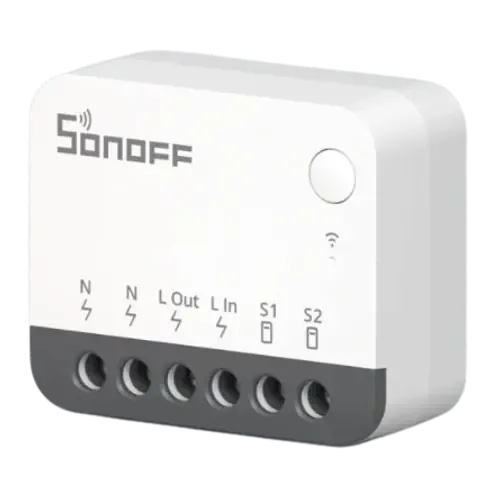
The Smart Device Compare comparison

Sonoff ZBMINIR2 Extreme Zigbee Smart Switch vs Switchbot Relay Switch 1PM

Understand the differences. Decide what matters to your home.

Build another comparison →

Before you compare every specification

Key differences between Sonoff ZBMINIR2 Extreme Zigbee Smart Switch and Switchbot Relay Switch 1PM

A summary of selected recorded differences between these relays. Check the full specification table below for details and conditions.

Feature differences among your selected devices
  • 2.4 GHz Wi-Fi (connectivity): Sonoff ZBMINIR2 Extreme Zigbee Smart Switch — No; Switchbot Relay Switch 1PM — Yes.
  • Bluetooth (connectivity): Sonoff ZBMINIR2 Extreme Zigbee Smart Switch — No; Switchbot Relay Switch 1PM — Yes.
  • Dry Contact Mode (features): Sonoff ZBMINIR2 Extreme Zigbee Smart Switch — No; Switchbot Relay Switch 1PM — Yes.
  • Energy Monitoring (features): Sonoff ZBMINIR2 Extreme Zigbee Smart Switch — No; Switchbot Relay Switch 1PM — Yes.
Specifications to check side by side
  • Zigbee (connectivity): Sonoff ZBMINIR2 Extreme Zigbee Smart Switch — Zigbee Hub required; Switchbot Relay Switch 1PM — No.
  • Apple Home (integrations): Sonoff ZBMINIR2 Extreme Zigbee Smart Switch — SONOFF Hub required (SONOFF lists this model among the Zigbee devices its Matter bridges (Zigbee Bridge Ultra, iHost, NSPanel Pro) publish to Matter, which is how it reaches the Apple Home app. Apple Home has no Zigbee radio of its own.); Switchbot Relay Switch 1PM — Yes.
  • Matter (integrations): Sonoff ZBMINIR2 Extreme Zigbee Smart Switch — SONOFF Hub required (The device is not Matter itself: SONOFF lists it among the Zigbee models its Matter bridges (Zigbee Bridge Ultra, iHost, NSPanel Pro) republish into Matter.); Switchbot Relay Switch 1PM — Yes.
  • Resistive Maximum Load Current (power): Sonoff ZBMINIR2 Extreme Zigbee Smart Switch — 10A; Switchbot Relay Switch 1PM — 16A.
Information still to confirm
  • 14 of 46 comparison fields lack a resolved value for at least one selected device. Missing information is not evidence that a feature is absent.
  • Check the full table and manufacturer documentation before ruling out a device.

These observations are derived from recorded catalog data and have not all been independently verified. Confirm details with the manufacturer before purchasing.

Compare capabilities, compatibility and setup requirements.

What the catalog tells us

Understand the tradeoffs.

These counts describe the available data, not a quality score. More features do not automatically make a better device.

14differences with recorded values for every device
14rows with missing or unspecified information

Consider your setup

Apple Home

  • Sonoff ZBMINIR2 Extreme Zigbee Smart SwitchSONOFF Hub required
  • Switchbot Relay Switch 1PMYes

Confirm which features appear in Apple Home and whether extra hardware or a subscription is needed for your intended use.

Inspect the specifications

Consider your setup

Matter

  • Sonoff ZBMINIR2 Extreme Zigbee Smart SwitchSONOFF Hub required
  • Switchbot Relay Switch 1PMYes

Confirm the exact device type and the features exposed in your chosen platform. Protocol support does not establish feature parity across apps.

Inspect the specifications

Your priorities, side by side

Focus on what changes.

Mark the specifications you care about. Open manufacturer sources for verification scope; fields without citations remain catalog data. Expand notes for other qualifications.

Showing 46 of 46 rows. “Not recorded” does not mean “No”.

Connectivity

Sonoff ZBMINIR2 Extreme Zigbee Smart Switch
No
Switchbot Relay Switch 1PM
Yes
Sonoff ZBMINIR2 Extreme Zigbee Smart Switch
No
Switchbot Relay Switch 1PM
No
Sonoff ZBMINIR2 Extreme Zigbee Smart Switch
No
Switchbot Relay Switch 1PM
Yes
Sonoff ZBMINIR2 Extreme Zigbee Smart Switch
No
Switchbot Relay Switch 1PM
No
Sonoff ZBMINIR2 Extreme Zigbee Smart Switch
No
Switchbot Relay Switch 1PM
No
Sonoff ZBMINIR2 Extreme Zigbee Smart Switch
No
Switchbot Relay Switch 1PM
No
Sonoff ZBMINIR2 Extreme Zigbee Smart Switch
Zigbee Hub required
Switchbot Relay Switch 1PM
No

Features

Sonoff ZBMINIR2 Extreme Zigbee Smart Switch
Yes
Switchbot Relay Switch 1PM
Yes
Sonoff ZBMINIR2 Extreme Zigbee Smart Switch
No
Switchbot Relay Switch 1PM
No
Sonoff ZBMINIR2 Extreme Zigbee Smart Switch
No
Switchbot Relay Switch 1PM
Yes
Sonoff ZBMINIR2 Extreme Zigbee Smart Switch
No
Switchbot Relay Switch 1PM
Yes
Manufacturer source

The relay monitors electrical consumption.

Switchbot Relay Switch 1PM manufacturer product page →
Source section
Product description
Model
Switchbot Relay Switch 1PM
Region
Manufacturer product page; no universal regional compatibility implied
Firmware
Not specified by this source
Checked

The described bridge function covers up to two compatible SwitchBot Bluetooth devices; it is not a universal Bluetooth bridge.

Document check only; not a hands-on test or verification of every regional or firmware variant.

Sonoff ZBMINIR2 Extreme Zigbee Smart Switch
No
Switchbot Relay Switch 1PM
No
Sonoff ZBMINIR2 Extreme Zigbee Smart Switch
Yes
Switchbot Relay Switch 1PM
No
Sonoff ZBMINIR2 Extreme Zigbee Smart Switch
Yes
Switchbot Relay Switch 1PM
No
Sonoff ZBMINIR2 Extreme Zigbee Smart Switch
Yes
Switchbot Relay Switch 1PM
Yes
Sonoff ZBMINIR2 Extreme Zigbee Smart Switch
1
Switchbot Relay Switch 1PM
1
Sonoff ZBMINIR2 Extreme Zigbee Smart Switch
Yes
Switchbot Relay Switch 1PM
Yes
Sonoff ZBMINIR2 Extreme Zigbee Smart Switch
No
Switchbot Relay Switch 1PM
Yes
Sonoff ZBMINIR2 Extreme Zigbee Smart Switch
Yes
Catalog note

A reliable connection is crucial for your Zigbee network. ZBMINIR2, as a Zigbee router device with Turbo Mode, boosts signal strength and expands coverage for optimal performance.

Switchbot Relay Switch 1PM
No

Integrations

Sonoff ZBMINIR2 Extreme Zigbee Smart Switch
Yes
Switchbot Relay Switch 1PM
Yes
Sonoff ZBMINIR2 Extreme Zigbee Smart Switch
SONOFF Hub required
Catalog note

SONOFF lists this model among the Zigbee devices its Matter bridges (Zigbee Bridge Ultra, iHost, NSPanel Pro) publish to Matter, which is how it reaches the Apple Home app. Apple Home has no Zigbee radio of its own.

Switchbot Relay Switch 1PM
Yes
Sonoff ZBMINIR2 Extreme Zigbee Smart Switch
Yes
Switchbot Relay Switch 1PM
Yes
Sonoff ZBMINIR2 Extreme Zigbee Smart Switch
Yes
Switchbot Relay Switch 1PM
Yes
Sonoff ZBMINIR2 Extreme Zigbee Smart Switch
SONOFF Hub required
Catalog note

The device is not Matter itself: SONOFF lists it among the Zigbee models its Matter bridges (Zigbee Bridge Ultra, iHost, NSPanel Pro) republish into Matter.

Switchbot Relay Switch 1PM
Yes
Manufacturer source

Matter integration is supported.

Switchbot Relay Switch 1PM manufacturer product page →
Source section
Product description
Model
Switchbot Relay Switch 1PM
Region
Manufacturer product page; no universal regional compatibility implied
Firmware
Not specified by this source
Checked

The described bridge function covers up to two compatible SwitchBot Bluetooth devices; it is not a universal Bluetooth bridge.

Document check only; not a hands-on test or verification of every regional or firmware variant.

Sonoff ZBMINIR2 Extreme Zigbee Smart Switch
Yes
Switchbot Relay Switch 1PM
Yes

Power

Sonoff ZBMINIR2 Extreme Zigbee Smart Switch
100-240 V
Switchbot Relay Switch 1PM
100-240 V
Sonoff ZBMINIR2 Extreme Zigbee Smart Switch
Yes
Switchbot Relay Switch 1PM
Yes
Sonoff ZBMINIR2 Extreme Zigbee Smart Switch
No
Switchbot Relay Switch 1PM
Not recorded
Sonoff ZBMINIR2 Extreme Zigbee Smart Switch
Not applicable / unspecified
Switchbot Relay Switch 1PM
Not recorded
Sonoff ZBMINIR2 Extreme Zigbee Smart Switch
Not applicable / unspecified
Switchbot Relay Switch 1PM
Not recorded
Sonoff ZBMINIR2 Extreme Zigbee Smart Switch
Not applicable / unspecified
Switchbot Relay Switch 1PM
Not recorded
Sonoff ZBMINIR2 Extreme Zigbee Smart Switch
Not applicable / unspecified
Switchbot Relay Switch 1PM
10A
Sonoff ZBMINIR2 Extreme Zigbee Smart Switch
Not applicable / unspecified
Switchbot Relay Switch 1PM
Not recorded
Sonoff ZBMINIR2 Extreme Zigbee Smart Switch
No
Switchbot Relay Switch 1PM
Yes
Sonoff ZBMINIR2 Extreme Zigbee Smart Switch
Not recorded
Switchbot Relay Switch 1PM
1.2W
Sonoff ZBMINIR2 Extreme Zigbee Smart Switch
No
Switchbot Relay Switch 1PM
Yes
Sonoff ZBMINIR2 Extreme Zigbee Smart Switch
Not applicable / unspecified
Switchbot Relay Switch 1PM
Not recorded
Sonoff ZBMINIR2 Extreme Zigbee Smart Switch
Not applicable / unspecified
Switchbot Relay Switch 1PM
Not recorded
Sonoff ZBMINIR2 Extreme Zigbee Smart Switch
Yes
Switchbot Relay Switch 1PM
Yes
Sonoff ZBMINIR2 Extreme Zigbee Smart Switch
Yes
Switchbot Relay Switch 1PM
Yes
Sonoff ZBMINIR2 Extreme Zigbee Smart Switch
10A
Switchbot Relay Switch 1PM
16A
Sonoff ZBMINIR2 Extreme Zigbee Smart Switch
2400W
Switchbot Relay Switch 1PM
Not recorded

Safety Features

Sonoff ZBMINIR2 Extreme Zigbee Smart Switch
Not recorded
Switchbot Relay Switch 1PM
Yes
Catalog note

SwitchBot Relay Switch 1PM is equipped with an overload protection feature that automatically disconnects the input if the current exceeds 16A. This protection helps prevent overheating or potential damage by cutting power when high current levels are detected. If overload protection is triggered, you can reset the device by turning off the power and restarting it, which will clear the protection state.

Sonoff ZBMINIR2 Extreme Zigbee Smart Switch
Not recorded
Switchbot Relay Switch 1PM
Yes
Sonoff ZBMINIR2 Extreme Zigbee Smart Switch
Not recorded
Switchbot Relay Switch 1PM
No
Sonoff ZBMINIR2 Extreme Zigbee Smart Switch
Not recorded
Switchbot Relay Switch 1PM
No
Specifications for Sonoff ZBMINIR2 Extreme Zigbee Smart Switch versus Switchbot Relay Switch 1PM
SpecificationSonoff ZBMINIR2 Extreme Zigbee Smart SwitchSwitchbot Relay Switch 1PM
Connectivity
NoYes
NoNo
NoYes
NoNo
NoNo
NoNo
Zigbee Hub requiredNo
Features
YesYes
NoNo
NoYes
NoYes
Manufacturer source

The relay monitors electrical consumption.

Switchbot Relay Switch 1PM manufacturer product page →
Source section
Product description
Model
Switchbot Relay Switch 1PM
Region
Manufacturer product page; no universal regional compatibility implied
Firmware
Not specified by this source
Checked

The described bridge function covers up to two compatible SwitchBot Bluetooth devices; it is not a universal Bluetooth bridge.

Document check only; not a hands-on test or verification of every regional or firmware variant.

NoNo
YesNo
YesNo
YesYes
11
YesYes
NoYes
Yes
Catalog note

A reliable connection is crucial for your Zigbee network. ZBMINIR2, as a Zigbee router device with Turbo Mode, boosts signal strength and expands coverage for optimal performance.

No
Integrations
YesYes
SONOFF Hub required
Catalog note

SONOFF lists this model among the Zigbee devices its Matter bridges (Zigbee Bridge Ultra, iHost, NSPanel Pro) publish to Matter, which is how it reaches the Apple Home app. Apple Home has no Zigbee radio of its own.

Yes
YesYes
YesYes
SONOFF Hub required
Catalog note

The device is not Matter itself: SONOFF lists it among the Zigbee models its Matter bridges (Zigbee Bridge Ultra, iHost, NSPanel Pro) republish into Matter.

Yes
Manufacturer source

Matter integration is supported.

Switchbot Relay Switch 1PM manufacturer product page →
Source section
Product description
Model
Switchbot Relay Switch 1PM
Region
Manufacturer product page; no universal regional compatibility implied
Firmware
Not specified by this source
Checked

The described bridge function covers up to two compatible SwitchBot Bluetooth devices; it is not a universal Bluetooth bridge.

Document check only; not a hands-on test or verification of every regional or firmware variant.

YesYes
Power
100-240 V100-240 V
YesYes
NoNot recorded
Not applicable / unspecifiedNot recorded
Not applicable / unspecified10A
Not applicable / unspecifiedNot recorded
NoYes
Not recorded1.2W
NoYes
Not applicable / unspecifiedNot recorded
YesYes
YesYes
10A16A
2400WNot recorded
Safety Features
Not recordedYes
Catalog note

SwitchBot Relay Switch 1PM is equipped with an overload protection feature that automatically disconnects the input if the current exceeds 16A. This protection helps prevent overheating or potential damage by cutting power when high current levels are detected. If overload protection is triggered, you can reset the device by turning off the power and restarting it, which will clear the protection state.

Not recordedYes
Not recordedNo
Not recordedNo

Know what’s behind the comparison.

The table matches specifications by section and field. It preserves notes, separates missing data from explicit “No” values, and keeps qualifications attached to their values. No overall winner is assigned from feature counts.

Read our comparison methodology