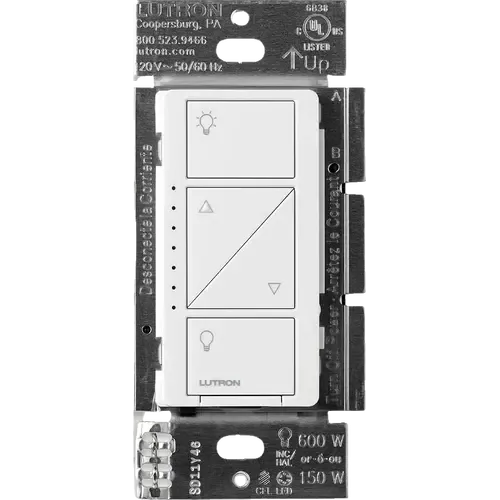
Option 1 · Lutron
Lutron Caseta Original Smart Dimmer Switch
Last updated October 2026
View full device profile
The Smart Device Compare comparison
Understand the differences. Decide what matters to your home.
Build another comparison →Before you compare every specification
A summary of selected recorded differences between these wall switches. Check the full specification table below for details and conditions.
These observations are derived from recorded catalog data and have not all been independently verified. Confirm details with the manufacturer before purchasing.
Compare capabilities, compatibility and setup requirements.
Option 1 · Lutron
Last updated October 2026
View full device profile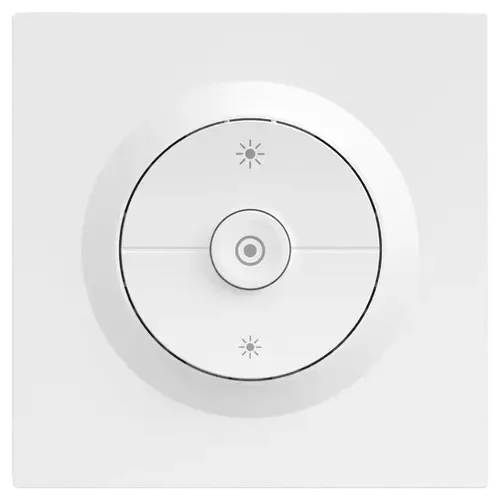
Option 2 · Sonoff
Catalog update date not recorded
View full device profileWhat the catalog tells us
These counts describe the available data, not a quality score. More features do not automatically make a better device.
Consider your setup
Confirm which features appear in Apple Home and whether extra hardware or a subscription is needed for your intended use.
Inspect the specificationsConsider your setup
Check the integration method, supported model and firmware. A catalog Yes does not establish local control or official support.
Inspect the specificationsConsider your setup
Confirm the exact device type and the features exposed in your chosen platform. Protocol support does not establish feature parity across apps.
Inspect the specificationsYour priorities, side by side
Mark the specifications you care about. Open manufacturer sources for verification scope; fields without citations remain catalog data. Expand notes for other qualifications.
Showing 34 of 34 rows. “Not recorded” does not mean “No”.
The dimmer talks to the Lutron Smart Hub, Pico remotes and motion sensors over Lutron's own Clear Connect RF technology instead of Wi-Fi, which is why the lights keep responding when the router is down
Zigbee over IEEE 802.15.4 on an EFR32MG21 MCU. It also acts as a Zigbee router and repeats the mesh for nearby devices, but it still needs a coordinator such as a SONOFF bridge, an iHost, an NSPanel Pro or a USB dongle to join.
Lutron documents the LED behaviour on this model as fixed, with no brightness setting or off option (the newer Diva line uses an adjustable light bar instead)
Scenes, schedules, geofencing, Smart Away and timers from the Lutron app, plus up to 10 Pico remotes or motion sensors paired directly to the dimmer
Schedules, timers, preset brightness scenes and cross-platform scene linkage through the eWeLink app or the Zigbee gateway the switch is paired to.
Power measurement is provided.
Sonoff Orb-ZBDIM Zigbee Dimmer Wall Switch — manufacturer product description →Check the specified variant, required hub and installation instructions. Manufacturer claims are not independent performance tests.
Document check only; not a hands-on test or verification of every regional or firmware variant.
Power metering shows the lighting circuit's consumption in real time, which the product page presents as "See Your Savings while Dimming".
Power failure memory: if power is interrupted, the control returns to the level it was set to before the interruption
Green status LEDs show the load level and glow softly as a night light when the load is off
SONOFF's pairing FAQ describes holding the button until the LED indicator starts blinking rapidly, so the unit carries an indicator for its network state.
The dimmer is wired to the load it controls; the wire-free half of the system is the separate Pico remote
Lutron lists Amazon Alexa among the platforms Caseta works with, through the Lutron Smart Hub
SONOFF's description states the switch works across Home Assistant, Alexa and other smart home platforms through a Zigbee gateway.
Lutron states the smart hub itself contains Apple Home technology, so Siri controls the lights once the dimmer is paired to it
The Orb-ZBDIM has no native HomeKit profile. Its product page carries a "Works with Apple Home Via Matter Bridge" section: a SONOFF ZBBridge-U or eWeLink CUBE republishes the switch into Apple Home over Matter.
Lutron lists Google Assistant among the platforms Caseta works with, through the Lutron Smart Hub
The retail listing is titled "Compatible with Alexa & Google Assistant", and SONOFF's distributor documentation describes setting a brightness percentage by voice through Google Assistant.
The core Lutron Caseta integration talks to the Lutron Caseta Smart Hub (L-BDG2-WH) and exposes wall dimmers as lights
The product page has an "Easily Integrates with Open-Source Platforms" section for Home Assistant through the SONOFF Dongle series, and owners report running the switch under both Zigbee2MQTT and ZHA.
The CSA certified-product database holds no Matter certification for Lutron (only two Zigbee 3.0 Aurora dimmers), and Lutron's own Caseta compatibility page never mentions Matter
The switch itself is Zigbee, not Matter. Its product page documents reaching Matter platforms through a SONOFF Matter bridge, the ZBBridge-U or eWeLink CUBE, and SONOFF sells the Orb-DIM as the native Matter version.
Lutron publishes a Caseta page for Samsung SmartThings: lights and shades are controlled from the SmartThings app once the Lutron Smart Hub is connected
SONOFF's distributor documentation lists Samsung SmartThings among the supported platforms, and a buyer reports the switch joining a SmartThings hub and appearing as a dimmable light.
Operating voltage 120 V~ 50/60 Hz
The stated operating voltage is 220–240 V only.
Sonoff Orb-ZBDIM Zigbee Dimmer Wall Switch — manufacturer product description →Check the specified variant, required hub and installation instructions. Manufacturer claims are not independent performance tests.
Document check only; not a hands-on test or verification of every regional or firmware variant.
The specification table rates the switch at 220-240V~ 50Hz, and the product description warns that it is a 220-240V only device, so it is not intended for 110-120V wiring.
Dimmable CFL up to 150 W, per Lutron's in-wall dimmer specification submittal 369804c
Dimmable LED drivers and dimmable electronic transformers for ELV fixtures are both listed as supported loads.
The product page caps dimmable electronic transformers at 200W and dimmable LED lighting at 200VA.
Dimmable LED rated for 120 V~, up to 150 W with LED+ forward-phase dimming
The load compatibility panel on the product page warns that the dimmer is not suitable for fluorescent lamps, CFLs, LED strips or inductive loads such as motors and fans.
Amazon's Product Information lists the dimmer's current rating as 1.25 A
Two-wire dimmer designed for retrofit, so no neutral wire is needed in the wallbox
SONOFF's own FAQ answers it directly: the Orb-ZBDIM requires a neutral wire for proper installation and operation.
Incandescent and halogen loads, 25 W minimum and 600 W maximum when not ganged
Rated for incandescent and halogen bulbs up to 400W each, with leading-edge dimming reserved for legacy fixtures under 100W.
SONOFF's specification table reads "220-240V~ 50Hz 400W Max Resistive load", and the label on the back of the unit repeats the same figure.
Overcurrent protection is listed among the switch's built-in safeguards.
Overheat protection is one of the four safety badges on the product page, and the description says power is disconnected automatically when an abnormality is detected.
Overload protection is listed among the switch's built-in safeguards, alongside overcurrent and overheat.
SONOFF lists overload, overcurrent and overheat protection for this model and no surge or overvoltage cut-off.
| Specification | Lutron Caseta Original Smart Dimmer Switch | Sonoff Orb-ZBDIM Zigbee Dimmer Wall Switch |
|---|---|---|
| Connectivity | ||
NoCatalog noteThe dimmer talks to the Lutron Smart Hub, Pico remotes and motion sensors over Lutron's own Clear Connect RF technology instead of Wi-Fi, which is why the lights keep responding when the router is down | No | |
| No | No | |
| No | No | |
| No | No | |
| No | No | |
| No | Zigbee Hub requiredCatalog noteZigbee over IEEE 802.15.4 on an EFR32MG21 MCU. It also acts as a Zigbee router and repeats the mesh for nearby devices, but it still needs a coordinator such as a SONOFF bridge, an iHost, an NSPanel Pro or a USB dongle to join. | |
| Features | ||
NoCatalog noteLutron documents the LED behaviour on this model as fixed, with no brightness setting or off option (the newer Diva line uses an adjustable light bar instead) | Not recorded | |
YesCatalog noteScenes, schedules, geofencing, Smart Away and timers from the Lutron app, plus up to 10 Pico remotes or motion sensors paired directly to the dimmer | YesCatalog noteSchedules, timers, preset brightness scenes and cross-platform scene linkage through the eWeLink app or the Zigbee gateway the switch is paired to. | |
| No | YesManufacturer sourcePower measurement is provided. Sonoff Orb-ZBDIM Zigbee Dimmer Wall Switch — manufacturer product description →
Check the specified variant, required hub and installation instructions. Manufacturer claims are not independent performance tests. Document check only; not a hands-on test or verification of every regional or firmware variant. Catalog notePower metering shows the lighting circuit's consumption in real time, which the product page presents as "See Your Savings while Dimming". | |
YesCatalog notePower failure memory: if power is interrupted, the control returns to the level it was set to before the interruption | Not recorded | |
YesCatalog noteGreen status LEDs show the load level and glow softly as a night light when the load is off | YesCatalog noteSONOFF's pairing FAQ describes holding the button until the LED indicator starts blinking rapidly, so the unit carries an indicator for its network state. | |
| 1 | 1 | |
NoCatalog noteThe dimmer is wired to the load it controls; the wire-free half of the system is the separate Pico remote | Not recorded | |
| Integrations | ||
Lutron Hub requiredCatalog noteLutron lists Amazon Alexa among the platforms Caseta works with, through the Lutron Smart Hub | YesCatalog noteSONOFF's description states the switch works across Home Assistant, Alexa and other smart home platforms through a Zigbee gateway. | |
Lutron Hub requiredCatalog noteLutron states the smart hub itself contains Apple Home technology, so Siri controls the lights once the dimmer is paired to it | SONOFF Hub requiredCatalog noteThe Orb-ZBDIM has no native HomeKit profile. Its product page carries a "Works with Apple Home Via Matter Bridge" section: a SONOFF ZBBridge-U or eWeLink CUBE republishes the switch into Apple Home over Matter. | |
Lutron Hub requiredCatalog noteLutron lists Google Assistant among the platforms Caseta works with, through the Lutron Smart Hub | YesCatalog noteThe retail listing is titled "Compatible with Alexa & Google Assistant", and SONOFF's distributor documentation describes setting a brightness percentage by voice through Google Assistant. | |
Lutron Hub requiredCatalog noteThe core Lutron Caseta integration talks to the Lutron Caseta Smart Hub (L-BDG2-WH) and exposes wall dimmers as lights | YesCatalog noteThe product page has an "Easily Integrates with Open-Source Platforms" section for Home Assistant through the SONOFF Dongle series, and owners report running the switch under both Zigbee2MQTT and ZHA. | |
NoCatalog noteThe CSA certified-product database holds no Matter certification for Lutron (only two Zigbee 3.0 Aurora dimmers), and Lutron's own Caseta compatibility page never mentions Matter | SONOFF Hub requiredCatalog noteThe switch itself is Zigbee, not Matter. Its product page documents reaching Matter platforms through a SONOFF Matter bridge, the ZBBridge-U or eWeLink CUBE, and SONOFF sells the Orb-DIM as the native Matter version. | |
Lutron Hub requiredCatalog noteLutron publishes a Caseta page for Samsung SmartThings: lights and shades are controlled from the SmartThings app once the Lutron Smart Hub is connected | YesCatalog noteSONOFF's distributor documentation lists Samsung SmartThings among the supported platforms, and a buyer reports the switch joining a SmartThings hub and appearing as a dimmable light. | |
| Power | ||
120VCatalog noteOperating voltage 120 V~ 50/60 Hz | 220-240VManufacturer sourceThe stated operating voltage is 220–240 V only. Sonoff Orb-ZBDIM Zigbee Dimmer Wall Switch — manufacturer product description →
Check the specified variant, required hub and installation instructions. Manufacturer claims are not independent performance tests. Document check only; not a hands-on test or verification of every regional or firmware variant. Catalog noteThe specification table rates the switch at 220-240V~ 50Hz, and the product description warns that it is a 220-240V only device, so it is not intended for 110-120V wiring. | |
YesCatalog noteDimmable CFL up to 150 W, per Lutron's in-wall dimmer specification submittal 369804c | YesCatalog noteDimmable LED drivers and dimmable electronic transformers for ELV fixtures are both listed as supported loads. | |
| Not recorded | Not recorded | |
| 150W | 200WCatalog noteThe product page caps dimmable electronic transformers at 200W and dimmable LED lighting at 200VA. | |
YesCatalog noteDimmable LED rated for 120 V~, up to 150 W with LED+ forward-phase dimming | NoCatalog noteThe load compatibility panel on the product page warns that the dimmer is not suitable for fluorescent lamps, CFLs, LED strips or inductive loads such as motors and fans. | |
1.25ACatalog noteAmazon's Product Information lists the dimmer's current rating as 1.25 A | Not applicable / unspecified | |
| 150W | Not applicable / unspecified | |
NoCatalog noteTwo-wire dimmer designed for retrofit, so no neutral wire is needed in the wallbox | YesCatalog noteSONOFF's own FAQ answers it directly: the Orb-ZBDIM requires a neutral wire for proper installation and operation. | |
YesCatalog noteIncandescent and halogen loads, 25 W minimum and 600 W maximum when not ganged | YesCatalog noteRated for incandescent and halogen bulbs up to 400W each, with leading-edge dimming reserved for legacy fixtures under 100W. | |
| Not recorded | Not recorded | |
| 600W | 400WCatalog noteSONOFF's specification table reads "220-240V~ 50Hz 400W Max Resistive load", and the label on the back of the unit repeats the same figure. | |
| Safety Features | ||
| No | YesCatalog noteOvercurrent protection is listed among the switch's built-in safeguards. | |
| No | YesCatalog noteOverheat protection is one of the four safety badges on the product page, and the description says power is disconnected automatically when an abnormality is detected. | |
| No | YesCatalog noteOverload protection is listed among the switch's built-in safeguards, alongside overcurrent and overheat. | |
| No | NoCatalog noteSONOFF lists overload, overcurrent and overheat protection for this model and no surge or overvoltage cut-off. | |
The table matches specifications by section and field. It preserves notes, separates missing data from explicit “No” values, and keeps qualifications attached to their values. No overall winner is assigned from feature counts.
Read our comparison methodology