
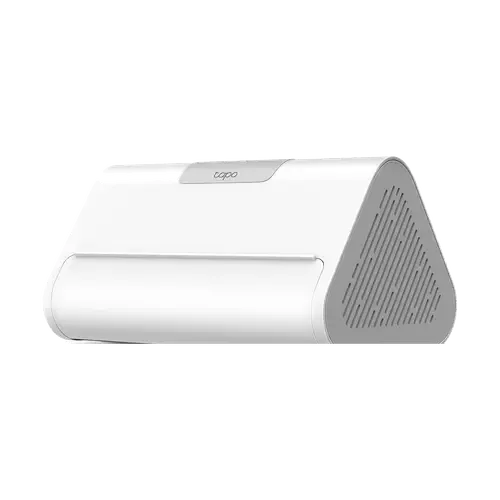
Device profile · Specifications & compatibility
TP-Link Tapo H500
TP-Link · Hubs · Model Tapo H500
We may earn a commission from qualifying purchases through these links.
Prices and stock change often on Amazon, so we do not show them here. The button opens the current listing.
- TP-Link Tapo H500 lists Matter bridge; Apple Home; 2.4 GHz Wi-Fi.
- Check which connected accessories and features the bridge exposes.
- A bridge is a different role from a Matter controller.
Browse more from TP-Link or explore all hubs in our catalog.
- Recorded year
- 2025
- Recorded warranty
- ?
- Dimensions
- 160.2 x 98.82 x 83.21 mm
- Weight
- 1.6lb
The details that shape your choice
TP-Link Tapo H500 Quick Features
Start with these specifications, then check the full details and conditions below.
Make the differences clear
Which device fits your setup?
Choose another model to compare features, connections and requirements side by side.
From specification to decision
TP-Link Tapo H500: Capabilities And Limitations
Based on listed specifications, not hands-on testing. Manufacturer sources are linked where checked.
What it offers
Matter-bridge functionality is listed, offering a route to investigate for exposing supported accessories. Check which connected accessories and features the bridge exposes. A bridge is a different role from a Matter controller. Acts as both a Matter controller and a Matter bridge, exposing its own Tapo devices to third-party Matter ecosystems, for the device types on TP-Link's compatibility list
View Matter bridge details →Apple Home support is listed as an integration option. Check the model, firmware, exposed controls and any additional hardware requirements. Via the Matter bridge
View Apple Home details →
What to consider
Thread border-router functionality is listed as unavailable; a Thread setup may need a separate border router. TP-Link states the H500 does not support Thread, so Matter devices that rely on Thread need a separate border router
View Thread border router details →A Zigbee coordinator is listed as unavailable; do not assume the device can form a Zigbee network. Sensors connect over TP-Link's Sub-1 GHz radio (920.9, 921.7 and 922.3 MHz in the US), not Zigbee
View Zigbee coordinator details →RTSP is listed as unsupported; do not assume an RTSP recorder can use this device.
View RTSP details →
Still needs verification
Confirm these details if they matter to your setup.
Questions About TP-Link Tapo H500
Does TP-Link Tapo H500 act as a Thread border router?
No, according to the listed specifications. A border router connects Thread to other IP networks. Check Matter-controller functions separately. TP-Link states the H500 does not support Thread, so Matter devices that rely on Thread need a separate border router
View Thread border router specifications →Does TP-Link Tapo H500 include a Zigbee coordinator?
No, according to the listed specifications. Confirm the supported device list and firmware before pairing accessories. Sensors connect over TP-Link's Sub-1 GHz radio (920.9, 921.7 and 922.3 MHz in the US), not Zigbee
View Zigbee coordinator specifications →Does TP-Link Tapo H500 provide a Matter bridge?
Yes, according to the listed specifications. Check which connected accessories and features the bridge exposes. A bridge is a different role from a Matter controller. Acts as both a Matter controller and a Matter bridge, exposing its own Tapo devices to third-party Matter ecosystems, for the device types on TP-Link's compatibility list
View Matter bridge specifications →Does TP-Link Tapo H500 work with Apple Home?
Yes, according to the listed specifications. Check the model, firmware, exposed controls and any additional hardware requirements. Via the Matter bridge
View Apple Home specifications →Does TP-Link Tapo H500 connect to 2.4 GHz Wi-Fi?
Yes, according to the listed specifications. Check the network security mode and setup requirements before connecting the device. 2.4 GHz band is used for the connection to Tapo cameras
View 2.4 GHz Wi-Fi specifications →Explore the full picture
TP-Link Tapo H500 Specifications
Recorded catalog values. Expand notes for qualifications; unknown values are not treated as missing features.
0 of 31 fields matched to manufacturer documentation. Source checks apply only to the named model and stated scope. Other fields remain catalog data. How we verify specifications →
Protocols7 fields
| Bluetooth | No |
|---|---|
| Z Wave | No |
| Zigbee coordinator | NoDetails & conditionsSensors connect over TP-Link's Sub-1 GHz radio (920.9, 921.7 and 922.3 MHz in the US), not Zigbee |
| Thread border router | NoDetails & conditionsTP-Link states the H500 does not support Thread, so Matter devices that rely on Thread need a separate border router |
| Matter bridge | YesDetails & conditionsActs as both a Matter controller and a Matter bridge, exposing its own Tapo devices to third-party Matter ecosystems, for the device types on TP-Link's compatibility list |
| Third Party Devices | PartiallyDetails & conditionsPairs Tapo cameras and Sub-G sensors, and acts as a Matter controller only for other brands' Matter plugs, bulbs and light strips; no Thread devices. |
| Ir | No |
Connectivity3 fields
| 2.4 GHz Wi-Fi | YesDetails & conditions2.4 GHz band is used for the connection to Tapo cameras |
|---|---|
| 5 GHz Wi-Fi | YesDetails & conditions5 GHz band is used for the uplink to the router |
| Ethernet | YesDetails & conditions1x 10/100 Mbps WAN port |
Features5 fields
| Subdevices | 80Details & conditionsUp to 16 Tapo cameras and video doorbells plus 64 Tapo Sub-G sensors, buttons and switches |
|---|---|
| Onvif | No |
| RTSP | No |
| Node Red | No |
| Tailscale | No |
Hardware7 fields
| Cpu | Not recorded |
|---|---|
| Memory | Not recorded |
| Storage | 16GB eMMC, expandable with one 2.5-inch SATA HDD or SSD up to 16TB |
| microSD card slot | NoDetails & conditionsExpansion is a 2.5-inch SATA bay rather than a microSD slot |
| Power Over Ethernet | NoDetails & conditionsMains powered through a 12V 2A DC adapter |
| Speakers | YesDetails & conditions110dB built-in siren that doubles as a chime for Tapo video doorbells |
| Microphone | YesDetails & conditionsTwo-way audio |
Integrations5 fields
| Google Home | YesDetails & conditionsVia the Matter bridge |
|---|---|
| Alexa | YesDetails & conditionsVia the Matter bridge |
| Apple Home | YesDetails & conditionsVia the Matter bridge |
| SmartThings | YesDetails & conditionsVia the Matter bridge |
| Home Assistant | Not recorded |
Sensors4 fields
| Temperature | No |
|---|---|
| Humidity | No |
| Light | No |
| Motion | No |
How this device compares
TP-Link Tapo H500 vs Other Similar Models
Statistical context from 29 hubs in this catalog. These figures describe our recorded data, not independent measurements.
Recorded feature coverage
Microphone: 2 of 29 known answers are Yes
Hardware: 7% among explicit Yes/No answers; 0 of 29 devices have no resolved answer. Check the specifications for this model’s conditions.
Recorded feature coverage
5 GHz Wi-Fi: 5 of 27 known answers are Yes
Connectivity: 19% among explicit Yes/No answers; 2 of 29 devices have no resolved answer. Check the specifications for this model’s conditions.
Recorded feature coverage
Matter bridge: 19 of 28 known answers are Yes
Protocols: 68% among explicit Yes/No answers; 1 of 29 devices have no resolved answer. Check the specifications for this model’s conditions.
Brand representation in this directory
2 of 29 models are from TP-Link
Counts hubs listed here, not sales or market share. Catalog inclusion does not imply a recommendation.
Side-by-side specification comparison
Compare TP-Link Tapo H500 vs Similar Hubs
See how TP-Link Tapo H500 stacks up against other hubs in this catalog. Compare specifications, compatibility and pricing.
Catalog specifications have not all been independently checked against manufacturer sources. Read our data and evidence methodology.